
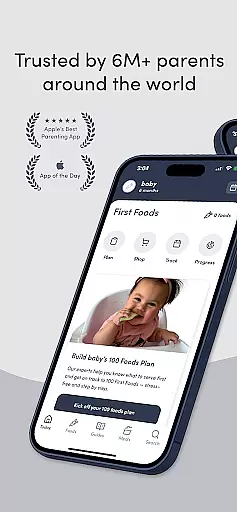
Solid Starts is the ultimate parenting companion for introducing solid foods to babies. This comprehensive app provides everything parents need to confidently transition their child from milk feeding to solids. With a team of pediatric professionals including board-certified pediatricians, infant feeding therapists, and dietitians, Solid Starts offers evidence-based guidance through each step of your baby's food journey.
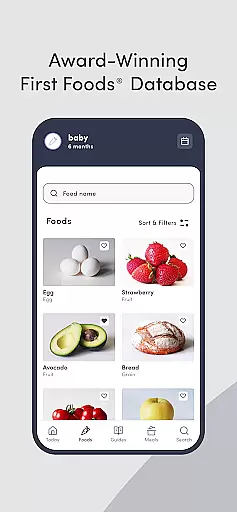
The app features an extensive First Foods® Database covering over 400 foods with detailed preparation instructions based on baby's age, choking hazard information, and allergen alerts. Parents can access personalized meal plans, track their baby's food progress, and learn about baby-led weaning techniques. The inclusion of real-life videos and practical articles makes this app an invaluable resource for creating positive mealtime experiences.
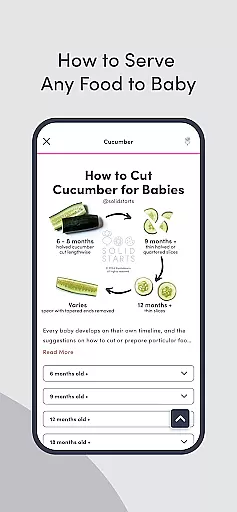
Solid Starts stands out with its comprehensive suite of features designed specifically for modern parents. The app's flagship feature is its First Foods® Database containing over 400 food entries, each with detailed preparation guidelines, age-appropriate serving suggestions, and safety information. The database is regularly updated by pediatric professionals ensuring parents have access to the latest research-backed advice.
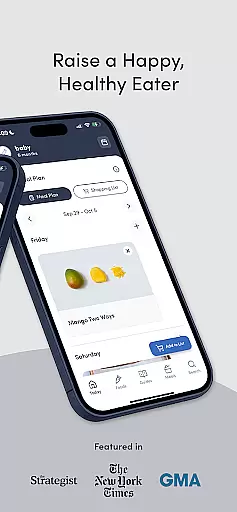
Parents benefit from personalized meal planning tools that suggest appropriate first foods and gradually introduce new textures. The app includes 300+ baby-led weaning meal ideas, family recipes, and nutritional guidance. Additional features include a digital food tracking system for monitoring reactions, an educational library covering infant CPR, allergen introduction, and feeding milestones, plus video demonstrations of babies eating various foods.
The app's premium subscription unlocks advanced features including tailored meal plans developed by pediatric experts, detailed allergen introduction guides, and comprehensive food journals. These tools work together to create a supportive environment for parents navigating their baby's crucial first foods phase while promoting healthy eating habits.
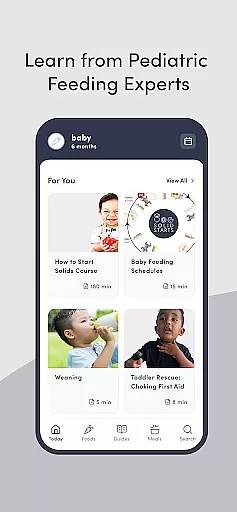
When it comes to parenting apps, the credibility of content and expert validation are paramount. Solid Starts stands out by offering a comprehensive solution developed by a team of board-certified pediatricians, infant feeding therapists, swallowing specialists, allergists, and dietitians. This multidisciplinary approach ensures that every piece of advice or information is vetted by professionals who specialize in child health and nutrition.
The app provides access to the First Foodsu00ae Database, which includes detailed guidance on introducing over 400 foods to babies. Each entry is crafted with care, offering not only nutritional information but also choking and allergen guidance. The database is regularly updated by pediatric professionals, ensuring that parents have access to the latest evidence-backed information. This level of detail and ongoing maintenance underscores the app's commitment to accuracy and safety.
For new parents, having expert-validated content means gaining confidence in their parenting decisions. Solid Starts equips users with knowledge about recognizing signs of readiness for eating, introducing allergens, and transitioning from spoon feeding to finger foods. By learning from trusted experts, parents can create joyful mealtimes and foster a positive relationship with food from an early age.
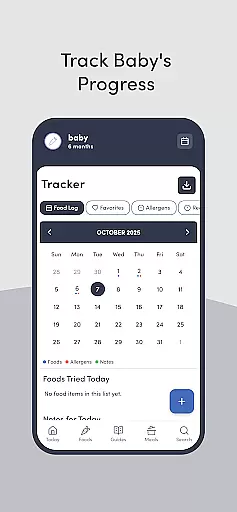
Growth tracking is an essential feature for any parenting app focused on child development. Solid Starts offers a digital food log that allows parents to record their babyu2019s progress accurately. This feature enables caregivers to log foods tried, track favorite foods, and make lists of foods they wish to try later. Such meticulous tracking helps monitor a babyu2019s dietary evolution and preferences over time.
In addition to food logging, the app provides tools for tracking reactions or sensitivities. Parents can document any adverse reactions and download reports to share with doctors and caregivers. This functionality is crucial for identifying potential allergies or intolerances early on. By maintaining accurate records, parents can work more effectively with healthcare providers to address any concerns that arise.
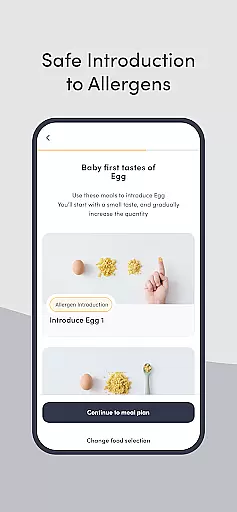
Solid Starts goes beyond simple tracking by integrating personalized meal plans. These plans, designed by pediatric experts, suggest new foods that gradually build a babyu2019s ability to bite and chew various textures. With step-by-step guidance, parents can introduce common food allergens safely. This structured approach ensures that growth tracking is not just about recording data but also about making informed decisions that support healthy development.
User-friendly interface
Expert-backed content
Comprehensive food database
Personalized meal plans
Regular updates
Premium subscription required
Limited free features
Occasional bugs
Large storage space
Internet connection needed

SENSORYSOOTHE and SENSORSAFE: Making car seats smarter and families safer.
 4.70
4.70
Find unique + popular baby names for your little peanut.
4.30
The Baby’s Bounty App is your hub to register for our diaper banks in Nevada
3.70
Family parental control app: limit screen time, block apps, GPS tracker.
4.20
Play activities, milestones, expert-led classes, baby tracker, and more!
3.00
Live Location, Alerts & 2-Way Voice for Kids and Adults with Special Needs
4.60
Kids story books for children. Baby reading books with audio for pre-k toddlers
4.70
Pinardin - Smart Parental Control, Online Safety & GPS Tracking!
4.80
Save money on diapers. Get the Pampers Rewards app.
3.90
Track your labor contractions
4.90
Daily Routine & Timer for kids, ADHD, & Autism
4.80
Block apps, set screen time limits, and customize usage schedules
4.50
It is a screen time management tool for games and mobile applications
4.50
App/Game blocker & GPS tracker
4.50
Real-time family location with consent, check-ins & SOS—private by default.
4.40
Magic chalkboard coloring and drawing!
4.20
Watching baby, helping parents
4.10
The 10 development leaps of your baby | newborn milestones & leap days tracker
4.10
Screen Time, App and Web Block & Monitoring, Location Tracker
3.60





User Reviews