
Ombi is a self-hosted entertainment management app that revolutionizes content discovery and request management for Plex, Emby, and Jellyfin users. This innovative application enables shared media library members to independently request movies and TV shows through an intuitive interface.
The app's seamless integration with popular DVR tools creates an end-to-end solution for content acquisition. Users can access their Ombi account by scanning a QR code through the mobile application, establishing a secure connection to their self-hosted server. This entertainment companion tool streamlines content requests while maintaining administrator control over approval processes.
Particularly valuable for households or organizations running their own media servers, Ombi enhances user engagement by empowering them to participate in content curation. The application's regular updates and evolving feature set ensure continuous improvement of the entertainment management experience.
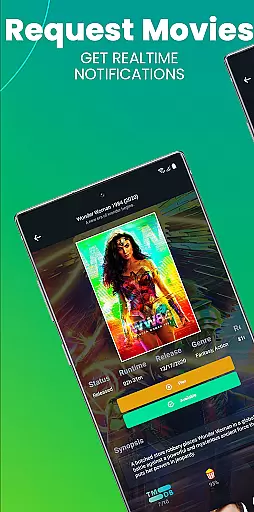
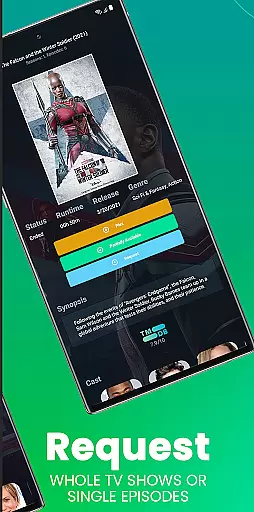
Ombi distinguishes itself through several remarkable features that enhance entertainment content management. Its primary capability allows users to submit content requests directly from their mobile devices, eliminating the need for manual requests through other channels.
The application supports integration with multiple content management systems including Plex, Emby, and Jellyfin, providing flexibility for different user preferences. Its compatibility with various DVR tools creates an automated workflow from request to content availability. The QR code authentication method ensures secure access to self-hosted servers without complex configuration requirements.
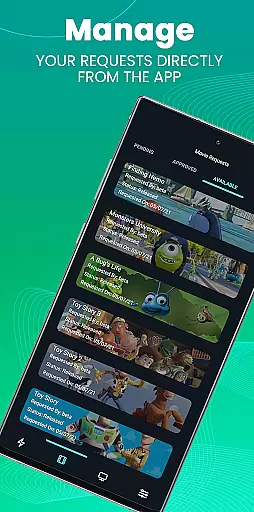
Administrators benefit from comprehensive request management tools, including approval workflows and user permission settings. The app's modular architecture allows for future expansion, with regular updates introducing new functionality. This adaptability makes Ombi a valuable long-term solution for managing entertainment content across different platforms and user groups.
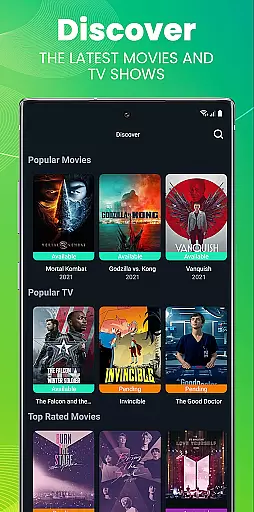
Ombi offers a diverse range of content options by integrating with multiple DVR tools and media servers such as Plex, Emby, and Jellyfin. This ensures users have access to the latest TV shows and movies requested by their community.
The application supports automatic updates from user requests, ensuring that the available content library remains fresh and up-to-date. This dynamic updating system allows for an evolving selection based on real-time demands.
By enabling shared users to request content independently, Ombi fosters a personalized entertainment experience. Users can explore new titles and enjoy varied media without manual intervention from the server administrator.
Ombi is designed to keep users engaged through its interactive request system. By allowing users to directly request and track the status of desired content, it encourages regular interaction with the platform.
The self-service nature of Ombi promotes higher retention rates as users feel empowered and invested in the content library. They are more likely to return to the app to check the status of their requests or make new ones.
Additionally, the seamless integration with media servers ensures that once content is available, users receive notifications, prompting them to engage with the newly added material. This creates a continuous loop of interaction and satisfaction.
User-friendly interface
Multi-platform support
Secure authentication
Regular updates
Customizable features
Requires self-hosting
Technical setup needed
Limited offline functionality
Version compatibility issues
No standalone use

Tarot & Oracle Card Readings
 4.50
4.50
Unofficial Game Companion App” “Guides • Builds • Tips • Progression
4.4
The OFFICIAL PeeWee Purpdrank Soundboard!
4.80
Heroclix search units with multi filter , team builder, collection manager.
4.40
Find out if you're on Santa's Naughty or Nice List with this magical scanner!
4.60
Stream videos to VIDAA & VEWD TVs from Hisense, Sharp, Skyworth, Vestel & TiVo
3.00
Fetch money rewards all just for playing games. Cash out for gift cards in app.
4.50
Realistic Baby Simulator App
4.00
Companion app for Elden Ring to track quests, bosses, progress and more.
4.70
Open-source, fast, simple and powerful IPTV app
4.90
Pathfinder 2e initiative tracker with bestiary, HP, reaction, conditions, etc
4.80
Catalog & tracker of your DVD, Blu-ray & Digital Movie and TV Collection Library
4.80
Wodfix Air aggregates popular online content for you.
4.80
Triple A is a highly complex, kinetic, and interactive visualizer.
4.50
Earn gift cards for playing games. Become a real game tester!
4.40
With the credits you earn play more games
2.90
EVP Recorder / Voice Recorder for ghost hunting, to communicate with ghosts.
4.4
Christmas Globe: Transform your Wear OS device into a festive timekeeper!
4.3
The classic game of rock, paper, scissors
4.1




User Reviews