
Sched is a premier platform designed for session registration and attendance management, ideal for organizing complex multitrack events. This app consolidates all event details in one place, offering users an efficient way to manage their schedules. With a vision of transforming event experiences from endured to enjoyed, Sched provides comprehensive tools that enhance attendee engagement.
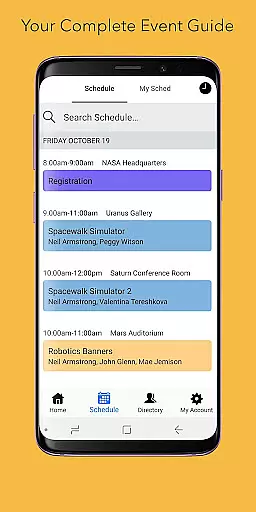
Key features include a full schedule view, allowing users to browse entire event schedules conveniently without needing a physical guide. Additionally, it offers personalized experiences by enabling users to log in and modify their schedules on-the-go. The directory feature presents detailed professional profiles of speakers and exhibitors, enhancing networking opportunities. Its offline caching ensures users have access to their schedules even without an internet connection.
Whether you're attending a conference, convention, or festival, Sched's robust functionality ensures you maximize your event experience while simplifying the organizational process.
Sched stands out with its array of sophisticated features tailored for optimal event management. One of its core functionalities is the full schedule view, which allows attendees to effortlessly navigate through sessions and events. This eliminates the need for cumbersome paper guides and streamlines the planning process.
Personalization is another cornerstone of Sched's offerings. Users can create and modify their schedules online and access them via their mobile devices. For public events, attendees can sign up and instantly save their preferred sessions to their personal schedules, ensuring they never miss out on key sessions.
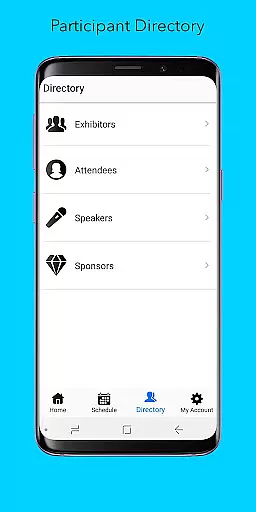
The directory feature enriches the user experience by providing detailed profiles of speakers and exhibitors, facilitating meaningful connections. Moreover, Sched’s offline caching capability guarantees uninterrupted access to schedules, regardless of connectivity issues. These features collectively ensure that users enjoy a seamless and enriched event experience.
Task creation and detail customization are essential features for event management platforms like Sched. This functionality allows event organizers to create detailed sessions with specific information such as time, location, and speaker details.
Sched offers a comprehensive suite of tools for task creation. Organizers can easily input session specifics, including descriptions, presenter bios, and multimedia content. The platform supports rich formatting options, enabling the inclusion of images, videos, and links to external resources.
The benefits to users are significant. Attendees receive complete and accurate information about each session, helping them make informed decisions about which events to attend. Customizable details also allow for personalization, catering to different attendee preferences and interests.
This level of detail enhances the overall event experience. By providing precise and tailored session information, Sched ensures that participants can fully engage with the content that matters most to them, leading to higher satisfaction and more productive event participation.
Reminder settings play a crucial role in ensuring attendees don't miss important sessions at events managed through Sched. This feature allows users to set up personalized alerts for upcoming sessions, enhancing their ability to manage time effectively during busy events.
Sched implements reminder settings with flexibility and user control in mind. Attendees can choose from various notification types, including push notifications, emails, or both. They can set reminders for multiple timeframes - from minutes before a session starts to hours or even days ahead.
The advantages of this feature are clear. Participants benefit from timely alerts that help them navigate complex multi-track events without missing key presentations. The ability to customize reminder timing accommodates different personal schedules and preferences.
This functionality significantly improves event engagement. By keeping attendees informed and punctual, Sched's reminder system helps maximize the value they extract from conferences and meetings, while reducing stress associated with manual schedule tracking.
User-friendly interface
Comprehensive scheduling
Offline access
Personalized profiles
Efficient organization
Limited free features
Requires account creation
Occasional sync issues
Premium cost
Complex navigation

The Official App
 4.1
4.1
Manage all your events, leads, ticketing, payments and check-ins.
4.30
Create Birthday Cards in Birthday Invitation Maker and Birthday Card Creator App
3.00
Fantasy of Lights Event App
5.00
Greeting card maker with photos best app| Birthday cards| All wishes eCards FREE
4.50
Invitation card maker for birthday party & Wedding. Digital greeting card editor
4.90
TV Garden is a video player to play your own TV streams from around the world!
4.4
Clubs, Festivals, Discounted Tickets, Guest Lists & VIP Tables
4.90
The official app of the Carmel Christkindlmarkt!
4.1
For weddings, parties & events
4.60
Everything you need for the Best Thursday Ever.
4.40
Invitation Card Maker, Design & share wedding, birthday & party invites fast
4.40
Meet people over dinner
4.40
Get live football here
4.30
Buy tickets for any event!
3.90
Local events, contests, and giveaways for local dads
3.70
Audio guide companion APP for SEE's Michelangelo's Sistine Chapel
3.50
Buy event tickets easily with our user-friendly App. Stay updated on hot events
4.3
Digital Income Wallet of the Final Libertadores 2025
4.3




User Reviews