
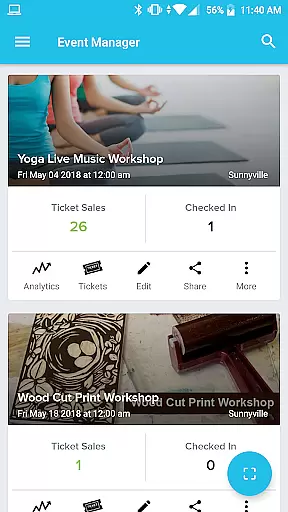
Event Manager - AllEvents.in is a comprehensive event management application designed specifically for event organizers seeking to enhance their event's reach and simplify the management process. This app provides an all-in-one solution for tracking event page visits, managing attendees, handling ticket sales, and analyzing event performance.
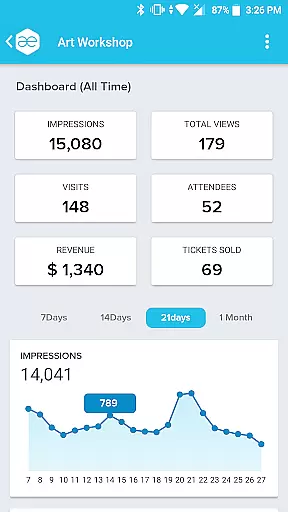
With its powerful dashboard, users can access detailed analytics such as total views, number of attendees, revenue generated, and tickets sold over a specific period. The app also supports promotional activities, allowing organizers to drive more traffic to their events through various promotional plans directly from the app interface.
The Event Manager app is particularly useful for professional event organizers who manage multiple events across different platforms. It offers essential features like attendee record-keeping, QR code scanning for easy check-ins, lead generation for future events, and seamless integration with various payment options including the convenient 'Pay at Venue' feature.
The Event Manager - AllEvents.in app boasts an impressive array of features that cater to every aspect of event management. At its core, the app provides a sophisticated dashboard for each event, displaying comprehensive performance metrics including views, attendees, revenue, and ticket sales over time.
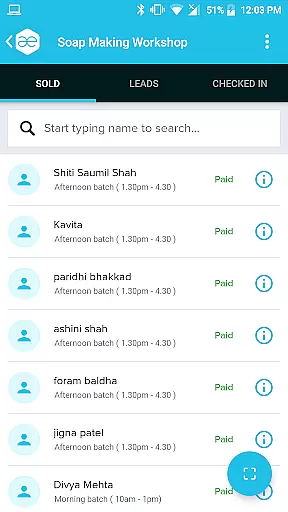
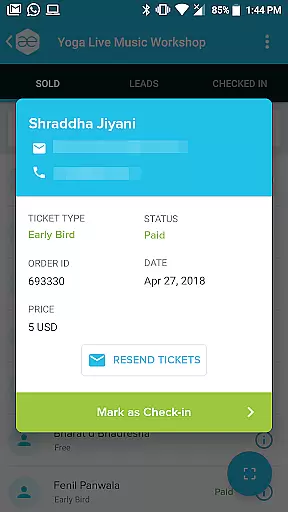
One of the standout features is the ability to view and manage all ticket buyers and their payment statuses. The app also enables organizers to maintain detailed records of each attendee, searchable by ticket ID or via QR code scanning. This functionality streamlines the check-in process and helps differentiate between actual attendees and no-shows.
Additional notable features include lead generation capabilities for upcoming events, multi-platform organizer profile management, and integrated promotional tools. Users can promote events with a single touch, verify tickets, manage payments (including the 'Pay at Venue' option), and communicate with attendees through email or phone notifications.
Task creation and detail customization are essential for event organizers who need to manage multiple events with precision. The All Events Organizer App excels in this area by providing a comprehensive dashboard for each event. This dashboard not only allows organizers to track the performance of their events but also customize various details to suit their needs.
The app's interface is designed to give a clear overview of each event's analytics, such as total views, number of attendees, revenue generated, and tickets sold over a period of time. Organizers can easily adjust settings and personalize event pages to align with their branding and marketing strategies, ensuring that every event is unique and tailored to its target audience.
Furthermore, the app offers advanced features like promotional plans which can be activated at the touch of a button. This functionality empowers organizers to drive more traffic to their events by selecting from various promotional options directly within the app. Such capabilities ensure that users can fine-tune their event's online presence and reach without needing to navigate away from the platform.
Ultimately, the ability to create tasks and customize event details through the All Events Organizer App translates into significant time savings and enhanced productivity for event professionals. By having all necessary tools at their fingertips, organizers can focus on delivering successful events while the app takes care of the administrative intricacies.
Reminder settings play a crucial role in ensuring that attendees do not miss out on important updates or changes regarding their registered events. With the All Events Organizer App, users have access to sophisticated reminder functionalities that keep both organizers and participants informed and engaged throughout the event lifecycle.
This app allows organizers to set up automatic reminders for attendees, notifying them about upcoming events, payment deadlines, or any last-minute changes. Attendees receive these notifications via email or SMS, depending on their preferences, which significantly reduces no-show rates and improves overall attendance.
In addition to attendee-focused reminders, the app also supports organizer-side alerts. These include notifications about ticket sales milestones, attendee registration thresholds, or pending promotional activities. Such timely alerts enable organizers to respond promptly to emerging trends or issues, thereby maximizing the success of their events.
By leveraging the reminder settings provided by the All Events Organizer App, users benefit from increased engagement levels and streamlined communication processes. This feature ensures that everyone involved remains on the same page, fostering a cohesive and well-coordinated event experience.
User-friendly interface
Comprehensive analytics
QR code scanning
Multi-event management
Promotional tools
Limited free features
Occasional bugs
High premium cost
Steep learning curve
Customer support delays

An App for Bhutanese
 4.4
4.4
Create Birthday Cards in Birthday Invitation Maker and Birthday Card Creator App
3.00
Audio guide companion APP for SEE's Michelangelo's Sistine Chapel
3.50
Purchase line-skip passes, drinks, cover, and more at bars and clubs
3.50
Invitation card maker for birthday party & Wedding. Digital greeting card editor
4.90
Track birthdays, habits & goals. Unlimited countdowns and count-ups
4.20
The Official Football Ticketing App for Fans in Qatar
4.2
Buy tickets for any event!
3.90
Discover events & experiences in NYC, LA, Chicago, DC, Miami and more!
4.70
The KRUU app - plan, celebrate, remember
4.80
Birthday Greetings provides Birthday Card, Frames, Gifs & Father's day Wishes
4.80
Find Live Event Ticket Deals to Sports, Concerts, Festivals, & Comedy For Less!
4.80
Freebie Games for Epic Games, Steam, Amazon, Rockstar etc.
4.40
Rocket Monkey - Space rocket launch schedule for launch sites around the world
4.20
Buy and sell tickets to sports, concerts, theater, festivals, and comedy events
4.10
Instant photo sharing for every occasion
3.80
Some connections are better kept private
4.5
Browse events, find transportation, keep up with the latest news from your team
4.3
Thanksgiving Wishes, Thanksgiving Stickers & Animated GIF for Whatsapp Stickers
4.5




User Reviews