
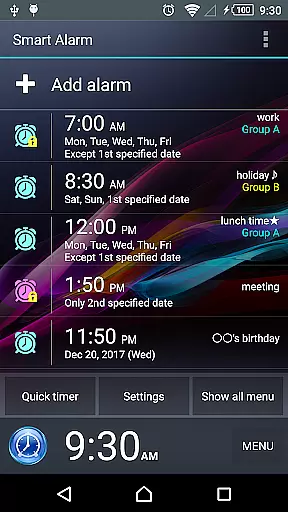
Smart Alarm is a premium alarm clock application designed for users seeking both simplicity and advanced functionality. This app offers essential alarm features combined with innovative customization options, making it suitable for various user needs. The transparent background setting allows users to display their device's wallpaper as the app background, creating a personalized experience.
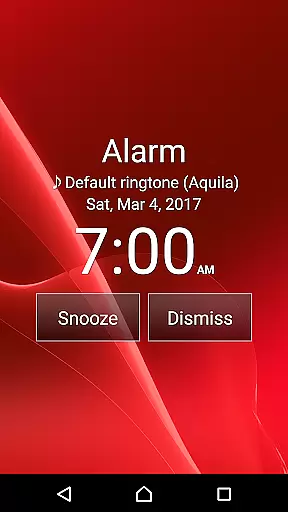
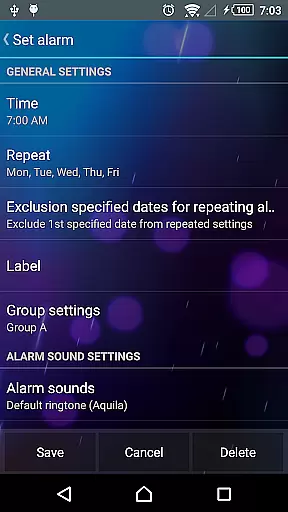
Key functionalities include snooze feature, weekly repeat settings, and holiday exclusion options. Users can also set custom alarm sounds from their SD card and enjoy gradually increasing alarm volume. The app provides multiple security measures to prevent accidental alarm dismissal, including math problem solving and customizable button sizes. These features ensure users wake up on time while enjoying a tailored alarm experience.
Smart Alarm stands out with its diverse feature set that caters to different user preferences. The application supports two-stage vibration strength settings and gradual alarm sound increase, preventing sudden loud noises during wakeup. Users can customize hardware keys for alarm control and adjust settings for silent mode operation.
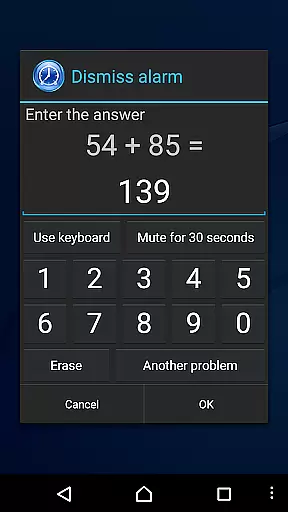
The app's sophisticated security features include math-based alarm dismissal and customizable button sizes to prevent accidental stops. Additionally, it offers specialized settings for headphone usage and external speaker output. The application requires specific permissions for proper functioning, including device wake prevention and system settings modification, ensuring reliable alarm performance across different scenarios.
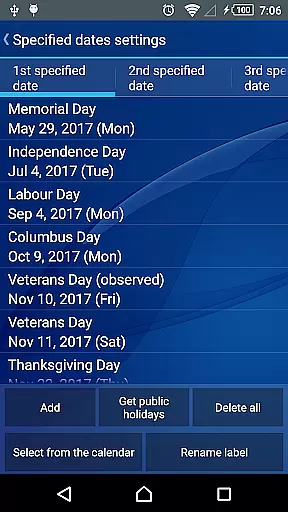
Smart Alarm offers comprehensive lifestyle functionalities that cater to various user needs. The app includes essential features such as a snooze function, weekly repeat alarms, and holiday exclusions for the United States, ensuring users are not disturbed on public holidays.
With additional options like setting custom alarm sounds from an SD card and gradual alarm volume increase, it provides personalized waking experiences. The two-stage vibration strength and transparency settings further enhance user comfort by adapting to individual preferences.
The application also integrates practical utilities such as math problem-solving or number entry to stop the alarm, preventing oversleeping. Customizable hardware keys for alarm control and headphone jack sensing ensure seamless interaction with the device's physical capabilities.
This broad spectrum of features confirms Smart Alarm's commitment to covering a wide array of lifestyle categories, making it a versatile tool for everyday use.
Smart Alarm ensures content authenticity by providing reliable and verified features that users can trust. The app undergoes sufficient verification processes to deliver accurate alarm functions, although it is important to note that no guarantees are provided for flawless operation across all devices.
Expertise is embedded in the app's design, offering advanced functionalities like vibration settings, adjustable button sizes, and specialized alarm stop operations. These features reflect a deep understanding of user needs and sleep patterns, promoting a more natural waking process.
Furthermore, the app requests specific permissions for core functionalities - such as preventing the device from sleeping during alerts and controlling vibrations - which reinforces its credibility. Such permissions are clearly explained, indicating transparency in how the app interacts with device systems.
While TanyuSoft disclaims responsibility for potential damages, the detailed explanations and preview recommendations demonstrate their dedication to user awareness and informed decision-making, establishing a level of expert credibility.
User-friendly interface
Highly customizable settings
Gradual wake-up function
Reliable snooze feature
Versatile alarm options
Paid application
SD card dependency
No guaranteed functionality
Limited device compatibility
Power-saving conflict

Unique BIG BOLD TIME with amazing colors and customisations.
 3.70
3.70
Big bold weather watch face with dynamic backgrounds and 3 complications
4.1
Pay your rent, submit work orders and much more with the RentCafe Resident App.
4.70
Your home in your hand
3.80
Colorful selection floral watch face with gyro for Wear OS
4.60
The cutest Autumn watchface featuring the adorable Mr. Squirrel
4.0
Colorful minimal digital watch face for Wear OS
4.60
Share opinions, get paid cash
4.30
Decorate your home screen with custom icons, color widgets, themes & wallpapers
4.70
Play. Earn. Repeat. Get rewarded for playing mobile games. Welcome to Mobius!
4.80
Get the news, events and savings that matter to you with AARP Now.
4.80
Your store’s deals, where you are.
4.80
Simple, stylish & fresh watch face. Customize colors, gradients & complications.
4.70
This app is intended to support professional EMDR therapy.
4.50
Unique "Isometric" style digital watch face for Wear OS
4.50
The go to app for taking unlimited notes!
4.50
Cute Adorable Animals now on your wrist with our Wear OS watch face!
4.40
Designed to delight, impress and energize your festive spirit every single day
4.5
A daily quote for success
4.2



User Reviews