
Video Meeting is a cutting-edge video conferencing app designed to enhance virtual communication and collaboration. With features like HD video calls, real-time team interaction, and seamless screen sharing, it ensures productive online connections. The app supports both professional and personal use cases, making it ideal for business meetings, project discussions, or casual chats.
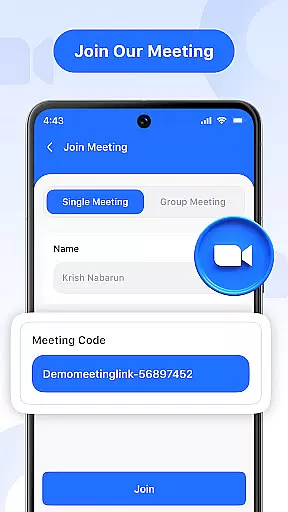
Key functionalities include instant meeting hosting, secure code-based invitations, and real-time chat. Users can toggle audio and video settings, share screens, and manage multi-language preferences. Whether you're leading a webinar or catching up with friends, Video Meeting provides a reliable platform for all your communication needs.
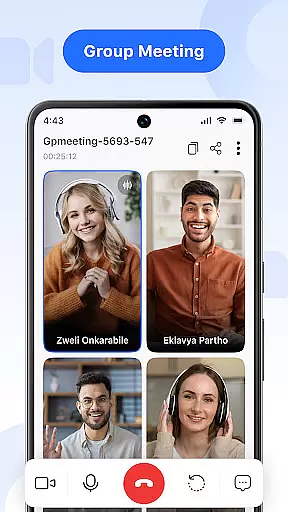
Video Meeting offers a comprehensive suite of tools tailored for modern communication. Host meetings instantly by launching your session and inviting participants via shared links or secure codes. The app supports one-on-one private chats as well as group hangouts, ensuring flexibility for various interaction types.
Advanced features include real-time messaging without disrupting the call, effortless audio controls to mute or unmute, and video toggling for privacy. Screen sharing allows users to present documents or slides live. Additionally, the app provides easy exit options and the ability to end sessions for all participants with a single click. Multi-language support further enhances accessibility.
Real-time messaging speed and reliability are crucial for effective communication in video conferencing applications. This feature ensures that messages are delivered instantly and consistently, without delays or failures.
Video Meeting app excels in this area by providing a robust infrastructure that supports uninterrupted message delivery. Whether you're sending a quick text during a meeting or sharing important updates, the app guarantees that your messages reach the recipients immediately.
The benefit to users is significant. With reliable messaging, participants can engage in seamless discussions, ask questions, and provide feedback without interrupting the flow of the meeting. This enhances collaboration and ensures that everyone stays informed and connected throughout the session.
Moreover, the app's commitment to speed and reliability extends beyond simple text messages. It encompasses all forms of real-time interaction, including file sharing, screen sharing, and even live reactions. This comprehensive approach ensures that every aspect of communication within the app is smooth, efficient, and dependable.
Media sharing support is an essential feature in modern communication apps, allowing users to exchange various types of media seamlessly during video calls. This capability enriches conversations by enabling participants to share images, documents, and other files directly within the meeting environment.
In Video Meeting, media sharing is implemented with user convenience in mind. The app supports multiple file formats, ensuring compatibility across different devices and operating systems. Users can easily drag and drop files into the chat window or use the dedicated share button to distribute content among participants.
This functionality offers numerous advantages to users. For instance, teams collaborating on projects can quickly exchange necessary documents without leaving the virtual meeting space. Similarly, educators conducting online classes can share presentations or worksheets with students in real time, enhancing the learning experience.
Beyond basic file sharing, Video Meeting also provides advanced options such as screen sharing and collaborative editing. These tools further augment the media sharing capabilities, making it easier for groups to work together efficiently and effectively, regardless of their physical locations.
User-friendly interface
HD video quality
Secure meeting access
Real-time chat functionality
Multi-language options
Limited free features
Occasional connectivity issues
No offline mode
Premium subscription required
Heavy on data usage

Fast and simple walkie talkie app
 4.20
4.20
فیلتر شکن قوی پرسرعت کلید جدید برای اندرویدسریع ترین وی پی ان برای همه اپراتورها
4.70
Block spam calls & scam - no more annoying calls with the call blocker function
4.30
Connect and browse the internet with a fast VPN proxy server and IP blocker.
4.50
Send SMS and chat messages easily with a fast text messaging app for Android.
4.10
2nd Phone Number Line for Anonymous Texting, Calling, and Picture Messages
4.30
Fun, free app that lets kids video call and message family and close friends.
3.80
A softphone with crystal clear SIP Calling & Reliable VoIP dialer
4.00
Caller ID, Spam Call & SMS Blocker
3.80
A browser that does more than load page, like keeping your privacy safe.
4.70
Manage BoostMobile Account
4.60
Manage your mobile phone plan, check unlimited 5g data usage and track rewards
4.50
Use this SMS app standalone or as a TREK: Total Interface companion.
4.30
Share the moment!
4.10
Messages: Fast, simple SMS app with scheduling and smart features.
4.00
Fast Dialer & Contact Manager with Caller ID and Spam Protection
4.00
Measure BHP, Torque & 0-60 Clear car OBD faults View engine data in Google Earth
4.00
Tether to Windows, OS X, Linux PCs or Android tablets. No root. No tether fees.
3.90
At select facilities, you now have an easy way to video visit your loved ones!
3.30








User Reviews