
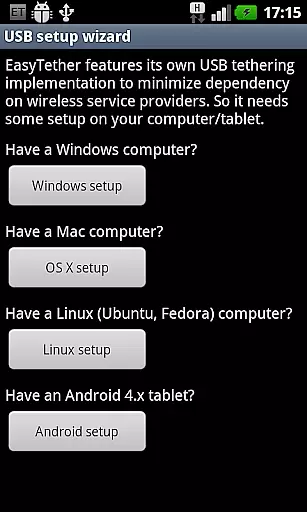
EasyTether Pro is a communication app designed to share your smartphone's Internet connection with other devices, including computers and tablets. It offers versatile tethering options through USB or Bluetooth, supporting Windows, Mac OS X, Linux, and Android 4.x platforms.
The app stands out by eliminating the need for root access or special tethering plans, making it accessible for users across various carriers. Additionally, EasyTether supports gaming consoles like PS3, Xbox, and Wii via Internet connection sharing on Windows or Mac, enhancing its utility beyond traditional computing devices.
With a one-time fee structure and broad compatibility, EasyTether Pro provides an efficient and cost-effective solution for users seeking seamless Internet connectivity across multiple devices.
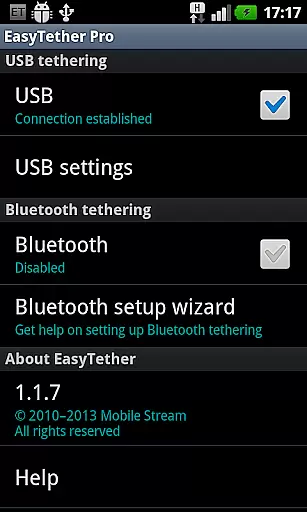
EasyTether Pro boasts several key features that enhance its functionality. First, it supports both USB and Bluetooth tethering, catering to different user preferences and device compatibilities. The USB tethering works seamlessly with Windows, Mac OS X, and Linux computers, while Bluetooth tethering is compatible with Windows PCs and Android 4.0.3+ tablets.
Another notable feature is its ability to tether gaming consoles such as PS3, Xbox, and Wii using Internet connection sharing on Windows or Mac systems. This expands its use case beyond typical office or home environments, appealing to gamers who require reliable Internet access.
Furthermore, EasyTether Pro operates without requiring root access or additional tethering plans, ensuring ease of use and broad accessibility. Its one-time payment model offers users long-term value without recurring charges, making it an attractive option for those looking to maximize their Internet sharing capabilities.
Real-time messaging speed and reliability are crucial for seamless communication. EasyTether Pro excels in this area by ensuring that your internet connection is shared instantly and consistently between devices.
The app employs advanced tethering technology that supports USB and Bluetooth connections, providing stable internet access to computers or tablets without delay. This means you can stay connected without worrying about sudden disconnections or lag.
EasyTether Pro's performance is not hindered by the need for root access or special tethering plans, making it an accessible solution for users who require dependable internet sharing capabilities on the go.
With support for various platforms including Windows, Mac OS X, Linux, and Android, EasyTether Pro ensures cross-platform compatibility with reliable connectivity, enhancing productivity and convenience.
Media sharing support is a vital feature for users who need to transfer files such as photos, videos, and documents between devices seamlessly. EasyTether Pro facilitates this process by enabling a stable internet connection that can be used to share media across different platforms.
By supporting both USB and Bluetooth tethering, the application allows for flexible media sharing options. Whether you're looking to move large video files from your smartphone to a computer or share documents with a tablet, EasyTether Pro provides the necessary infrastructure.
In addition to direct device-to-device sharing, EasyTether Pro also supports Internet Connection Sharing (ICS), which enables media streaming to gaming consoles like PS3, Xbox, and Wii. This expands the scope of media sharing beyond just personal devices.
Overall, EasyTether Pro enhances the user experience by offering versatile and robust media sharing capabilities, ensuring that all your digital content is easily accessible across all your devices.
User-friendly setup
Broad platform support
No root access required
One-time payment
Gaming console compatibility
Limited free version
Carrier restrictions
Bluetooth speed limitations
Installation conflicts
Outdated interface

We’re taking the yada yada out of wireless—now we’ve taken it out of your app.
 4.70
4.70
Messenger for SMS - texting message app, faster, simpler & safer, for you.
4.70
Messenger, an MMS & SMS messages app with Blockers, Driving mode & Private box
4.60
HD Video Meeting app is a fast & unlimited video conferencing app across world.
4.30
Comprehensive and powerful scan tool app with enhanced functions
3.00
A browser that does more than load page, like keeping your privacy safe.
4.70
Build your web browser around you with private search, and more.
4.60
Talk & text free with a second phone number plus unlimited 5G data, no fees.
4.50
Telegram is a messaging app with a focus on speed and security.
4.00
Say “hello” to privacy.
4.60
Experience real private browsing without tracking, surveillance, or censorship.
4.50
Caller ID App! Add names & photos to unknown calls & Call Recording
4.40
A web browser that respects your privacy.
4.30
2nd Phone Number Line for Anonymous Texting, Calling, and Picture Messages
4.30
Messages: Fast, simple SMS app with scheduling and smart features.
4.00
Pure modern IRC experience for Android
3.70
Chat on the Jabber network (XMPP protocol); support for SMS and other gateways
2.10
Radio communication simulator for gaming communities
4.2
Bringing the functionality of Winlink to your Android device
4.2



User Reviews