
CloudEye 365 is a cutting-edge remote monitoring application designed to provide users with enhanced security and peace of mind. The app allows you to access live video feeds from your connected devices, regardless of your location. Whether you are at home, in the office, or traveling abroad, CloudEye 365 ensures that you can keep an eye on your property in real-time.
One of the standout features of CloudEye 365 is its intelligent notification system. When the connected device detects abnormal movement or suspicious activity, the app immediately alerts the user. This proactive approach helps mitigate potential risks to personal safety and property security. With its user-friendly interface and reliable performance, CloudEye 365 serves as your personal security assistant throughout the year.
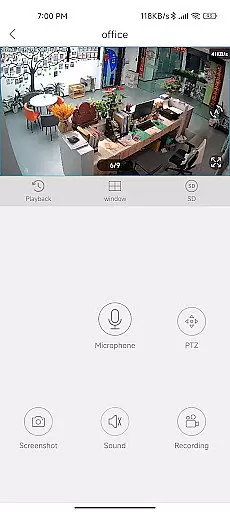
CloudEye 365 offers a comprehensive suite of features tailored for remote monitoring and security management. The app provides high-quality live video streaming directly to your mobile device, ensuring that you never miss a moment. Its intuitive design makes it easy to switch between multiple camera feeds, giving you complete control over your surveillance setup.
In addition to live monitoring, CloudEye 365 incorporates advanced motion detection technology. This feature analyzes movement patterns and sends instant notifications when unusual activity is detected. Users can customize sensitivity levels to reduce false alarms and tailor the app's performance to their specific needs. Furthermore, the app supports cloud storage integration, allowing you to securely store and access recorded footage anytime, anywhere.
Functionality completeness is a critical aspect of any monitoring application, and CloudEye 365 excels in this area. The app provides a comprehensive suite of features that cover all essential aspects of remote surveillance.
The application allows users to access live video feeds from their connected devices anytime, anywhere. This core functionality is supported by additional features such as motion detection alerts, suspicious activity notifications, and customizable security parameters.
CloudEye 365's coverage extends beyond basic monitoring capabilities. The app supports various camera models and resolutions, ensuring compatibility with different hardware setups. Its year-round operation guarantees consistent performance regardless of location or time zone differences.
Users benefit from having complete control over their security systems through a single interface. The app's comprehensive feature set eliminates the need for multiple applications, streamlining the remote monitoring process while maintaining high security standards.
Usability and operational smoothness are crucial factors that determine how effectively users can interact with their security systems. CloudEye 365 demonstrates exceptional attention to these aspects through its thoughtful design and implementation.
The application features an intuitive interface that makes navigation straightforward even for non-technical users. Key functions like live feed access and alert management are easily accessible from the main dashboard, reducing the learning curve for new users.
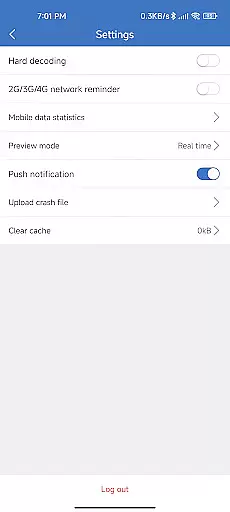
Operational smoothness is evident in how seamlessly the app handles resource-intensive tasks. Video streaming maintains high quality without significant delays or interruptions, while push notifications deliver real-time alerts without noticeable latency.
These usability features translate into practical benefits for users who require reliable access to their security systems. Whether checking routine footage or responding to urgent alerts, the app ensures that all operations run smoothly across different devices and network conditions.
User-friendly interface
Real-time notifications
Multi-device support
Cloud storage integration
Customizable settings
Limited free features
Requires stable internet
Premium subscription cost
Device compatibility issues
Occasional connection drops

View your cameras anywhere and anytime
 4.20
4.20
SmartCast mirrors Android phone to TV screen With Cast Screen, Chromecast.
4.80
The Free Catholic Latin American Bible in complete Spanish
4.60
Sad ringtones full of feeling, sad music ringtones
3.90
Zlink Carplay Android a mirror link app with a Carplay interface style
4.4
Recite Quran Majeed القران with special 16 line real Kuran page in hand
4.30
Mirror Link Car Display to share your screen with car dashboard wirelessly
4.0
Turn your phone into a wireless Xbox controller – play, stream & control anytime
4.2
Manage apps & elevate your gaming experience with Game Launcher: Gaming Hub app.
4.30
Expo is a free & open source platform to build apps using JavaScript and React.
4.70
An essential GFX utility developed for specific FPS mobile games
4.50
Block, disable and secure phone camera from secretly taking photos by spyware.
4.50
Game booster GFX may reduce interruptions and improve gaming experience.
4.50
A Pydroid Quick Install repository provider.
4.00
Use your Phone as Drone Controller.
3.70
Ps2 plugins for 64 bit artitechture
3.70
Connect and find your Smart Tag 2 devices through our app.
3.60
Identify securely online
3.10
Collection of high-quality, trendy skins and outfits!
4.1



User Reviews