
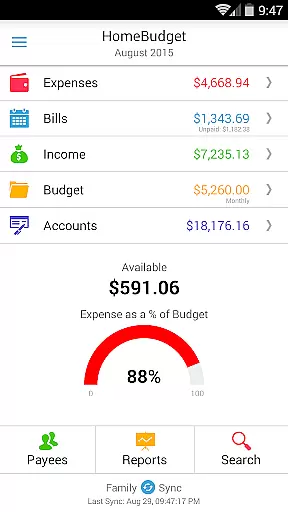
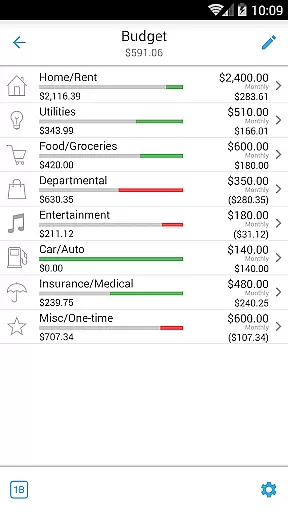
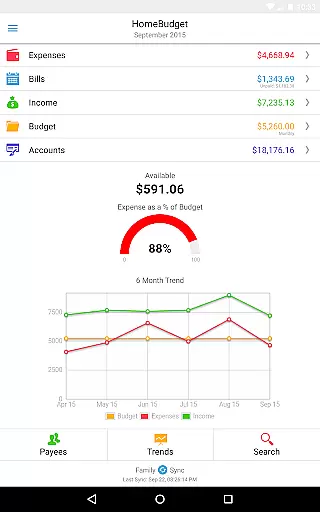
Home Budget with Sync is a comprehensive financial management application designed to help users track expenses, income, bills-due, and account balances across multiple platforms. Available on Android, iPhone/iPad, Windows, and Mac OS, this app offers instant data synchronization between devices, ensuring that your financial information is always up-to-date. The app stands out with its integrated feature set, allowing bills to become expenses while adjusting account balances simultaneously, and Family Sync, which enables household devices to exchange expense and income information seamlessly.
This app is particularly useful for families or individuals who manage shared budgets and need real-time updates across different devices. By providing detailed analysis through charts and graphs, Home Budget with Sync empowers users to make informed financial decisions and maintain a clear overview of their financial health.
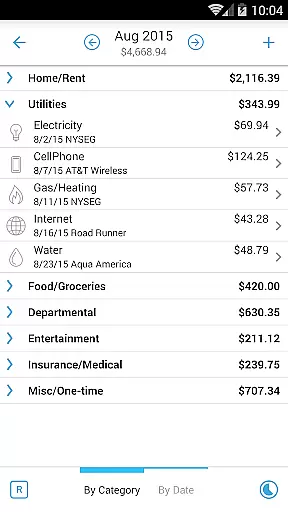
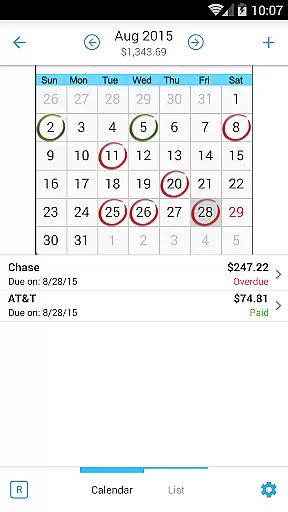
Home Budget with Sync boasts an array of features tailored to simplify personal finance management. Key functionalities include the ability to create, edit, and delete expenses, income, and recurring bills, as well as attaching photo images of receipts for easy reference. Users can browse entries by month or category, search specific transactions, and even classify expenses into fixed, variable, and discretionary categories to compute disposable income.
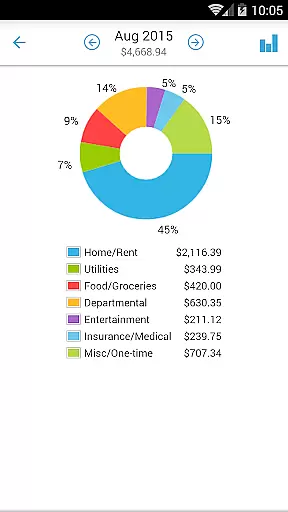
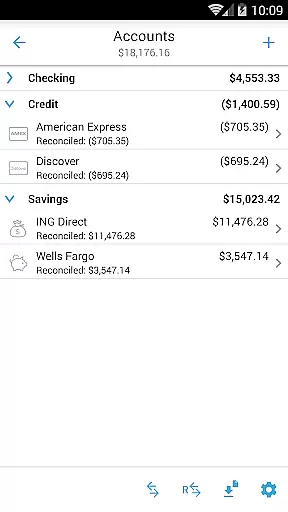
The app supports various account types such as Checking, Savings, Credit, and Debit, enabling accurate tracking of account balances. With Family Sync, multiple devices within a household can automatically sync data over 3G/4G and WiFi, allowing all members to work within a single budget. Additionally, Home Budget with Sync provides trend charts, pie/bar charts for expense breakdowns, and options to export data via email or WiFi, making it an indispensable tool for anyone seeking to gain better control over their finances.
Account and fund security is a critical aspect of any financial management application, ensuring that users' sensitive information remains protected. Home Budget with Sync employs multiple layers of security to safeguard your data. The app supports password protection, allowing only authorized access to the application's features and information.
In addition to password protection, the app provides backup and restore functionality for all application data, including receipts. This ensures that even if your device is lost or damaged, your financial records remain safe and can be restored on a new device. The ability to upload your own list of category icons adds another layer of personalization and security, making your setup unique to your preferences.
The app also follows locale and region settings on your device, displaying date and currency symbols appropriate for your region. This localization feature not only enhances usability but also minimizes errors in data entry, indirectly contributing to account security by reducing input mistakes.
By integrating these security measures, Home Budget with Sync offers peace of mind to its users, knowing their financial data is secure while they take advantage of the app's comprehensive budgeting and expense tracking capabilities.
A seamless transaction experience is vital for maintaining accurate financial records and ensuring user satisfaction. Home Budget with Sync excels in this area by offering an integrated set of features that streamline the process of managing expenses, income, and bills. With the ability to create, edit, and delete transactions, including recurring ones, users can maintain precise control over their financial activities.
The app allows users to associate accounts and payees with transactions, providing a detailed view of where money is coming from and where it is going. This level of detail helps users understand their spending habits better and make informed financial decisions. Additionally, attaching photo images of receipts and the option to search through expense entries ensure that every transaction is well-documented and easily accessible for future reference.
Home Budget with Sync goes further by offering automatic syncing across multiple devices within a household via Family Sync. This means that every member contributing to the family budget has real-time access to the latest financial data, enhancing collaborative financial management.
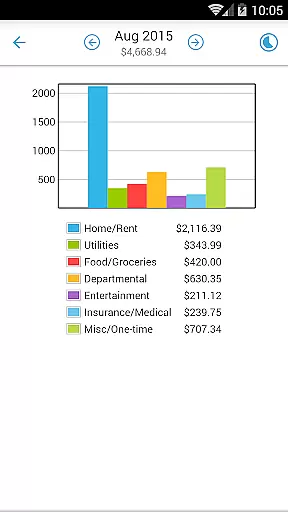
With trend charts for expenses, budgets, and income, alongside pie and bar charts for expense breakdowns, users gain valuable insights into their financial health. These visual aids, combined with the ability to export data and reports via email or WiFi, contribute to a comprehensive and user-friendly transaction experience.
User-friendly interface
Real-time data sync
Comprehensive budgeting tools
Family Sync functionality
Detailed financial reports
Separate purchase for each OS
No free full version
Limited cross-platform integration
Requires internet connection
Advanced features may overwhelm new users

Manage your account, make a payment, and redeem your rewards on the go.
 4.50
4.50
BA Financial Calculator PRO – Perfect for CFA/FRM/CPA and finance professionals
4.90
Manage your prepaid cards and add to Google or Samsung Wallet.
4.60
The simplest way to budget, bank, save and invest.
4.50
Get 250$ Cash Advance to solve emergencies instantly in loan app called LendMe
4.70
Car Insurance Made For You.
4.50
Easy budgeting planning on a calendar!
4.80
Currency Converter (200+ currencies) with live exchange rates and offline mode.
4.70
Keep track of your subscriptions with no limitations
4.80
PayMe helps you claim money from settlements on companies that harmed you.
4.80
Check EBT, SNAP, WIC balances, manage food stamps, and save money with benefits
4.80
All expenses at a glance.
4.80
Powerful Money Manager, Expense & Savings Tracker, Budget Planner - Pro Version
4.70
Banking, Budgeting & Investing
4.60
Real-time tracking: Stocks, Indices, Futures, Commodities, ETF, & Funds prices.
4.60
The all-in-one app to save, earn, travel, and put more money in your pocket
4.50
Registration of your debts and Mdionatk and assembled, as well as a significant reports
4.30
Make your paycheck work harder for you with Perpay.
4.10
Bank better with our new app
3.80




User Reviews