
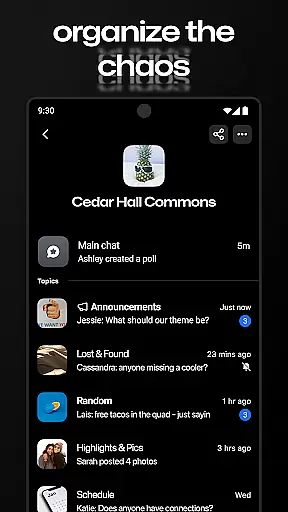
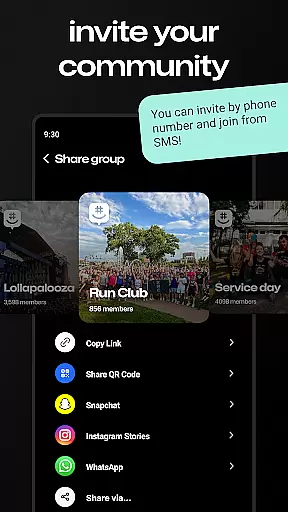
GroupMe is a free communication app that allows users to stay connected with important people in their lives through group chats. It supports various types of groups such as family, friends, coworkers, and more. The app offers features like adding anyone via phone number or email, controlling notifications, using exclusive emoji, sharing media, and exploring content shared within the group.
With GroupMe, users can easily manage their group conversations and even engage in direct messaging for one-on-one chats. The app also provides access to a gallery where photos and videos shared in the group are saved for future viewing. Whether communicating across the room or around the world, GroupMe ensures that users maintain meaningful connections.
GroupMe stands out with its versatile communication tools. Users can add participants to a group chat using their phone numbers or email addresses, enabling SMS-based chatting for those new to the platform. Notification settings are highly customizable, allowing users to mute specific chats or the entire app as needed.
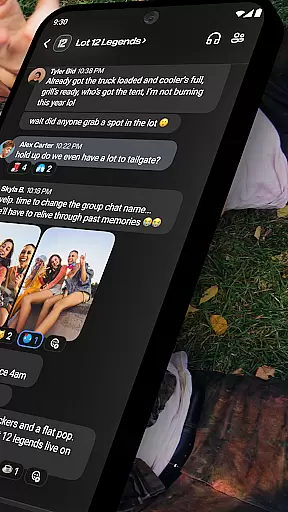
The app includes an array of expressive emoji and supports rich content sharing, including meme images, GIFs, and URL previews. A built-in gallery feature lets users store and revisit shared media. Additionally, GroupMe offers direct messaging capabilities, providing a texting-like experience with enhanced functionality. These features collectively enhance user engagement and streamline group interactions.
Real-time messaging is a critical feature for any communication app, and GroupMe excels in this area. The app ensures that messages are delivered instantly, allowing users to maintain seamless conversations without delays.
GroupMe's infrastructure is designed to handle high volumes of messages simultaneously, ensuring reliable delivery even during peak usage times. This reliability is crucial for maintaining the flow of conversation among family, friends, or coworkers.
Users benefit from knowing their messages will be received promptly, making it easier to coordinate plans, share updates, or simply stay connected with loved ones. Whether you're down the street or across the globe, GroupMe keeps your conversations flowing smoothly.
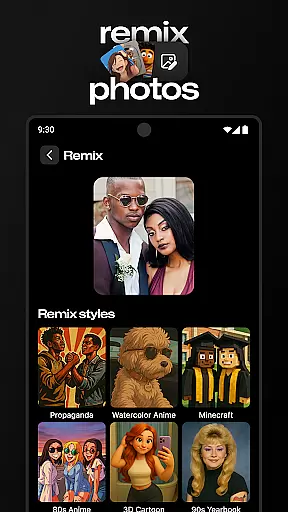
Sharing media within chats enhances communication by adding visual context and personal touches to conversations. GroupMe supports various forms of media sharing, including photos, videos, GIFs, and links to online content.
The app allows users to search and send GIFs directly within the chat interface, providing an engaging way to express emotions or reactions. Additionally, when URLs are shared, GroupMe displays the linked content directly in the chat, enriching the conversation experience.
This comprehensive media support enables users to create more dynamic and interactive group chats, fostering stronger connections through multimedia exchanges. With these features, GroupMe goes beyond basic text-based communication, offering a richer platform for interaction.
User-friendly interface
Customizable notifications
Exclusive emoji collection
Rich media sharing options
Cross-platform accessibility
SMS limited to US
Occasional bugs reported
Standard texting rates apply
Limited video call features
Privacy concerns with URL sharing

Identify unknown numbers, block spam calls, customize calls with cool themes.
 4.60
4.60
Use this Dialer app alone or as a TREK: Total Interface companion.
4.70
Save 10% automatically on your first international mobile top up.
4.60
Messages: Fast, simple SMS app with scheduling and smart features.
4.00
Smart and simple anti-wiring application - IMSI-catchers catcher
4.40
Comprehensive and powerful scan tool app with enhanced functions
3.00
RemoteHams.com Android RCForb Client Pre-Release
4.30
Use this SMS app standalone or as a TREK: Total Interface companion.
4.30
Manage your mobile phone plan, check unlimited 5g data usage and track rewards
4.50
Adblock & VPN Browser: Blocks banners, pop-ups and video ads, fast downloader!
4.60
The ultimate productivity solution for all your email communication needs.
4.40
Create a secure hotspot on-the-go with Portable WiFi - Mobile hotspot.
4.40
A web browser that respects your privacy.
4.30
Phone Dialer with Caller ID, Address Book & Contacts Manager.
4.30
Call Blocker app: Identify unknown callers, block spam calls, fraud & robocalls
4.30
A customizable phone number in the cloud
4.20
Send SMS and chat messages easily with a fast text messaging app for Android.
4.10
This app enables the phone to receive and send FT8 traffic!
3.80
Quickly and easily identify and block unknown callers
3.70






User Reviews