
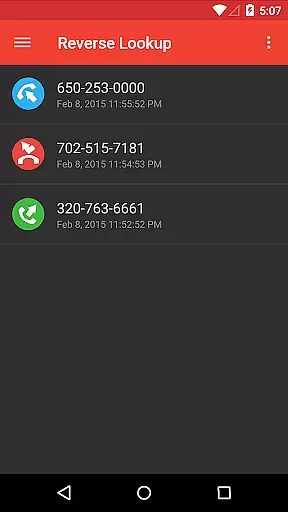
Reverse Lookup+ is a powerful communication tool designed to help users identify unknown callers and protect themselves from spam calls. The app provides detailed caller information by accessing publicly available data published by phone companies, including the caller's location when possible. This premium version is completely ad-free, offering an uninterrupted user experience while directly supporting ongoing development efforts.
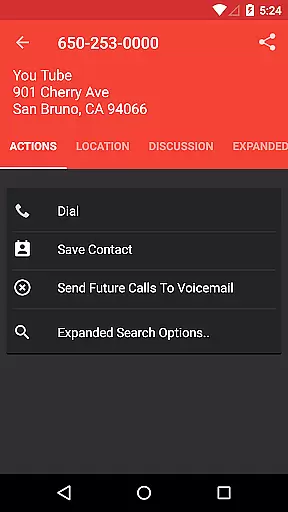
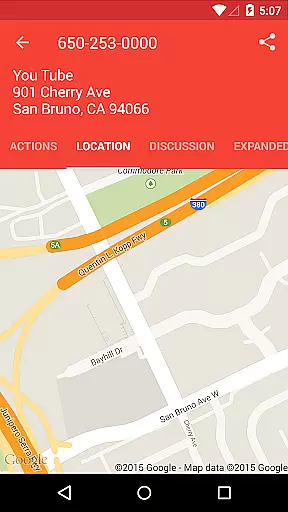
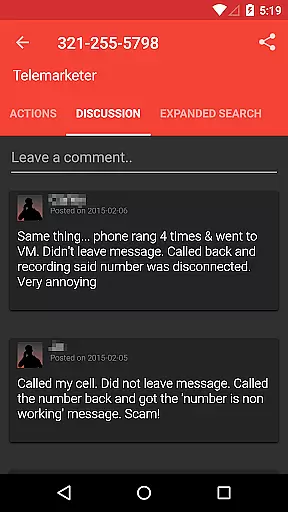
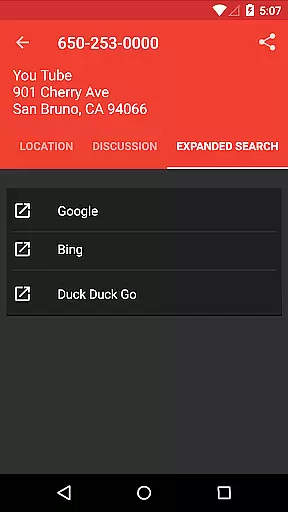
Beyond basic caller identification, the app includes advanced features such as community-driven comments, easy contact saving, and one-tap search expansion to popular search engines like Google. Users can also map caller locations and create 'send to voicemail' contacts for known spammers. These capabilities make Reverse Lookup+ particularly valuable for professionals and individuals who frequently receive unknown calls and need to maintain a clean contact list.
The application's strength lies in its comprehensive approach to call management. By combining real-time caller information with community insights and robust blocking capabilities, it creates a protective shield against unwanted communications. The developers have also implemented strict privacy measures, ensuring that all permissions are clearly explained and justified, making it a reliable choice for security-conscious users.
Reverse Lookup+ distinguishes itself through several innovative features that enhance traditional caller ID functionality. The app's core capability revolves around its ability to access and display publicly available data from phone company directories, providing users with accurate caller information. What sets this application apart is its integrated commenting system, where users can share insights about specific numbers, creating a crowdsourced database of potential spammers and telemarketers.
The application implements sophisticated call management features including automatic contact creation, direct calling after lookup, and intelligent notification systems based on user preferences. Its seamless integration with both device contacts and Google accounts enables advanced functionality like 'send to voicemail' settings. Additionally, the app's permission structure has been carefully designed to balance functionality with privacy concerns, requiring only necessary permissions such as internet access for database queries and read/write access for contact management.
Technical implementation extends to practical features like network state monitoring for reliable data connections and call log integration for tracking unknown calls. Each feature has been optimized for efficiency and user control, allowing customization of notification preferences and maintaining complete transparency about how permissions are utilized. This combination of technical sophistication and user-centric design makes Reverse Lookup+ a comprehensive solution for modern call management needs.
Real-time messaging speed and reliability are crucial for effective communication applications like Reverse Lookup+. This app ensures that users can quickly identify unknown callers and manage spam calls with minimal delay. The real-time aspect is powered by an internet connection that allows the app to access lookup databases instantly.
The app's infrastructure is designed to offer reliable performance, ensuring that every query returns accurate information as soon as it's requested. Users benefit from this reliability when they perform actions such as mapping a caller's location or expanding searches to other search engines with just one tap. These features contribute to a seamless user experience where time-sensitive actions, like call blocking, happen without noticeable lag.
Moreover, Reverse Lookup+ maintains its performance by checking network states to ensure data connectivity during use. This means that even when identifying or blocking spammers and scammers, the application remains stable and responsive, providing consistent support for ongoing development and user engagement.
Media sharing support in communication apps like Reverse Lookup+ refers to the ability to share various types of media files seamlessly within the app environment. Although primarily focused on caller identification and spam protection, Reverse Lookup+ facilitates media sharing through its comprehensive contact management system.
Users can easily save caller information as contacts, which may include profile pictures or other media-rich details. By integrating with popular services such as Google search, it also enables expanded media context around caller identities, enhancing the useru2019s understanding of who is calling.
Furthermore, while Reverse Lookup+ does not directly handle traditional media files like photos or videos, its permissions setup supports creating 'send to voicemail' contacts which could be considered another form of media interactionu2014voice messages. Overall, these capabilities ensure that users have versatile options for managing their communications effectively.
Comprehensive caller details
Active community reporting
Ad-free experience
Robust privacy controls
Seamless contact integration
Limited cellphone data
No GPS tracking
Premium price point
Occasional outdated information
Device compatibility issues

BiP is a fast, secure, free messaging and HD video calling app!
 4.10
4.10
Enables Plus features of Quick Search.
4.2
Fast Dialer & Contact Manager with Caller ID and Spam Protection
4.00
RemoteHams.com Android RCForb Client Pre-Release
4.30
FolderSync enables easy sync of files between cloud storage and Android devices.
4.60
Read OBD2 data and DTCs Create custom dashboards Enhanced diagnostics available
4.70
Get through your inbox faster with the mail app designed to simplify your life.
4.40
Caller ID, Spam Call & SMS Blocker
3.80
Useful. Social. Expressive.
4.70
Enhance browsing with AI-powered features and Copilot.
4.70
Stay in touch with the people who matter most.
4.60
Faster version of Messages. Messenger for your contacts.
4.50
Caller ID App! Add names & photos to unknown calls & Call Recording
4.40
SMS Messenger is a lightning-fast messaging app.
4.20
Share the moment!
4.10
WazzapMigrator: transfer your WhatsApp history from iPhone to Android
4.00
Messages is Private SMS Messenger 2023 with text message, instant messaging.
4.00
Comprehensive and powerful scan tool app with enhanced functions
3.00
An app dedicated solely to marriage, not dating, and supported by a rigorous verification mechanism to ensure seriousness.
4.1



User Reviews