
Network Cell Info & Wifi is a comprehensive mobile network and Wi-Fi monitoring tool designed for users seeking to optimize their connectivity experience. The app provides detailed diagnostic data on 5G, LTE, CDMA, WCDMA, GSM, and Wi-Fi signals, helping troubleshoot reception issues while offering insights into local cellular coverage.
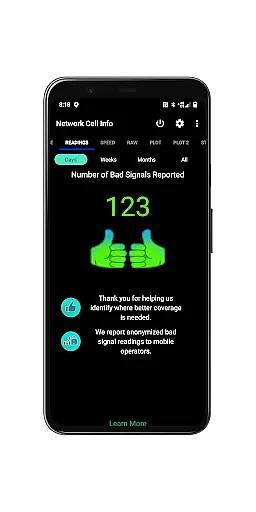
A standout feature of the app is its Bad Signal Reporter functionality, which allows users to automatically report poor signal areas to mobile network operators (MNOs). This crowdsourced data empowers MNOs to improve network performance. Additionally, Network Cell Info offers advanced tools such as almost real-time signal monitoring, dual-SIM support, and personal best signal finder maps, making it an invaluable resource for both casual users and tech enthusiasts.
Whether you're diagnosing connectivity problems or exploring optimal signal zones, this app ensures you stay informed about your network environment while delivering actionable insights to enhance your mobile experience.
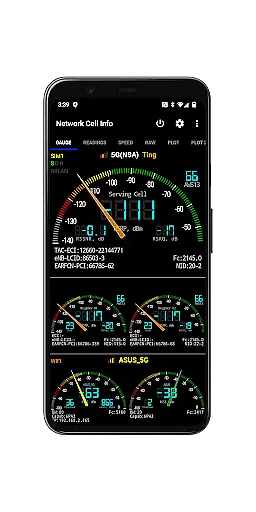
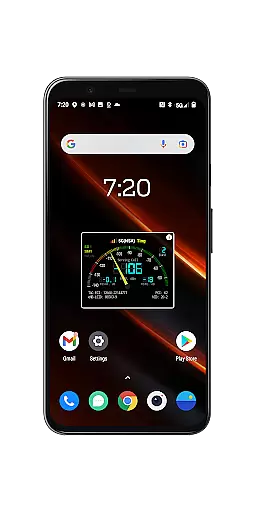
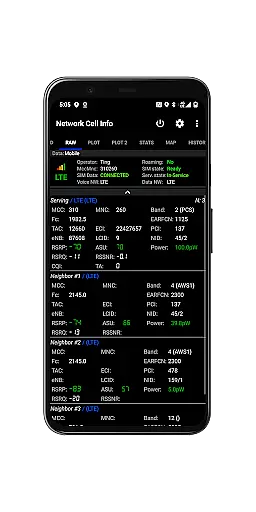
Network Cell Info & Wifi stands out with its robust set of features tailored for network diagnostics and optimization. One of its core functionalities is the almost real-time (1-second refresh rate) monitoring of cellular and Wi-Fi signals, presented in both gauge and raw data formats. This includes support for modern networks like 5G, LTE+, and IWLAN, alongside legacy systems such as GSM and CDMA.
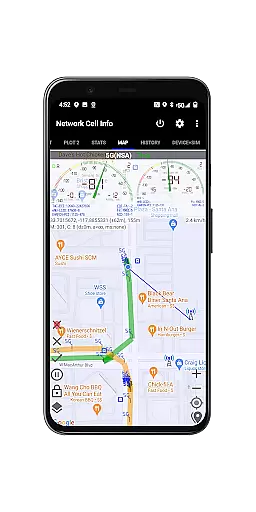
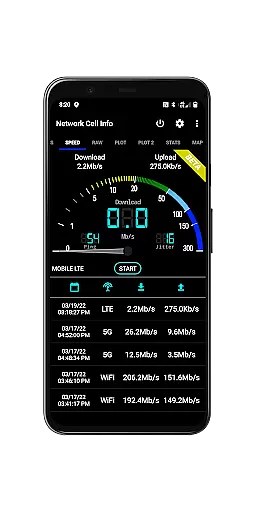
The app also incorporates a one-tap speed test feature that measures download, upload, ping, and jitter performance for both mobile internet and Wi-Fi connections. Its dual-SIM support and multi-signal meter gauges provide flexibility for users managing multiple carriers. Advanced mapping tools display network information, signal strength history, and even crowdsourced best signal locations, ensuring users can pinpoint optimal connectivity zones.
Additional highlights include a personal best signal finder, detailed connection statistics, SIM/device info, and customizable measurement settings. With database export capabilities and historical logging, Network Cell Info equips users with professional-grade tools to analyze and improve their network performance effectively.
Network Cell Info provides an extensive suite of tools designed to monitor and diagnose mobile network signals with precision. The app supports a wide range of network types including 5G, LTE+, LTE, CDMA, WCDMA, and GSM, ensuring comprehensive compatibility and accurate readings across different carriers and devices.
One of the standout features is the almost real-time monitoring of cellular carrier and WiFi signals, which updates every second. This allows users to troubleshoot reception and connectivity issues effectively. Additionally, the one-tap WiFi/mobile internet performance speed test measures download, upload, ping, and jitter, providing a holistic view of network performance.
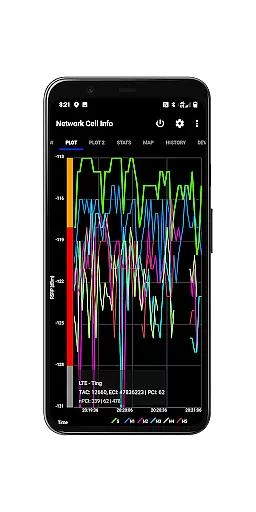
The app also includes advanced functionalities such as dual-SIM support, signal plots for up to six cells, and band number information. These features enable users to optimize their mobile experience by understanding their signal environment in detail. With the Personal Best Signal Finder and Crowdsourced Best Signal Finder, users can locate areas with the strongest signals, enhancing both personal and professional communication reliability.
Despite its technical depth, Network Cell Info maintains an intuitive and user-friendly interface. The app presents complex data through easily digestible gauges and raw tabs, making it accessible even to those who may not be tech-savvy. Users can quickly access critical information without feeling overwhelmed by the underlying technical details.
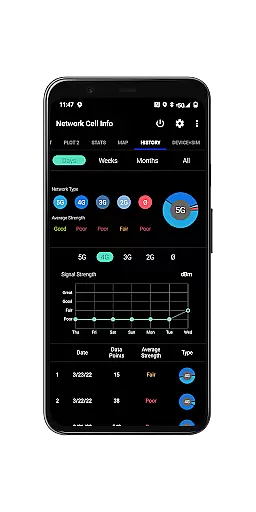
Features like the Signal-meter gauges for both SIMs and WiFi, along with clear visual indicators on the Map tab, simplify the process of monitoring signal strength and network performance. The inclusion of a History Log and Readings Tab further aids users in tracking changes over time, offering insights into persistent issues or improvements in their network environment.
Moreover, Network Cell Info offers customizable settings such as minimum distance, minimum accuracy, and motion sensor options, allowing users to tailor the app's behavior to their specific needs. This flexibility ensures that whether you are a casual user looking to improve your mobile experience or a professional needing detailed diagnostics, the app remains approachable and effective.
Comprehensive network diagnostics
Real-time signal monitoring
Dual-SIM support
Crowdsourced signal data
Free Bad Signal Reporter
Complex for beginners
Requires technical knowledge
No offline maps
Heavy on battery
Premium features locked

A recovery soft,it features photo recovery, video recovery, file recovery.
 3.40
3.40
Head tracking for PC sim games such as MSFS 2024 or Elite:Dangerous. No headset!
4.50
Family Locator, Share location, StayConnect with your family in real time
3.90
Smart and comfortable browsing experience.
3.80
Detect hidden spy camera with advanced scanning {{ Premium version }}
4.00
Powerful collection of electronics tools and reference.A must for any enthusiast
4.90
A simple app to back up and restore SMS & MMS messages and call logs.
4.10
Mobile Security with Scam Protection | Malware & Virus Cleaner | Safe Browser
4.70
fast and easy mp3 music downloader
4.80
Connect instantly to a fast, encrypted VPN with one tap
4.60 4.50
4.50 4.50
4.50
Button mapper, mouse toggle, sleep timer and a lot of another features
4.50
An easy-to-use calculator designed to save time calculating and bending conduit
4.30
Quickly check the frequency of the Earth
4.30
Just one-tap to easy translate in any language after calls within seconds.
4.20
An open-source APK explorer for Android!
4.10
View detailed information about your Nissan Leaf the dealer never shows you.
4.10
Save any video in HD - paste the link, download fast and watch offline.
4.5



User Reviews