
Realtor.com Real Estate & Rent is the premier app for homebuyers, renters, and sellers seeking a seamless property search experience. As the #1 trusted platform among real estate professionals, it offers award-winning tools to simplify your journey to finding the perfect home. Whether you're looking to buy, rent, or sell, Realtor.com provides customizable filters, detailed maps, 3D virtual tours, and collaborative features that make home searching more intuitive and efficient.
The app stands out with its advanced search capabilities, including filtering by price, size, commute time, and school districts. Its map-based exploration allows users to refine areas, assess risks like floods or wildfires, and discover nearby amenities. Realtor.com also ensures you stay informed with real-time alerts on new listings and price changes while offering budgeting tools such as affordability and mortgage calculators. With its user-friendly interface and robust functionality, Realtor.com empowers users to make smarter real estate decisions.
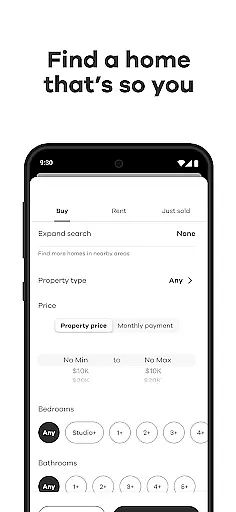
Realtor.com Real Estate & Rent boasts an array of innovative features designed to enhance every step of your property search. One standout tool is the customizable home filter, which lets users narrow down listings based on specific criteria like bedrooms, bathrooms, price range, and commute times. This ensures that only the most relevant options appear in your search results.
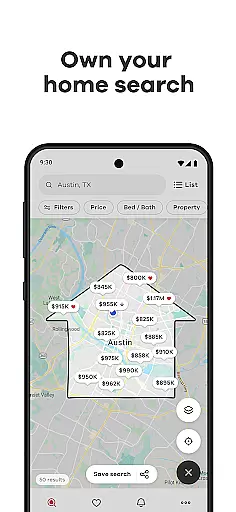
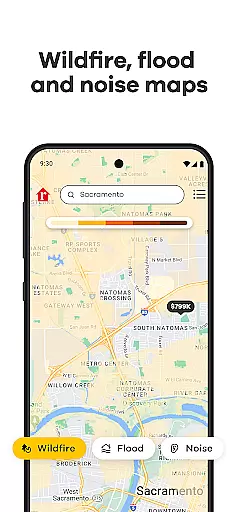
Another key feature is the interactive map functionality. Users can draw custom boundaries, explore neighborhood details such as noise levels and traffic patterns, and even evaluate environmental risks like flood zones or wildfire-prone areas. Additionally, Realtor.com offers immersive 3D virtual tours and video walkthroughs, allowing users to experience properties remotely. Collaborative tools further enrich the process by enabling shared accounts where users can exchange feedback via text, email, or social media.
Finally, the app keeps users engaged through timely notifications about new listings, price drops, and market trends. Budget-conscious buyers will appreciate financial tools like the Affordability Calculator and Mortgage Estimator, which help plan expenses effectively. These comprehensive features collectively create a dynamic, all-in-one solution for modern real estate needs.
When searching for a new home, the authenticity of property listings is crucial. Realtor.com ensures that all homes for sale or rent are verified and updated regularly to provide accurate information. This verification process includes checking the availability, pricing, and key details of each listing against reliable sources.
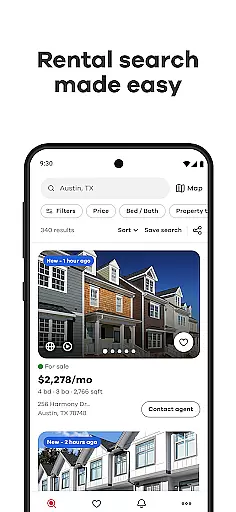
The app's direct integration with MLS listings guarantees that users receive the most current and trustworthy data available. Through features like video walkthroughs and sorted photo galleries, buyers can explore properties in detail without leaving the app. These tools help ensure that what you see online matches the actual property condition.
For users, this means peace of mind knowing that the homes they are interested in are legitimate and worth their time to visit in person. The ability to assess flood and wildfire risks adds another layer of transparency, allowing for informed decisions based on potential environmental hazards.
Beyond just finding a home, Realtor.com offers various home management features that assist users throughout their entire home-buying journey. One standout tool is the collaborative search functionality, which allows multiple users to link accounts and share favorite listings along with comments. This feature is particularly useful for couples or families searching together.
The app also provides essential financial tools such as the Affordability Calculator and Mortgage Calculator. These calculators help users stay within budget by estimating monthly payments and determining an appropriate price range based on personal finances. Additionally, real-time alerts notify users about new listings or price changes, ensuring no opportunity is missed.
By offering these comprehensive resources, Realtor.com not only simplifies the process of finding a home but also equips users with everything needed to manage their home search effectively. From initial exploration to final decision-making, these features support a seamless transition into homeownership.
User-friendly interface
Advanced search filters
Real-time listing alerts
Comprehensive map tools
Collaborative sharing options
Limited international listings
Occasional slow load times
Premium features require subscription
Ads in free version
Complexity for first-time users

For all of your Airthings devices
 4.30
4.30
Calculate baluster spacing with ease and precision.
4.2
Control your Daikin, Amana & Goodman heating & cooling systems from anywhere
4.40
Our app allows Sunrun customers to monitor systems, pay bills, and get support.
3.80
Convert your Phone to HiSense Smart TV Remote Control
4.70
Floor Plan Creator Home Design with 2D interior design and 3d view.
3.90
Find the perfect paint color with advanced tools to explore and visualize color.
3.80
Find your next home, house, apartment, condo, casa, flat, rental, studio, or bed
4.70
An easier way to make payments and maintenance requests from anywhere.
3.50
Search for Homes, Rentals, Agents & Schools
4.70
A Smarter Home in Seconds
4.70
Your guide to apartments & rental homes. Find your next place to rent with AG.
4.60
Night Owl Protect helps you secure, protect, and connect your world!
4.60
Wobble Fix Tool
4.40
SmartRent - Opening Doors To A Smarter World
4.40
Design your dream home with 3D planning app, Visualize your dream home in 3D.
4.20
AI floor creator to design your dream house, plan rooms & style your home
4.00
Technology powering many in-home services for residents across the United States
3.80
Universal TV remote Control for Roku TV brands via WiFi remote
4.2







User Reviews