
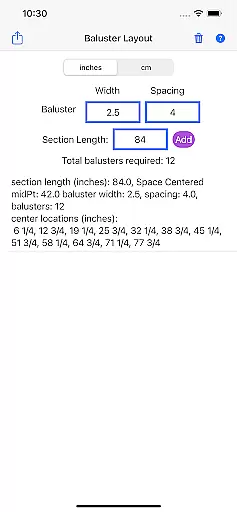
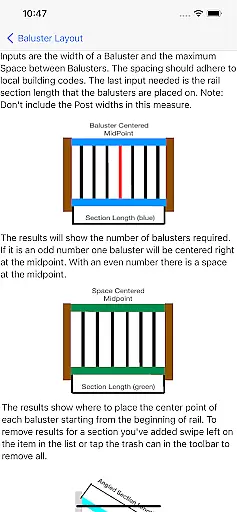
Baluster Layout is a specialized application designed for deck and stair builders, aiding in the precise calculation of baluster spacing to meet building code requirements. The app's core functionality lies in its ability to determine the exact number of balusters needed and their placement by simply inputting the railing length, baluster width, and desired spacing.
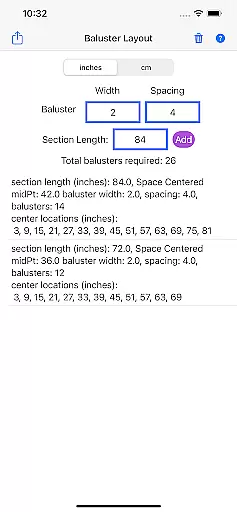
One of the standout features of Baluster Layout is its support for projects with multiple railing sections, each having unique dimensions. This flexibility, combined with the option to choose between inches or centimeters, makes it an indispensable tool for both professionals and DIY enthusiasts aiming for accuracy and compliance in their construction projects.
The app finds its use in scenarios where precision and adherence to safety standards are paramount. By eliminating manual calculations, it not only saves time but also ensures that the structures are both visually appealing and up to code, providing tangible value by preventing costly mistakes and ensuring the safety and stability of railings.
Baluster Layout stands out due to its rich feature set tailored specifically for baluster installation projects. One of its primary characteristics is the precision spacing calculator, which optimally determines baluster spacing to ensure compliance with building codes, thus promoting safety and stability.
In addition to handling simple projects, the app excels in managing complex constructions involving multiple rail sections. Each section can have its own unique dimensions, and the app provides detailed results on the number of balusters needed and their exact placement. This level of detail supports users in executing their projects without error and with complete adherence to required standards.
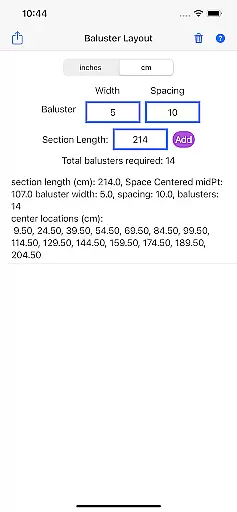
Furthermore, unit flexibility enhances user experience by allowing measurements in either inches or centimeters, accommodating project specifications worldwide. These features collectively contribute to making Baluster Layout an innovative and essential tool for accurate, efficient, and reliable baluster installations.
In the realm of home improvement and construction, having reliable information is crucial. Baluster Layout provides accurate calculations for baluster spacing, ensuring that all data you receive is authentic and complies with building codes. This precision helps both professionals and DIY enthusiasts to avoid common pitfalls associated with incorrect measurements.
The app's ability to handle multiple rail sections with unique dimensions means that each project detail is processed with meticulous attention. By entering specific parameters such as railing length and baluster width, users can trust that the app will deliver precise results tailored to their needs. This level of detail guarantees that every property modification or addition is both safe and compliant.
Moreover, Baluster Layout offers unit flexibility, allowing users to work in either inches or centimeters. This feature ensures that the information provided matches the user's project specifications perfectly, further enhancing the authenticity of the property listings created through the app. With these capabilities, users can confidently plan and execute their projects.
Beyond just calculating baluster spacing, Baluster Layout incorporates a variety of home management features designed to streamline deck and stair building projects. One key aspect is its capacity to save time and reduce hassle by automating complex calculations, which traditionally required manual effort and were prone to errors.
The app also enhances safety and stability in your structures by ensuring that all baluster placements meet stringent building code requirements. This not only prevents costly mistakes but also contributes to the overall aesthetic appeal of the finished project, making it visually pleasing while remaining code-compliant.
Additionally, detailed results provided by the app offer a comprehensive breakdown of the number of balusters needed for each section and their exact placement. These insights empower users to manage their projects more effectively, providing clarity and precision at every step. Whether you're a seasoned professional or a DIY enthusiast, Baluster Layout equips you with the tools necessary for successful project completion.
User-friendly interface
Accurate calculations
Supports multiple units
Complies with building codes
Saves time and effort
Limited to baluster projects
No 3D visualization
Basic design layout
Few customization options
Requires manual input

Draw your floor plan smartly. Make house design blueprint with home planner app
 3.60
3.60
AI-powered home design, interior design, home decor, and room design solutions
4.50
Control the scent and ambiance of your home and car, right from your phone.
4.50
The only mappable smart lights for custom decoration.
4.50
Innovative and budget-friendly housing options
4.60
Floor Plan Creator Home Design with 2D interior design and 3d view.
3.90
Book your local plumber 24/7, track your service order & get exclusive coupons
4.00
Plan your remodel AI home renovation easily using planner 5D and home decor AI.
4.40
Universal Tv Remote Control for all Tv. Cast for chromecast & all Tv Controller
4.20
Convert your Phone to HiSense Smart TV Remote Control
4.70
Real estate app to find homes for sale or rent in the right neighborhood for you
4.70
Search for Homes, Rentals, Agents & Schools
4.70
Plants, Beauty, Collectibles
4.60
Parcel Pending Resident App
4.50
Rent on-the-go with TurboTenant’s app made just for renters
4.50
Control your Daikin, Amana & Goodman heating & cooling systems from anywhere
4.40
Control your Vivint Smart Home with the next generation Vivint App.
4.30
PRO Version of GLB AR Viewer
4.3
Universal TV Remote for TV, control all Smart TVs with your mobile phone.
4.5




User Reviews