
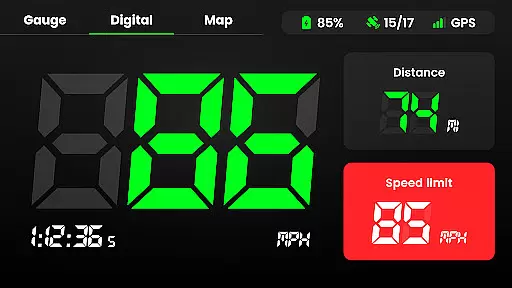
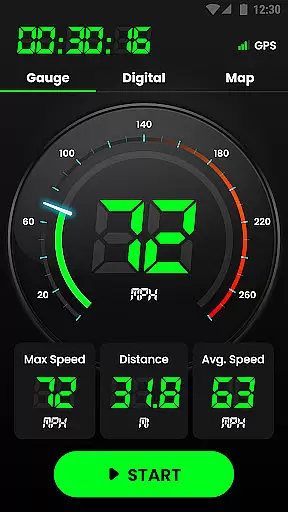
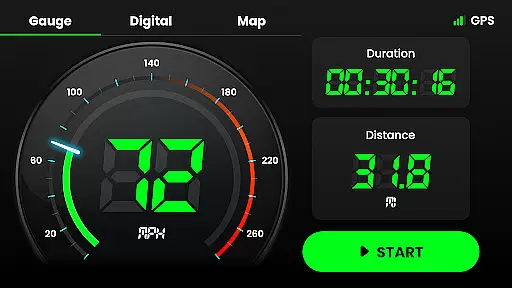
Speedometer is a highly accurate GPS-based speed tracking application designed to measure the velocity of various modes of transportation. Whether you're driving a car, riding a bicycle, or even jogging, this app provides real-time speed updates and distance tracking in both digital and analog formats. The app's offline functionality ensures that users can track their speed and location even without an internet connection, making it reliable in remote areas.
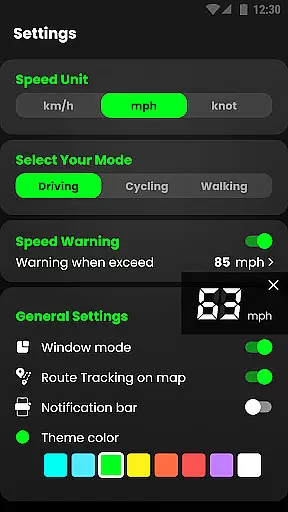
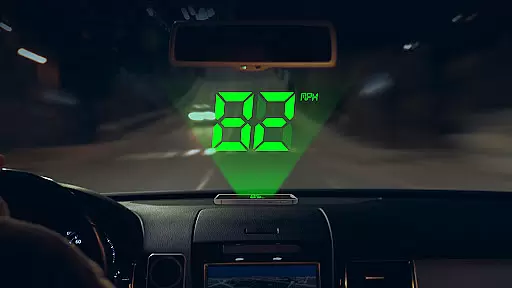
In addition to its core speed-tracking feature, Speedometer offers advanced functionalities such as speed limit alerts, which notify users via vibrations or voice alerts when they exceed predefined limits. Its Head-Up Display (HUD) mode mirrors your speed onto your car windshield for easy viewing while driving. With support for multiple units like km/h, mph, and knots, this app caters to a global audience and is suitable for different types of vehicles, ensuring precision and reliability in every scenario.
Speedometer stands out with its comprehensive set of features tailored for accuracy and convenience. One of its key highlights is the dual-mode display, offering both digital and analog speedometer views. Users can switch between these modes based on preference, while also choosing from multiple themes to customize the interface. The app includes an odometer function that tracks trip details such as average speed, maximum speed, total mileage, and starting/ending points, providing a complete overview of each journey.
Another notable feature is the offline map recording capability, allowing users to track their routes without requiring an active internet connection. This is complemented by the ability to toggle speed limit alerts, which enhance safety during travel. Additionally, the app supports portrait and landscape orientations, small widget displays, and even picture-in-picture mode for simultaneous use with navigation apps. These versatile features make Speedometer not just a tool for measuring speed but also a robust companion for tracking and analyzing travel history efficiently.
Map accuracy is crucial for any navigation or tracking application, and Speedometer excels in this area. The app leverages advanced GPS technology to provide real-time location data with impressive precision. Whether you're driving, cycling, or walking, the app ensures that your position is accurately reflected on the map.
The speedometer function relies heavily on precise mapping to deliver reliable speed measurements. By utilizing high-frequency GPS updates, the app tracks your movement across different terrains and routes with minimal deviation. This level of accuracy allows users to trust the app's velocity readings, whether they're monitoring their jogging pace or ensuring they stay within legal driving speeds.
Speedometer also offers offline capabilities, maintaining map accuracy even without an internet connection. This feature is particularly beneficial when traveling through areas with poor network coverage. Users can confidently track their journeys, knowing that the app will continue to provide accurate location and speed data regardless of connectivity issues.
Ultimately, the map accuracy provided by Speedometer enhances user experience by delivering dependable information for various activities. From daily commutes to outdoor adventures, users can rely on the app to provide precise location tracking and speed measurement, making it an essential tool for anyone needing to monitor their movement effectively.
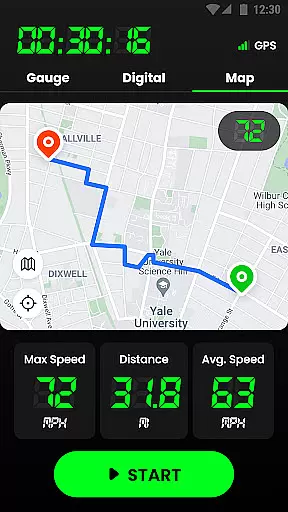
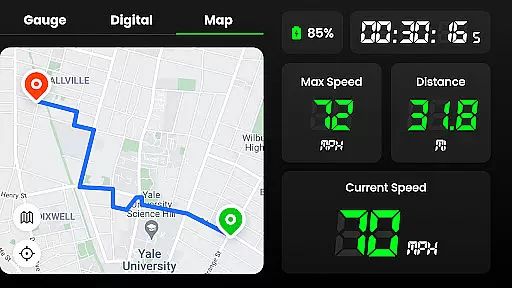
Route planning is a fundamental aspect of navigation apps, and Speedometer provides users with valuable tools to manage their journeys efficiently. While primarily a speed tracking application, it incorporates essential route planning features that enhance travel experiences. Users can view their current location, track their path, and monitor important metrics like distance and speed along their chosen routes.
The app's ability to record and display trails on a map supports effective route planning. As users move, Speedometer creates a visual representation of their journey, marking starting and ending points while documenting the entire trail. This functionality helps users understand their travel patterns, optimize future routes, and maintain records of their trips for personal or professional purposes.
Additionally, Speedometer offers both portrait and landscape modes, allowing users to customize their view for optimal route visualization. The app's multiple theme colors further enhance readability and personal preference, making route planning more accessible and enjoyable. These features collectively contribute to a comprehensive navigation experience that accommodates various user needs and preferences.
While Speedometer may not offer traditional turn-by-turn directions, its robust tracking capabilities and detailed journey records make it an excellent companion for those who prefer flexible route planning. Users can pause or reset their routes anytime, giving them complete control over their travel documentation and analysis. This combination of features makes Speedometer a valuable tool for anyone seeking to optimize their travel routes while monitoring essential metrics like speed and distance.
User-friendly interface
Accurate GPS tracking
Offline functionality
Customizable speed units
Voice alerts for safety
Battery consumption may be high
Limited free features
Occasional GPS inaccuracies
No social sharing options
Ads in free version

Compass is an accurate compass and a great tool for any outdoor activities
 4.2
4.2
Turn your Android device into a real off-road GPS using off-line topo maps!
4.40
Find 93 Octane Gas: Locate Gasoline Stations Selling Premium 93 Octane or Higher
4.0
Ride CTA, Metra & Pace: Manage your fares, buy Metra tickets, get arrivals.
3.00
Get route map navigation with 3D satellite view, and live earth camera streaming
3.70
GPS navigation offers route finder, compass, translator, currency converter, etc
4.30
Get real-time bus and train schedules for easy, hassle-free city transportation.
3.90
Navigate MTA, NJ Transit, MBTA, SEPTA, BART, MARTA, CTA & 900+ cities
4.60
Navigation, weather, offline maps & tools for smarter, safer travel planning.
4.00
Offline maps & GPS for hiking, travel, fieldwork & outdoor adventures
4.70
Affordable rides and food delivery with incredible discounts in just one app.
4.50
Route tracker, Speedometer, Odometer, Fuel, HUD mode, save route as .GPX
4.40
Route schedules, maps, and real-time tracking of MTA buses in New York City.
4.20
Find radar, speed camera, flight tracker. Use hud, location tracker, speedometer
4.20
Easy, Moderate and difficult offroad adventures.
4.00
OpenCPN is a full featured ChartPlotter and Navigator for Android.
3.60
Play in the outdoors with Android as your Handheld GPS and offline topo maps!
3.50
Off-Roading Navigation App With Trails, Public Lands, & Private Property Info
3.30
Explore the world with Live Satellite View, 3D Maps, GPS Navigation & Earth Map.
2.90



User Reviews