
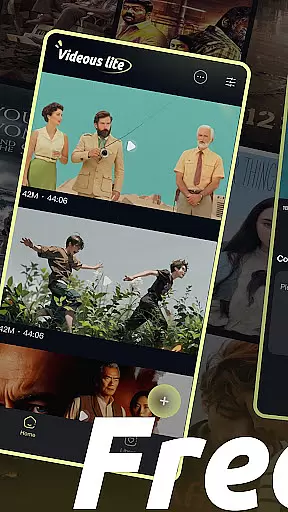
Videous lite is a streamlined video management and editing application tailored for both casual users and professional creators. Its user-friendly interface allows for efficient video processing, making it simple to organize, edit, and manage your video library. The app supports essential functions such as uploading, editing, and categorizing videos with custom tags, ensuring that users can easily locate and refine their content.
Designed for entertainment and creative projects, Videous lite offers practical tools like chronological video arrangement, detailed metadata display (length and size), and batch management options. Whether you're looking to trim clips, tag content for easier retrieval, or expand your video collection, this app provides the necessary features in an intuitive package. It's particularly useful for those who need quick access to video editing without compromising on functionality.
The app's value lies in its ability to simplify complex tasks while maintaining a clean and organized workspace. By combining essential editing tools with robust organizational capabilities, Videous lite empowers users to focus on creativity rather than technicalities. This makes it an ideal choice for anyone seeking an accessible yet powerful solution for personal or professional video projects.
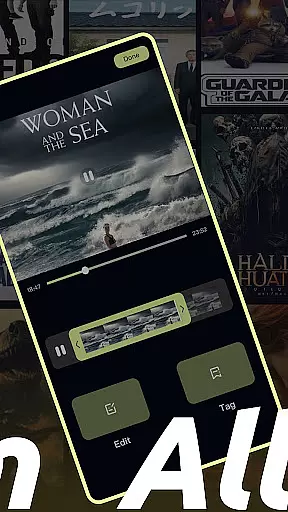
Videous lite stands out with its comprehensive set of features designed to streamline video management and editing. One of its core strengths is the intuitive drag-and-drop editing tool, which allows users to trim videos accurately using a progress bar. This feature ensures precision when creating clips, catering to both beginners and experienced editors who need reliable performance.
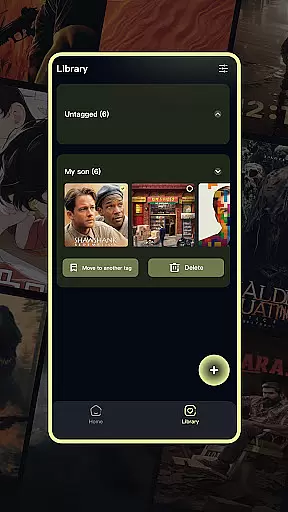
Another notable aspect is the tagging system, which lets users categorize videos efficiently. Tags are displayed on the Library Page, where users can filter videos by category, move them between folders, or delete unnecessary files. This organizational structure helps maintain a tidy video library, reducing clutter and saving time during retrieval. Additionally, the app provides quick-upload functionality through a + button on the homepage, enabling seamless expansion of your collection.
Beyond these primary features, Videous lite includes administrative tools such as settings customization and batch operations (select, move, delete). These options enhance usability by giving users greater control over their libraries. With its combination of editing precision, organizational efficiency, and ease of use, Videous lite delivers significant value for anyone managing large volumes of video content.
In the realm of digital entertainment, content variety and freshness are paramount for user engagement. Videous lite-Made Easy excels in this area by offering a diverse range of video management and editing features that cater to both personal and professional needs. The application's intuitive interface allows users to not only upload and manage their video libraries with ease but also to edit videos with precision.
One of the standout features of Videous lite is its ability to keep the content fresh and engaging. Users can quickly upload local videos through the prominent + button on the homepage, instantly expanding their video collection. This seamless integration of new content ensures that users always have access to the latest videos, keeping their libraries up-to-date and interesting.
Moreover, the app provides an array of practical functions such as chronological video arrangement, detailed tagging for easy retrieval, and efficient categorization options. These features collectively ensure that users can maintain a dynamic and organized video library, enhancing both the variety and freshness of their content. By empowering users with these tools, Videous lite-Made Easy significantly boosts the overall entertainment value it offers.
User engagement duration and retention are critical metrics for any entertainment application, and Videous lite-Made Easy addresses these aspects effectively. The app's straightforward and user-friendly design encourages prolonged usage by simplifying complex video editing tasks. With features like drag-and-drop editing and customizable tags, users can effortlessly create and manage their ideal video clips, which inherently increases the time spent within the app.
Videous lite further enhances user retention through its comprehensive video management system. The Library Page displays all video tags, allowing users to filter and access relevant content swiftly. This organizational clarity not only makes video retrieval more efficient but also motivates users to continue using the app for their video management needs.
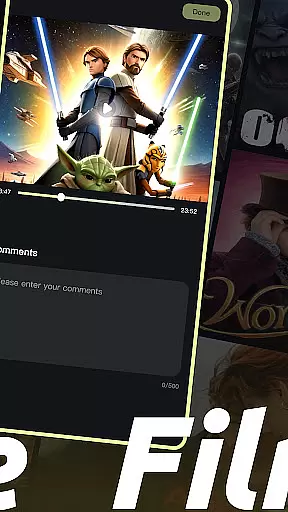
Additionally, the app's ability to tweak settings according to user preferences and offer functionalities such as viewing comments and deleting videos adds another layer of personalization and control. These elements contribute to a more engaging and satisfying user experience, fostering higher retention rates. By focusing on these key areas, Videous lite-Made Easy successfully keeps users engaged and invested in their video projects over the long term.
User-friendly interface
Efficient video tagging
Quick upload option
Intuitive editing tools
Batch management support
Limited advanced editing
Few customization options
No cloud integration
Basic audio tools
Occasional lag

Ultimate VR movie player for android mobile videos
 4.0
4.0
Unofficial Game Companion App” “Guides • Builds • Tips • Progression
4.1
Stream Online TV - Watch Live IPTV Playlist & Channel with Built-In Player
4.50
Practice and master your ESP and intuition with five mode trainer.
4.20
SpiritWave is paranormal ITC application.
5.00
Scan sets, track your builds, and enjoy intuitive digital instructions.
4.70
Connect. Discover. Control.
3.60
Your Avatar, Endless Fun
4.60
Pop Drama is a premier app crafted for short drama lovers
4.60
5 funny and lovely ponies waiting for you to style them!
4.80
Watch Reels, Drama Shorts & TV Series Anytime. Download DramaWave Now!
4.70
Find out if you're on Santa's Naughty or Nice List with this magical scanner!
4.60
Heroclix search units with multi filter , team builder, collection manager.
4.40
Best of icon for christmas
4.30
Watch New Episodes & Live TV
3.80
Your choice of 350+ networks plus movies and full TV series on-demand.
3.70
Simulation of Dashboard / Touch Screen for Tesla. (Works without actual Tesla).
4.5
Christmas Globe: Transform your Wear OS device into a festive timekeeper!
4.2
Control your AWTRIX 3 easily
4.3



User Reviews