
Vivid Navigation Gestures is a powerful tool that revolutionizes the way you interact with your Android device. This app allows users to control their devices through intuitive gestures instead of traditional button presses, offering a more modern and fluid user experience.
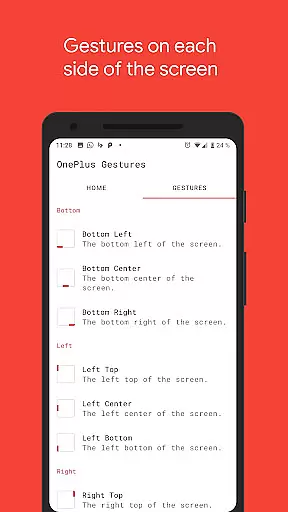
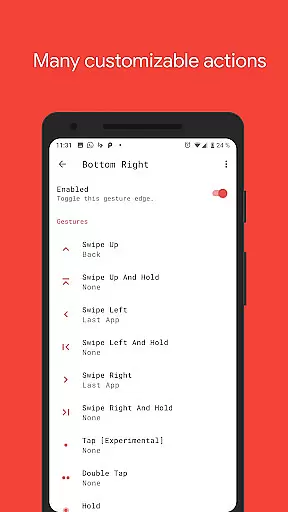
The application supports multiple gesture triggers across different areas of the screen, including bottom left, center, right, and various positions on the left and right edges. With options like swipe up, swipe left, double tap, and hold, users can execute a wide range of actions such as launching Google Assistant, navigating back, accessing recent apps, and even taking screenshots.
Designed for power users and those looking to maximize their device's potential, Vivid Navigation Gestures also features beautiful visual effects during gesture execution and requires minimal setup. Whether you're using an older Android version or simply want to enhance your device's functionality, this app provides an accessible solution without the need for new hardware.
Vivid Navigation Gestures offers an extensive set of features designed to enhance user interaction with Android devices. One of its standout capabilities is the support for multiple gesture triggers located at various points on the screen, allowing users to perform actions by swiping or tapping in designated areas.
In addition to basic navigation functions like Back, Home, and Recent Apps, the app includes advanced actions such as toggling split-screen mode, opening quick settings, and controlling media playback. These gestures are highly customizable, enabling users to tailor them according to their preferences and usage patterns.
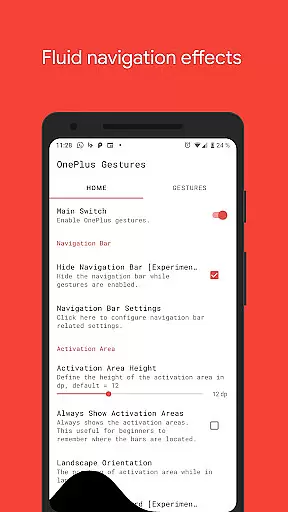
Another notable feature is the ability to hide the stock navigation bar when gestures are enabled, providing a cleaner and more immersive interface. While this function may require ADB or root access, it demonstrates the app's commitment to delivering a comprehensive gesture-based navigation solution that caters to both casual users and tech enthusiasts alike.
Vivid Navigation Gestures excels in delivering precise and effective gesture controls that redefine how users interact with their devices. The app supports a wide array of gestures, including swipes, holds, taps, and more, each triggering specific actions like launching Google Assistant or navigating back to the home screen.
What sets this tool apart is its ability to replace traditional button presses with fluid, intuitive gestures. For instance, users can perform a swipe-up motion to return to the home screen or double-tap to take a screenshot. These functions are not only responsive but also eliminate the need for physical navigation buttons, streamlining the user experience.
The app's effectiveness is further enhanced by its visual feedback during gesture execution. Beautiful animations accompany each gesture, providing clear confirmation that an action has been registered. This feature ensures users feel confident while using the app, knowing their inputs are accurately recognized.
By integrating accessibility services, Vivid Navigation Gestures goes beyond basic functionality, enabling advanced actions such as toggling split-screen mode or opening quick settings. This versatility makes it a powerful tool for both casual users and tech enthusiasts seeking to optimize their device interactions.
Vivid Navigation Gestures prioritizes a clean and straightforward interface that ensures users can easily configure and utilize its features without unnecessary complexity. Upon opening the app, users are greeted with a well-organized layout that categorizes gestures and their corresponding actions, making customization simple and efficient.
The app offers multiple gesture triggers spread across different screen areas, such as bottom-left, bottom-center, and right-top zones. This thoughtful design allows users to assign specific actions to various parts of the screen based on their preferences, enhancing the overall intuitiveness of the system. For example, assigning 'Back' to a left-swipe motion feels natural and aligns with typical navigation patterns.
Additionally, the app provides clear instructions for enabling advanced features like hiding the stock navigation bar through ADB commands. While these options cater to more experienced users, they do not clutter the primary interface, ensuring beginners can still navigate the app effortlessly. This balance between simplicity and advanced functionality is key to its appeal.
Overall, Vivid Navigation Gestures achieves a seamless blend of usability and innovation, empowering users to control their devices in a way that feels both modern and instinctive. Its intuitive design reduces the learning curve, allowing users to quickly adapt to gesture-based navigation.
Intuitive gesture controls
Highly customizable options
Beautiful visual effects
Wide range of supported actions
Compatible with older Android versions
ADB or root access required for some features
Potential learning curve for new users
Limited iOS support
May conflict with existing navigation systems
Requires careful setup for optimal performance

Just one-tap to easy translate in any language after calls within seconds.
 4.20
4.20
Complete kernel toolbox with features to manage and tweak your rooted device
4.30
Learn the vast amount of system information about device and monitor it's state
4.70
Remote for Roku, Fire TV, Samsung TV, LG TV, Android TV, Chromecast and VIZIO TV
4.20
An easy-to-use calculator designed to save time calculating and bending conduit
4.30
Detect hidden spy camera with advanced scanning {{ Premium version }}
4.00
Excellent scientific calculator with symbolic algebra, integrals, derivatives
4.80
View detailed information about your Nissan Leaf the dealer never shows you.
4.10
Automate everything from settings to photos, SMS to speech. ADC2 prize winner.
4.10
Support Fossify apps with a warm thank you!
5.00
Change your GPS location instantly. Simulate routes anywhere in the world.
4.90
The ultimate tool for network analysis, wifi scanning and problem detection.
4.90
Fast Video Downloader, Movie Downloader, Torrent Downloader & Adblock Browser
4.70
NFC Tools can read and write NFC tags.
4.70
Mirror your screen to Chromecast and Android TV - Super fast and simple
4.60
Signal Strength, Mobile, Wifi, Speed Test, Bad Signals, Cellular, 5G, LTE, 4G
4.20
Screen Mirroring with sound for Samsung TV, LG TV, Sony TV, Smart TV and Browser
4.20
Amateur Radio app for APRS: Track friends, exchange messages, get tactical info.
3.90
Fun lie-detection pranks for friends and parties.
3.80



User Reviews