
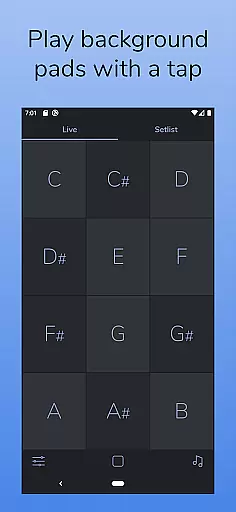
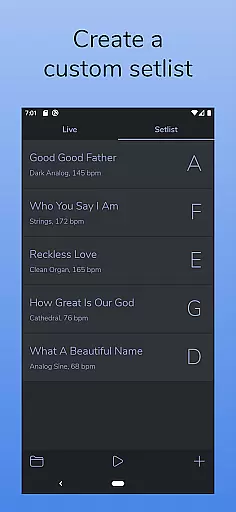
AutoPad is a powerful ambient pad loop application designed for musicians and audio professionals. It provides seamlessly looped sample-based drones that add subtle structure to live performances and recordings. The app allows users to instantly trigger tasteful soundscapes with a simple tap, maintaining natural crossfades between keys automatically. AutoPad offers two distinct modes - LIVE mode for instant access to all twelve keys and SETLIST mode for creating custom song lists. With its intuitive interface and professional-grade features, it's an essential tool for enhancing musical performances.
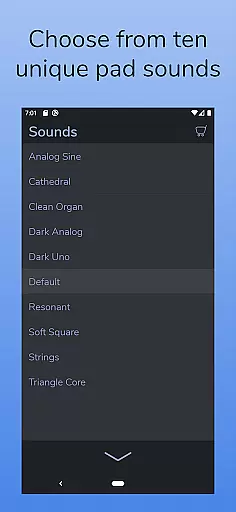
The app comes equipped with 10 expertly designed pad sounds, each providing unique atmospheres across all 12 keys. Users can expand their sound library through in-app purchases or by importing custom WAV files. Additional features include a built-in metronome for band synchronization, MIDI compatibility for external controllers, and comprehensive menu controls for crossfade time, filters, reverb, pan, and volume adjustments. Its dark color scheme ensures optimal visibility on stage while reducing eye strain during long sessions.
AutoPad stands out with its dual-mode functionality, offering both LIVE mode for instant key access and SETLIST mode for customized performance planning. This flexibility makes it suitable for various performance scenarios, from spontaneous jam sessions to structured concerts. The app includes 10 professionally crafted pad sounds, each meticulously designed to provide unique atmospheric elements across all 12 musical keys, ensuring maximum versatility.
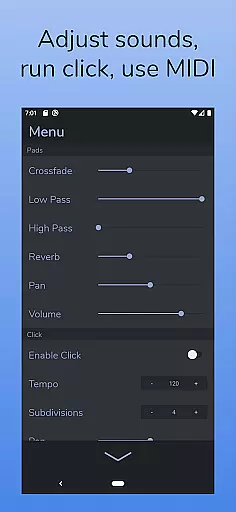
Advanced customization options allow users to enhance their experience through in-app sound pack purchases or by importing personal WAV files. The built-in metronome feature helps maintain perfect timing without the need for additional equipment. Comprehensive control parameters including crossfade time, dual filters, reverb amount, pan, and volume give users precise command over their sound. MIDI compatibility enables integration with external controllers, while the visually optimized dark theme ensures comfortable use during extended performances.
These features collectively create a robust ambient pad solution that caters to both amateur musicians and professional performers, making AutoPad an indispensable tool for modern music production and live performances.
AutoPad offers a robust music library that includes 10 carefully designed pad sounds, each providing a unique atmosphere in all 12 keys. These sounds are crafted to bring ambient pad loops into your mix seamlessly.
In addition to the built-in sounds, AutoPad allows users to expand their sound library by purchasing in-app sound packs or importing their own pad files. This feature ensures that musicians have access to a wide variety of high-quality audio options tailored to their specific needs.
All sounds provided by AutoPad are copyright-authentic, meaning they can be used without legal concerns. This makes it an ideal choice for live performances and recordings where originality and legality are paramount.
The app features superior audio quality options, ensuring that every sound produced is clear and professional-grade. With controls over crossfade time, two filters, reverb amount, pan, and volume, users can fine-tune their audio experience to match their preferences.
AutoPad supports WAV files on the Android version, which are known for maintaining high audio fidelity. This means that whether you're using the default sounds or imported files, the audio quality remains consistently excellent.
Furthermore, AutoPad's responsive design and MIDI compatibility enable precise control over sound output, allowing musicians to achieve the exact auditory landscape they envision for their performances and recordings.
Intuitive user interface
Seamless looping technology
Versatile sound library
Precise control parameters
Professional-grade features
Limited file format support
No virtual MIDI on Android
Basic free sound selection
Learning curve for beginners
Additional in-app purchases

A synth that really lets you shape your sounds!
 4.50
4.50
Full-featured, High-Quality Groovebox Workstation, perfect for Live Performance!
4.80
The ultimate media player for Android devices
3.90
Ultimate Sonos Controller
4.70
AI Music Maker: Generate And Compose AI Tunes & AI Songs & AI Music & AI Melody!
4.60
Learn to play the piano using falling notes!
3.80
A complete sound package for the sound engineer or enthusiast
4.60
MilkDrop for Android TV
3.00
Get alarms that fit your lifestyle and wake up to the sounds you love.
4.80
More downloads than any other metronome. Includes drum machine & tempo trainer.
4.80
SqueezePlayer turns your Android phone or tablet into a SqueezeBox on its own!
4.60
Enhance the sound quality of your devices, listen to what you want
4.50
Formerly known as Spotistats! View your top tracks, artists, albums and more!
4.40
DJ Music Mixer - DJ Remix: remix songs, make beat music & record mix of DJ.
4.40
Master Salsa Rhythm quickly and with a lot of fun!
4.30
Time Trainer: accurate metronome w tools to help you develop your internal time!
4.20
Versatile MP3 recorder with auto-backup to Dropbox and Google Drive
4.10
Simple mp3 and mp4 player with advanced features.
3.40
Remove ads permanently from Music Visualizer
4.1




User Reviews