
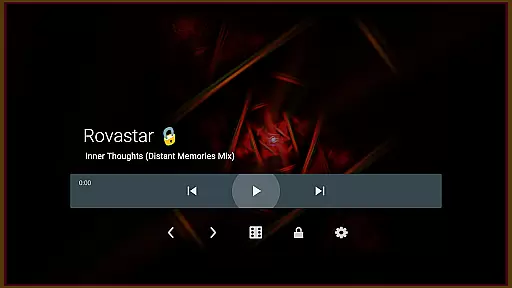
projectM Music Visualizer TV is a cutting-edge music visualization application designed specifically for Android TV. This app transforms your audio experience by generating stunning visual effects that are perfectly synchronized with the music you play. With over 200 visual presets and advanced rendering capabilities, projectM delivers smooth 60 FPS visuals that elevate your listening sessions.
The app supports integration with popular music players like Spotify, Pandora, and Google Music, allowing users to control playback directly from the visualizer interface. Whether you're enjoying a relaxing evening or hosting a lively gathering, projectM creates an immersive audio-visual environment that enhances every occasion.
projectM stands out with its comprehensive feature set tailored for both casual listeners and audio enthusiasts. The app includes over 200 unique visual effects powered by advanced pixel-shaded rendering technology, ensuring top-notch graphics quality at 60 frames per second. Users can customize their experience through adjustable texture and mesh sizes, optimizing performance based on their device's capabilities.
One of the key innovations is its compatibility with MilkDrop (.milk) presets, bringing a new level of customization to Android TV users. The integrated music player controls work seamlessly with various streaming services, eliminating the need to switch between apps. These features combine to create a versatile tool that adapts to different user preferences while maintaining exceptional performance standards.
projectM Music Visualizer TV offers an extensive library of over 200 visual effects, ensuring a rich and diverse audio-visual experience. This vast collection provides users with a wide array of visually stunning presets that cater to every musical genre and personal preference.
The application is not just about quantity but also quality and legality. Each preset within projectM is crafted with attention to detail, guaranteeing that users receive authentic and high-quality visual content. The developers have ensured that all visual effects comply with copyright laws, offering peace of mind to users who wish to enjoy their music with legitimate and impressive visuals.
Compatibility with MilkDrop (.milk) presets further extends the authenticity and richness of the visual library. Users can explore classic visual effects while enjoying the modern enhancements that projectM brings to the table. This compatibility ensures that projectM remains a versatile and future-proof choice for music visualization enthusiasts.
One of the standout features of projectM Music Visualizer TV is its ability to deliver 60 FPS Pixel Shaded Rendering. This high frame rate ensures that animations are buttery smooth, providing an immersive experience that perfectly syncs with your music's rhythm and beat.
In addition to smooth graphics, projectM allows users to configure graphics quality according to their preferences and device capabilities. Whether you prioritize performance or visual fidelity, the settings menu offers options to adjust texture size and mesh size, enabling a tailored experience that maximizes both quality and performance.
Users can enjoy their favorite tracks from various music players like Pandora, Spotify, and more, thanks to projectM's Music Player Control feature. This seamless integration ensures that audio quality remains uncompromised while delivering breathtaking visuals, making it the ultimate tool for elevating your listening sessions on Android TV.
Stunning visual effects
Seamless music integration
High frame rate rendering
Customizable graphics settings
User-friendly interface
Requires powerful hardware
Limited mobile device support
No iOS version available
Preset loading can be slow
Occasional sync issues

Your HD audio recorder on the go for music, meetings, ambience, animal sounds…
 4.30
4.30
The Music Journey in Your Hands
4.30
Performance-Synthesizer & Multi-Track-Sequencer, polyphonic + multi timbral!
4.70
Permanently backup Now Playing. Maps, filters & listening stats.
4.00
More downloads than any other metronome. Includes drum machine & tempo trainer.
4.80
Sheet music reader, piano & music note player. Play music score & learn to read.
3.90
Responsive piano with great sounds, graphics, and songs
4.80
Customize Your Favorite Songs and Videos with booster.
4.70
Play your music offline without limits
4.80
Voice recorder - Audio recorder. Best recorder for recording
4.90
Full-featured, High-Quality Groovebox Workstation, perfect for Live Performance!
4.80 4.70
4.70
Save hundreds of dollars for a physical strobe tuner and instead use this app.
4.50
Learn and play 2M+ music tabs & chords on guitar, ukulele, bass, and more
4.30
The alternative folder based music player.
4.20
Turn your phone into a musical instrument from the future!
3.90
USB audio recording and playback finally possible on Android 3.1 or higher!
3.90
Powerful beat maker & DJ mixer to remix tracks, make music, & perform DJ mix
3.70
Remove ads permanently from Music Visualizer
4.5







User Reviews