
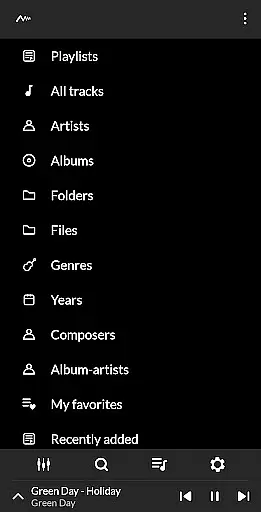
PowerAudio Plus Music Player is a feature-rich audio player designed to deliver an exceptional music experience. With its intuitive interface and advanced audio capabilities, the app supports all major audio formats including MP3, WAV, and AAC. Users can browse their music library by albums, artists, or playlists, while enjoying high-quality sound enhanced by a powerful equalizer.
The app includes specialized features such as BassBoost and Virtualizer, customizable presets, and the ability to create personal playlists. Whether you're organizing favorites, setting a sleep timer, or sharing media files, PowerAudio Plus ensures seamless functionality. Its support for codec details and multi-select options makes it a versatile tool for both casual listeners and audiophiles.
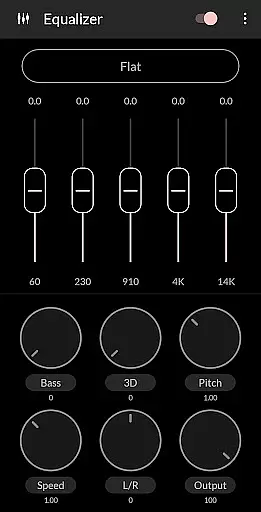
PowerAudio Plus Music Player stands out with its comprehensive set of features tailored for music enthusiasts. The app's equalizer offers various presets, allowing users to customize audio output to their preference. Advanced controls like BassBoost and Virtualizer enhance sound quality, while options to repeat, shuffle, or queue tracks provide a personalized listening experience.
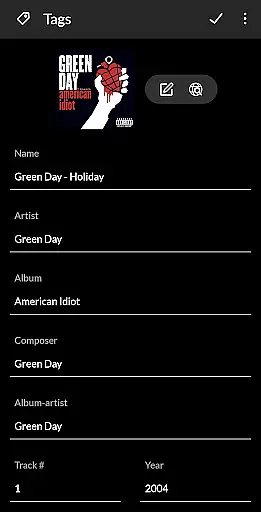
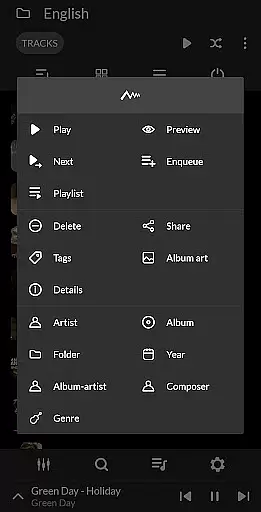
Additional functionalities include automatic headphone detection, which pauses playback when headphones are disconnected, and the ability to set ringtones directly from the app. PowerAudio Plus also supports extensive library management, enabling users to sort songs by name, date, or date added. With tools for deleting songs, creating custom playlists, and sharing media, this app combines powerful performance with user-friendly design.
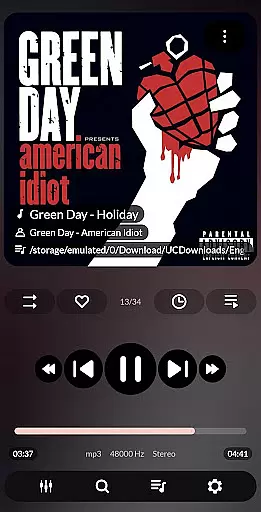
PowerAudio Plus Music Player offers an extensive music library that supports all major audio formats including mp3, m4a, wav, aac, amr, and ogg. This ensures that users can access their music collection without compatibility concerns.
The application focuses on copyright authenticity by providing features like codec details which display information such as bitrate, sample frequency, and channels. Users can be confident in the legitimacy of their media files while enjoying high-quality playback.
With options to browse songs by albums, artists, or playlists, PowerAudio Plus enhances music discovery and organization. The ability to create custom playlists allows personalized listening experiences tailored to individual preferences.
Delivering top-tier audio quality is a hallmark of PowerAudio Plus Music Player. It includes a powerful equalizer with BassBoost and Virtualizer, allowing users to customize their sound experience with various presets or create their own custom settings.
Users have the option to modify audio quality through advanced playback controls such as repeat or shuffle tracks, set phone ringtones from their music library, and share media files effortlessly. These features ensure a versatile and high-quality listening session every time.
In addition to superior audio quality, the app provides practical functions like detecting headphones for auto-pause on disconnect and offering a sleeptimer feature. Such attention to detail elevates user satisfaction by catering to both auditory pleasure and convenience.
User-friendly interface
High-quality audio playback
Customizable equalizer settings
Supports multiple audio formats
Comprehensive playlist management
Requires multiple permissions
May drain battery faster
Limited visual customization
No built-in lyrics support
Occasional bugs in updates

Full-featured, High-Quality Groovebox Workstation, perfect for Live Performance!
 4.80
4.80
DJ Music Mixer - DJ Remix: remix songs, make beat music & record mix of DJ.
4.40
Walkout Song DJ is the most intuitive app to manage your sports music.
4.70
Learn and play 2M+ music tabs & chords on guitar, ukulele, bass, and more
4.30
The official Sonos app
4.10
The original SP-1200 experience on your iPad
4.20
Sheet music reader, piano & music note player. Play music score & learn to read.
3.90
Master Salsa Rhythm quickly and with a lot of fun!
4.30
Sing, record, and create music together — enhanced by smart voice tools.
4.00
Music, News & Sports Radio Tuner App. Tune in Live FM & AM Radio Stations.
4.80
Bass Booster & Volume Equalizer Pro improves your music and video sound quality
4.60
Recording studio w/ 10k beats, pro vocal FX and a network of 20M rappers & fans!
4.60
Formerly known as Spotistats! View your top tracks, artists, albums and more!
4.40
Equalizer, Bass Booster and Volume Booster (Eq & Bass) improve sound quality
4.30
The alternative folder based music player.
4.20
A sleek, no-frills player designed for true music lovers.
4.20
Versatile MP3 recorder with auto-backup to Dropbox and Google Drive
4.10
The Minimalistic Premium Music Player. Handmade with passion for music
2.20
Simply convert wav to mp3. Clear. Reliable. Safe.
4.4





User Reviews