
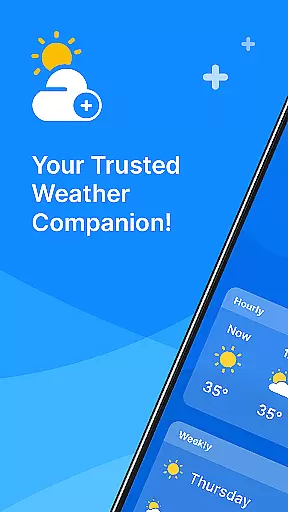
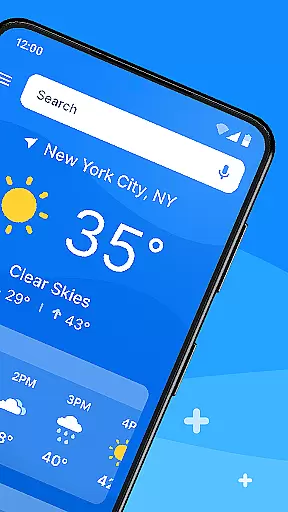
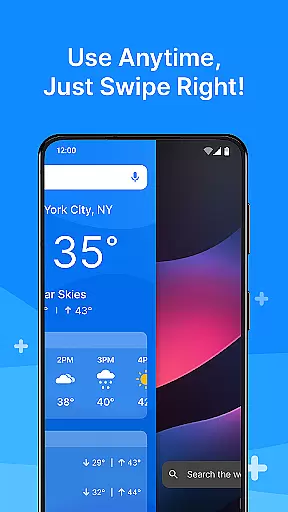
All Weather Mode is a comprehensive weather application designed to keep users informed about current and forecasted weather conditions. The app provides real-time updates, detailed forecasts, and location-based reporting, ensuring you are always prepared for the day ahead. With an intuitive home screen layout, it offers quick access to essential weather information through swipe shortcuts.
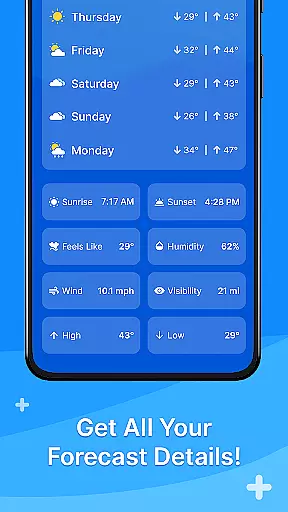
Key features include accurate temperature readings, sunrise and sunset times, feels-like temperatures, humidity levels, wind speed, and visibility metrics. Whether planning daily activities or outdoor excursions, All Weather Mode helps you make informed decisions with confidence. The app's robust search capabilities, powered by Yahoo, allow for efficient location searches and multiple location tracking.
This personalization tool transforms your device into a reliable weather companion, offering 7-day forecasts with daily highs and lows, hourly updates, and precipitation percentages. Stay ahead of severe weather conditions and enjoy peace of mind with All Weather Mode.
All Weather Mode stands out with its user-friendly interface and powerful functionality. The app's intuitive home screen layout ensures that even first-time users can easily navigate and access weather reports. Quick-swipe shortcuts provide instant access to forecasts, eliminating the need to search through menus.
Real-time weather reporting delivers up-to-the-minute information for current and saved locations. Users can view detailed metrics such as temperature, humidity, wind speed, and visibility. The app also offers 7-day forecasts with daily temperature ranges and hourly updates, helping users plan their week with confidence.
Additional features include location-based weather reporting, allowing users to track multiple locations, and sunrise and sunset times for planning outdoor activities. Powered by Yahoo, the robust search function makes it easy to find weather information for any location. All Weather Mode combines these elements to create a personalized and reliable weather experience.
Weather Mode: Weather Launcher offers a rich array of customization options that cater to individual preferences and needs. The app provides an intuitive home screen layout, allowing users to personalize their experience with easy access shortcuts for weather forecasts.
The robust search feature powered by Yahoo enables quick location-based weather searches, while quick-swipe shortcuts ensure that vital weather information is just a gesture away. This level of personalization ensures that whether you are at home or traveling, your weather data is always tailored to your current situation.
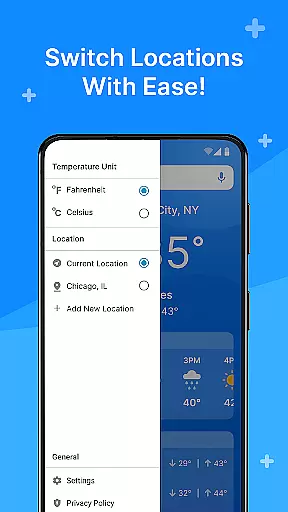
Users can also add multiple locations to stay informed about different areas, making it an ideal tool for those who travel frequently or wish to check on loved ones in other regions. With the ability to customize the display of detailed forecasts including temperature highs and lows, sunrise and sunset times, this app truly puts the user in control.
Theme compatibility is a standout feature of Weather Mode: Weather Launcher, ensuring that the visual presentation remains consistent across various devices and themes. The app's clean design integrates seamlessly with different Android themes, providing a cohesive look and feel that respects user preferences.
Whether using a light or dark theme, the app maintains its clarity and usability, presenting weather information in a readable format without compromising aesthetics. This attention to detail extends to the customizable home screen widgets which adapt to match the chosen device theme.
By prioritizing theme compatibility, Weather Mode: Weather Launcher not only enhances the visual appeal but also improves the overall user experience. Users can enjoy a personalized yet familiar interface that works harmoniously with their device settings, making daily weather checks a seamless part of their routine.
User-friendly interface
Real-time weather updates
Detailed 7-day forecasts
Location-based reporting
Quick-swipe shortcuts
Limited customization options
Occasional data inaccuracies
Ads in free version
Resource-intensive
No offline mode

Winter's Journey: digital watch face for Galaxy Watch & Wear OS
 4.80
4.80
Ninja Turtles Cowabunga SE watch face for Wear OS
4.50
Sparkle your screen with Glitter Wallpapers For Girls and Cute Backgrounds!
4.80
Interactive Miniature Painting Catalogue
3.30
Want to make your phone more special than ever?
4.60 3.50
3.50
300+ Beautifully crafted widgets inspired by OneUI.
4.60
Magic fluids wallpaper 4D: Relax with stunning fluid simulation wallpaper app
4.20
Fast SMS & group chat - use GIFs and emojis from your home screen launcher.
4.50
Only for Wear OS devices!
4.90
A launcher for Samsung Good Lock and Good Guardians modules without ads
4.70
Zip lock screen with magic wallpaper to decorate your phone with fun zipper lock
4.60
Customizable screen pets that play, climb, and keep you company.
4.50 4.50
4.50 4.50
4.50
Romantic Kiss Stickers App. Start romantic messaging now!
4.30
App Icon Changer & Shortcut Creator. Customize your icons without any watermarks
4.30
Realistic animated snow on your wrist, with 10 images landscapes to choose from
4.00
Crystal-clear, square icon provides a sleek and sophisticated visual upgrade
4.00



User Reviews