
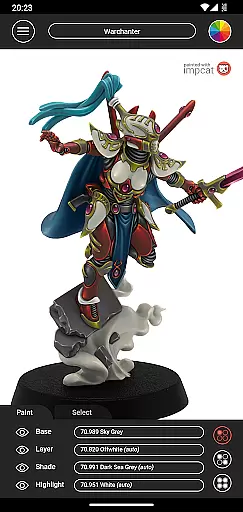
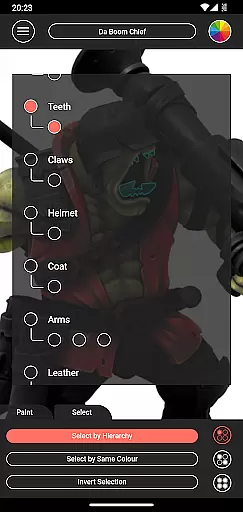
Impcat, short for Interactive Miniature Painting Catalogue, is a simulator designed to deliver photorealistic painting results on gaming and tabletop miniatures. This app provides users with a variety of miniature images that can be painted with colors from predefined palettes, simulating a four-step painting process including base coloring, layering, shading, and highlighting.
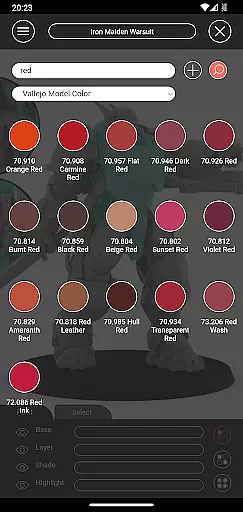
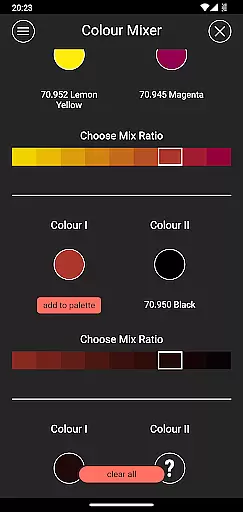
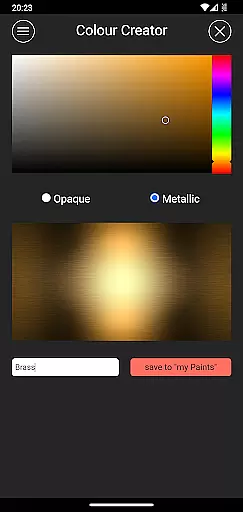
With built-in miniatures and color palettes like Vallejo Model Color and Vallejo Game Color, impcat offers an extensive range of 308 colors. The app also features complement recommendation mode, shopping list generator, color mixer tool, color creator tool, and randomizer tool, enhancing the painting experience by allowing customization and easy access to needed resources.
Whether you are a hobbyist or professional painter, impcat serves as a valuable tool in experimenting with different color schemes and techniques virtually before applying them to physical models, thus saving both time and resources.
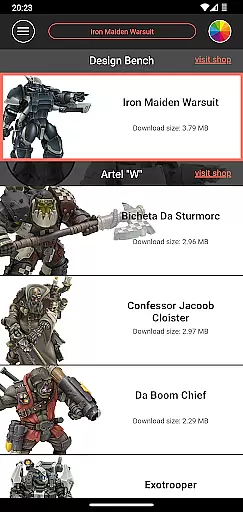
Impcat stands out with its comprehensive features tailored for miniature painting enthusiasts. It includes six built-in miniatures provided by Artel "W" and supports color palette DLCs, ensuring users have access to updated content without additional costs. The app's complement recommendation mode allows users to select a base color and automatically applies harmonizing layers, shades, and highlights.
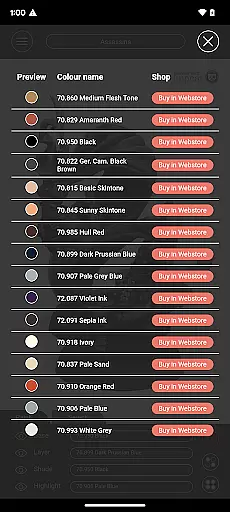
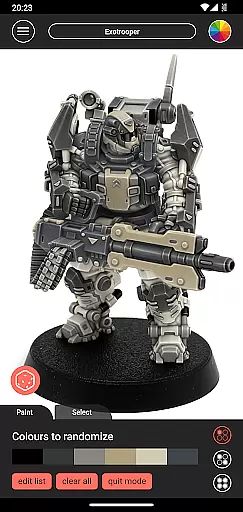
One of the key highlights is the photorealistic simulation of applied paints, giving users a realistic preview of their work. Additionally, the shopping list generator simplifies the process of gathering required colors by providing direct links to shop pages. Tools such as the color mixer and creator enable detailed customization, while the randomizer tool adds an element of surprise by distributing colors across models randomly.
These features collectively ensure that impcat not only aids in the creative process but also streamlines the workflow for painters, making it an indispensable tool in their arsenal.
Customization is at the heart of impcat, allowing users to tailor their miniature painting experience with precision. The app provides a rich selection of predefined color palettes from renowned manufacturers, ensuring that artists can replicate real-world paints in their digital creations. With over 308 colors available, including Vallejo Model Color and Vallejo Game Color, users have an extensive range to choose from.
Beyond its built-in features, impcat supports downloadable content (DLC) for additional miniatures and color palettes. This means your library can grow without any extra cost, as updates are provided free of charge. The complement recommendation mode further enhances customization by suggesting harmonious layering, shading, and highlighting options based on selected base colors. These suggestions serve as a starting point, which artists can tweak to match their creative vision.
The app also includes advanced tools like the color mixer and creator, enabling users to experiment with unique shades and maintain personal collections of custom colors. For those seeking inspiration or wanting to test random combinations, the randomizer tool distributes colors across models unpredictably yet pleasingly. Such comprehensive customization empowers both novice painters learning the craft and seasoned professionals refining their techniques.
While impcat focuses primarily on providing robust painting simulation tools, it ensures theme compatibility through consistent design elements throughout the application interface. Users will find that visual components such as menus, buttons, and sliders adhere to uniform styling guidelines, creating a cohesive user experience regardless of device type or operating system version.
This attention to detail extends to how different themes might affect usability; impcat's developers have optimized text readability against various background colors while maintaining aesthetic appeal. Whether using light or dark mode settings within your deviceu2019s display preferences, you'll notice no compromise in clarity or functionality when interacting with this sophisticated painting simulator.
Moreover, impcat integrates seamlessly with external resources thanks to its shopping list generator feature, which compiles used paint data into actionable links directing users towards online retailers' product pages. By prioritizing cross-platform accessibility alongside visually appealing but functional UI/UX design principles, impcat guarantees an engaging yet practical approach to digital miniature painting customization.
User-friendly interface
Extensive color options
Free DLC updates
Photorealistic simulations
Customizable tools
Limited built-in miniatures
No mobile version
Advanced features require learning
Dependent on third-party shops
Resource-intensive

Ultimate widget creator. Design custom widgets for a truly unique home screen!
 3.90
3.90
100+ Stylish Fonts, Emojis, Symbols keyboard for Instagram & TikTok!
4.80
Aesthetic Widgets, HD Wallpapers, Themes in Mico Widget for Home and Lock Screen
4.50
Stylish Pink Cute Hippo keyboard with 10000+ customized keyboard themes!
4.60
Unleash Your Creativity and Connect with Loved Ones with Lockscreen Drawing!
4.20
Yandex Browser — stylish and secure, with voice search and data compression
4.40
350+ widgets with a premium glass-style finish, perfect for home & lock screens.
4.70
A minimalist productivity launcher. One-hand-friendly. Zero ads.
4.70
Install amazing sticker packs: endless styles, always cool.
4.70
Dark icon pack based on One 8
4.80
Enjoy a variety of amazing live wallpapers and colorful EDGE lighting borders!
4.80
Customize your home screen with stunning themes, blur, widgets & icons.
4.60
Icons made of colorful linear lines
4.60
Choose your keyboard with RGB colors effect, themes, fonts, emojis.
4.60
Turn text & photos into stunning AI videos, art, and creative visual stories.
4.50 4.50
4.50
The definitive Icon pack maker and editor
4.30
Unique Fonts, typefaces and stylish text. Fonts for Instagram, Whatsapp & others
4.20
Create unique, fun emojis with Funny Emoji Maker! Unlimited creativity!
4.00




User Reviews