
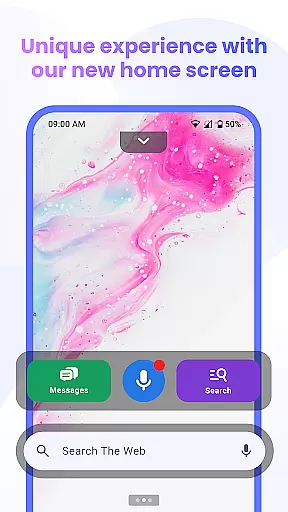
Messenger Chat Home is a unique personalization app that transforms your Android home screen into an efficient messaging hub. This innovative application combines the simplicity of traditional SMS with modern launcher capabilities, allowing users to send and receive messages, manage group chats, and access multimedia content without switching between multiple apps.
The app's standout feature is its seamless integration with the home screen, providing instant access to messaging functions through intuitive widgets. Users can enjoy creative expression with free stickers, GIFs, and emojis while benefiting from practical features like voice-to-text functionality and smart search integration powered by Yahoo. The ad-light experience ensures minimal distractions, making it perfect for users seeking both productivity and personalization in their mobile communication.
Messenger Chat Home distinguishes itself through several remarkable features that enhance user experience. The app's home screen launcher provides one-swipe access to recent chats and inbox, streamlining communication workflow. Its widget system enables quick previews of unread messages and rapid responses, significantly improving message management efficiency.
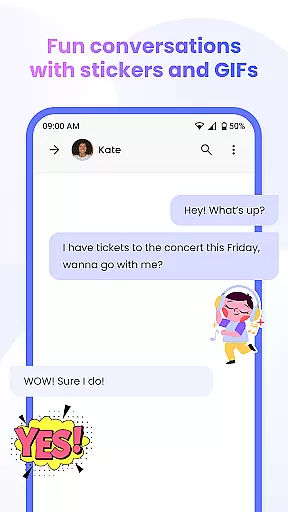
The application supports comprehensive media sharing capabilities, allowing users to exchange photos, videos, and other files within both individual and group conversations. Advanced features include voice-to-text functionality for hands-free operation and customizable chat options using various stickers, GIFs, and emojis. These elements work together to create a personalized messaging environment that maintains professional performance standards while offering entertainment value.
Furthermore, Messenger Chat Home prioritizes user privacy and device performance. The app operates with minimal data collection, ensuring messages remain private while maintaining smooth operation. Its lightweight design optimizes battery usage and storage requirements, making it an ideal choice for users who value both functionality and device efficiency.
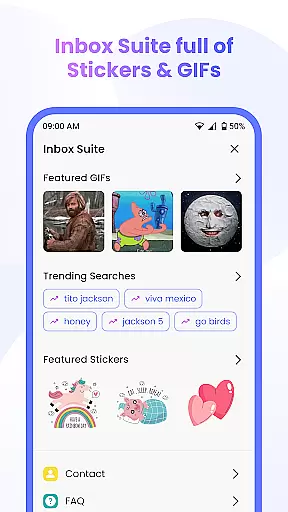
Messenger Chat Home offers a rich array of customization options that allow users to personalize their messaging experience. The app provides free stickers, GIFs, and emojis, enabling users to express themselves in diverse and creative ways. This extensive library of expressive tools ensures that every conversation can be as unique and engaging as the user desires.
The ability to customize is not limited to just text enhancements. Users can modify their home screen to serve as a direct access point to their messaging activities. With features like the smart widget for messages, users can preview unread texts and reply quickly without needing to open the app fully. This level of personalization streamlines communication and enhances productivity by integrating essential functions directly into the user's daily interface.
Moreover, Messenger Chat Home supports group chat and media sharing, allowing users to stay connected with friends and family through photos, videos, and group messages. This fosters a community-oriented environment where users can maintain dynamic and interactive conversations. By offering these varied customization options, Messenger Chat Home caters to individual preferences and encourages a more personalized and enjoyable user experience.
Theme compatibility in Messenger Chat Home ensures that users can enjoy a consistent and visually pleasing experience across different devices and operating systems. The app is designed to integrate seamlessly with various Android themes, providing a smooth and intuitive interface that aligns with the user's preferred aesthetics. This compatibility extends to both visual elements and functional aspects, ensuring that users do not have to compromise on style or usability.
In addition to supporting a wide range of themes, Messenger Chat Home also emphasizes privacy and performance. The app avoids unnecessary data collection and runs efficiently on battery and storage, maintaining a lightweight presence on the user's device. This focus on performance ensures that theme changes do not impact the app's speed or reliability, offering a consistently high-quality experience regardless of the chosen visual style.
By prioritizing theme compatibility, Messenger Chat Home allows users to tailor their messaging environment to match their personal tastes while maintaining optimal functionality. Whether switching between light and dark modes or applying custom themes, users can expect a seamless transition that preserves the integrity and efficiency of their communication tools. This dedication to both form and function underscores Messenger Chat Home's commitment to delivering a superior and adaptable user experience.
User-friendly interface
Customizable chat options
Efficient widget system
Voice-to-text functionality
Ad-light experience
Limited cross-platform support
Occasional widget glitches
Requires learning curve
No end-to-end encryption
Basic customization options

Customizable Glass widgets. Over 360+ stunning widgets and more!
 4.70
4.70
Add cute Shimeji pets to screen, interact with them and relax with cute motions
4.60
Ultimate widget creator. Design custom widgets for a truly unique home screen!
3.90
Want to make your phone more special than ever?
4.60
100+ Stylish Fonts, Emojis, Symbols keyboard for Instagram & TikTok!
4.80
Romantic Kiss Stickers App. Start romantic messaging now!
4.30
⭐ OneUI inspired Fluffy Icon Pack – Soft. Stylish. Standout. ⭐
4.4
Crystal-clear, square icon provides a sleek and sophisticated visual upgrade
4.00
Amazing letter fonts in your messages and social statuses
4.70
350+ widgets with a premium glass-style finish, perfect for home & lock screens.
4.70
400+ Beautifully crafted widgets inspired by NOTHING.
4.70
Customize your home screen with stunning themes, blur, widgets & icons.
4.60
Embrace the Night. Unleash the power of darkness with Raven Dark Icon Pack
4.60
Choose your keyboard with RGB colors effect, themes, fonts, emojis.
4.60
Ultra realistic gold analog watch face with lots of customization options.
4.50
Unleash Your Creativity and Connect with Loved Ones with Lockscreen Drawing!
4.20
Magic fluids wallpaper 4D: Relax with stunning fluid simulation wallpaper app
4.20 3.50
3.50
Turn your lock screen into fun with smile live wallpapers & animated wallpapers!
2.50





User Reviews