
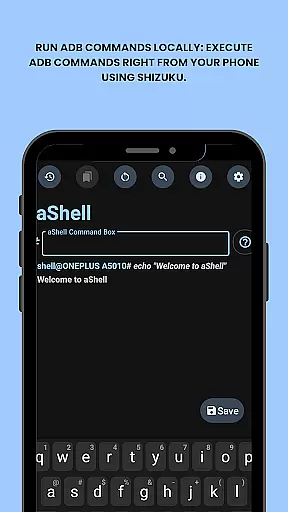
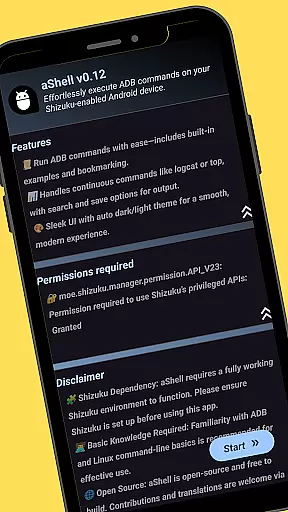
aShell is a specialized Android tool designed for advanced users who require direct device control through ADB commands. This lightweight, open-source application operates within a Shizuku-enabled environment, allowing users to execute complex operations directly from their mobile devices without the need for a PC.
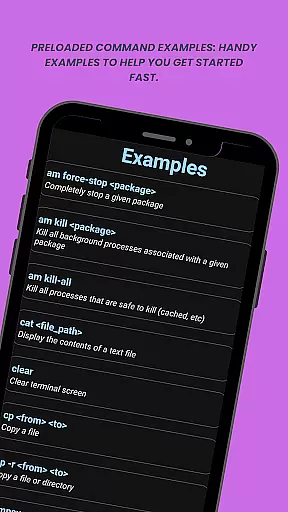
The app's core functionality revolves around its ability to run ADB shell commands locally on Android devices. It features preloaded command examples, live output monitoring, and search capabilities within results. Users can also save outputs to text files and bookmark frequently used commands. With support for both dark and light modes, aShell provides a versatile and user-friendly interface for managing device internals.
This tool is particularly valuable for developers and power users who need to perform debugging, system modifications, or other administrative tasks on-the-go. Its comprehensive feature set makes it an indispensable utility for those familiar with ADB/Linux command-line operations.
aShell distinguishes itself through several key features that enhance the command-line experience on mobile devices. The application allows users to execute ADB commands directly from their phone using the Shizuku framework, providing unprecedented control over device internals without requiring a computer.
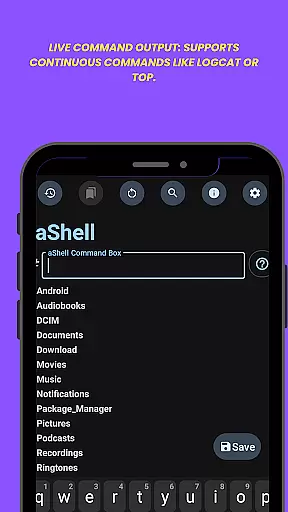
Among its notable features are preloaded command examples that help users quickly get started with common operations. The app supports continuous commands like logcat or top, displaying live output that updates in real-time. Users can search within command results for specific information and save outputs to text files for documentation or sharing purposes. Additional conveniences include dark/light mode adaptation and a command bookmarking system for frequently used operations.
These features collectively create a powerful mobile terminal experience, enabling developers and advanced users to efficiently manage their Android devices while maintaining mobility. The application's thoughtful design and functionality make it a valuable tool for anyone working with Android systems.
aShell delivers exceptional core functionality by enabling users to execute ADB commands directly on their Android devices. This eliminates the traditional requirement of a PC for ADB operations, offering a streamlined solution for developers and power users.
The app leverages a fully functional Shizuku environment, ensuring that all commands are processed with precision. With features like live command output support for continuous tasks such as logcat or top, aShell guarantees accurate and real-time results, enhancing both control and efficiency.
Users benefit from preloaded command examples and the ability to bookmark frequently used commands. These capabilities not only simplify complex operations but also significantly reduce the time required to perform routine tasks, making device management more effective.
aShell excels in providing an intuitive and user-friendly interface, designed to cater to both beginners and experienced users. The app supports automatic adaptation to dark or light modes based on the system theme, ensuring visual comfort and ease of use in any setting.
Its design incorporates essential features such as search within output and saving outputs to files, which are easily accessible and straightforward to use. These elements contribute to a seamless user experience, allowing users to focus on their tasks without distraction.
By removing the need for external devices and offering handy examples alongside clear instructions, aShell reduces the learning curve associated with ADB operations. This simplicity empowers users to harness the full potential of their devices effortlessly.
Powerful ADB functionality
User-friendly interface
Comprehensive feature set
Open-source availability
Dark mode support
Requires Shizuku setup
Steep learning curve
Limited target audience
No standalone operation
Dependent on external tools

pdf merge, word to pdf, jpg to pdf, edit pdf, convert to pdf and much more!
 4.20
4.20
Extremely fast, secure, and protects your privacy
4.80
Amateur Radio app for APRS: Track friends, exchange messages, get tactical info.
3.90
VESC Tool can monitor and configure VESC-compatible devices over BLE and Wifi
4.20
MS-DOS in your pocket. Play old DOS games anywhere you are ;)
4.10
Making emulation easy for everyone!
4.30
With videos, electrical calculators, and built-in ebook, Ugly’s has your answer.
4.50
The ultimate tool for network analysis, wifi scanning and problem detection.
4.90
fast and easy mp3 music downloader
4.80
Mirror your screen to Chromecast and Android TV - Super fast and simple
4.60
Quickly switch to an encrypted DNS server on Android TV
4.50
Screen Mirroring for Roku Sticks, Roku TCL TV and Roku Hisense TV
4.50
Use your phone as a webcam on your computer over WiFi or USB.
4.40
View detailed information about your Nissan Leaf the dealer never shows you.
4.10
A convenient photo, video, and file recovery tool.
4.00
Detect hidden spy camera with advanced scanning {{ Premium version }}
4.00
Create your own custom widget with endless possibilities
3.90
A powerful, easy-to-use flight computer on your phone or tablet!
3.80
Clean the junk files on your device
3.40



User Reviews