
EmuReady Beta is a comprehensive emulation compatibility tool designed to help users discover which games work best on their devices. The app provides a detailed compatibility report for various devices, games, and emulators, allowing users to launch games with optimal settings effortlessly. EmuReady is not an emulator itself but serves as a trusted guide in the world of emulation.
The platform offers a community-driven database where users can browse thousands of games and see how they perform across different devices and emulators. With features like smart filtering, performance tracking, and device-specific information, EmuReady ensures that users find the best gaming experience tailored to their hardware. Whether you are a retro gaming enthusiast or a seasoned pro, EmuReady enhances your emulation journey by saving time and effort.
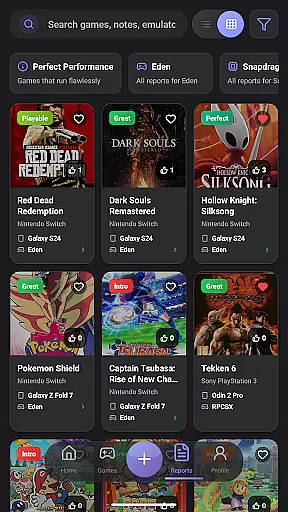
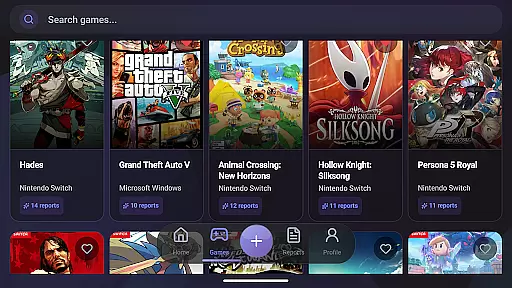
EmuReady Beta boasts several key features that make it an indispensable tool for emulation enthusiasts. One standout feature is the extensive game compatibility database, which allows users to search by game title, system, or browse through an extensive catalog. This database is enriched by community reports, providing real user experiences complete with performance ratings and custom settings.
Another significant feature is the support for multiple emulators, including those for Nintendo Switch, 3DS, and more. Users can compare performance metrics such as FPS, graphical fidelity, and playability ratings ranging from Perfect to Unplayable. Additionally, EmuReady includes a vote and comment system, enabling users to upvote helpful reports and contribute their insights, fostering a collaborative environment.
EmuReady Beta focuses on providing accurate and effective core functions that are essential for retro gaming enthusiasts. The app's Game Compatibility Database allows users to browse thousands of games, offering instant insights into how each game performs across different devices and emulators. This feature ensures that users can make informed decisions about which games will work best on their specific hardware.
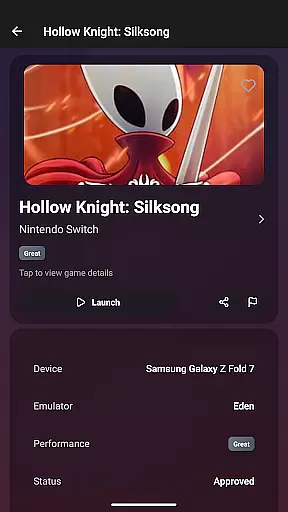
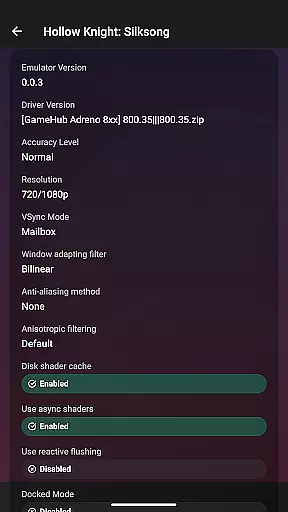
The app actively incorporates feedback from its community-driven platform to improve stability and add enhancements. Community Reports enable real users to share detailed compatibility experiences, including performance ratings and custom settings. These reports provide valuable data that helps in refining the app's core functionalities, ensuring that the information remains relevant and up-to-date.
With Device-Specific Information, EmuReady tailors reports to match exact device models, whether you're using a flagship phone or a budget tablet. This specificity enhances the app's effectiveness by delivering precise recommendations based on your hardware capabilities. Additionally, Multiple Emulator Support allows users to compare performance metrics across various emulators, ensuring optimal game selection and configuration.
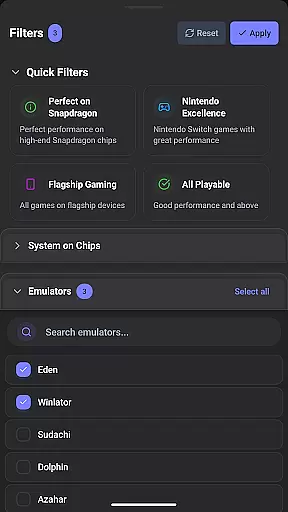
Smart Filtering and Performance Tracking further augment the app's functionality by allowing users to filter reports based on specific criteria such as device, emulator, and performance rating. Detailed metrics like FPS, graphical fidelity, and playability ratings help users gauge the gaming experience accurately. By leveraging these features, EmuReady Beta delivers an unmatched level of precision and reliability in identifying compatible games for emulation.
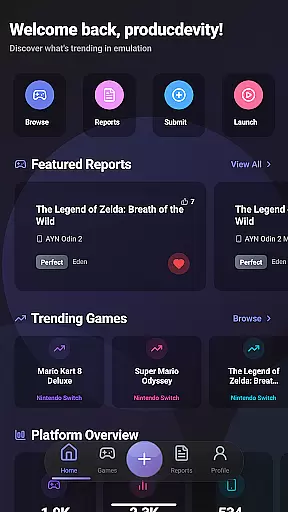
EmuReady Beta excels in offering an interface that is both simple and intuitive, making it accessible even for those new to emulation. The app's design emphasizes ease of use, with straightforward navigation that allows users to quickly find the information they need. Key features like the Game Compatibility Database and Community Reports are easily accessible, ensuring that users can browse and search without any hassle.
The app includes a Vote & Comment System that encourages user interaction and contribution. This system not only simplifies the process of sharing feedback but also enriches the community-driven aspect of the app. Users can upvote helpful reports and leave comments, fostering a collaborative environment where everyone benefits from shared knowledge.
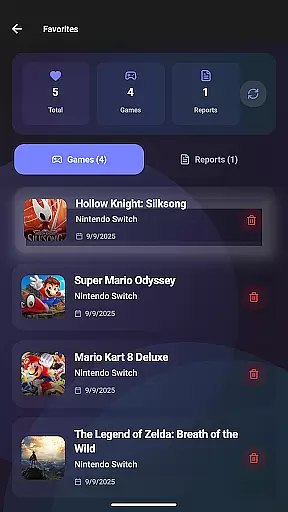
Dark Mode offers a comfortable viewing experience, adapting automatically to provide optimal readability day or night. This feature highlights EmuReady's commitment to user-centric design, ensuring that the interface remains pleasant to use regardless of lighting conditions. Additionally, the Save Favorites feature allows users to keep track of games they are interested in, building a personalized library that is easy to manage and revisit.
Overall, EmuReady Beta combines essential tools with an intuitive layout, creating an interface that is both powerful and easy to navigate. By focusing on simplicity and user engagement, the app ensures that even beginners can confidently explore the world of emulation without feeling overwhelmed.
User-friendly interface
Comprehensive game database
Community-driven reports
Device-specific information
Multiple emulator support
Limited to compatibility checking
Beta version may have bugs
No emulator provided
Dependent on user reports
Performance varies by device

Enjoy smooth gameplay with Game Booster
 4.90
4.90
An open-source APK explorer for Android!
4.10
An easy-to-use calculator designed to save time calculating and bending conduit
4.30
Best leveling tool for your Android device. Hang paintings like a pro.
4.90
Excellent scientific calculator with symbolic algebra, integrals, derivatives
4.80
Play your X-Box games remotely in 1080p with any controller and zero latency
4.60
NFC Tools can read and write NFC tags.
4.70
Button mapper, mouse toggle, sleep timer and a lot of another features
4.50
Your personal health butler
3.60
WiFi Signal Strength Meter help you detect WiFi Signal Strength in real time.
4.80
Fast Video Downloader, Movie Downloader, Torrent Downloader & Adblock Browser
4.70
FV File Manager Pro, Fast and powerful file manager for Android
4.60 4.50
4.50
Screen Mirroring for Roku Sticks, Roku TCL TV and Roku Hisense TV
4.50
Universal TV remote control all TVs, Roku, LG, Samsung, Fire, Vizio, Sony, TCL.
4.40
Forza Tuning Calculator App for Forza Horizon 5, Motorsport and Earlier Titles
4.40
Clean up large files and similar photos, fast and easy to use
4.40
Detect hidden spy camera with advanced scanning {{ Premium version }}
4.00
Transfer Files, APK from Phone to Watch & Install.
4.5



User Reviews