
TDUK DNS Switcher is a specialized tool designed to enhance your Android TV's security by enabling the use of encrypted DNS servers. This application allows users to protect their privacy and secure their DNS requests against unauthorized access.
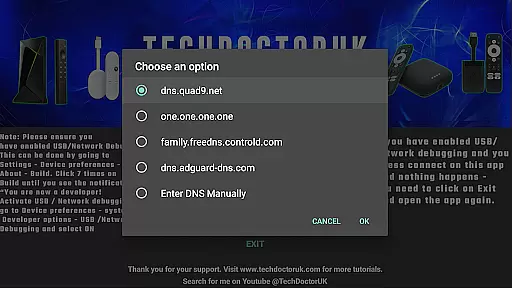
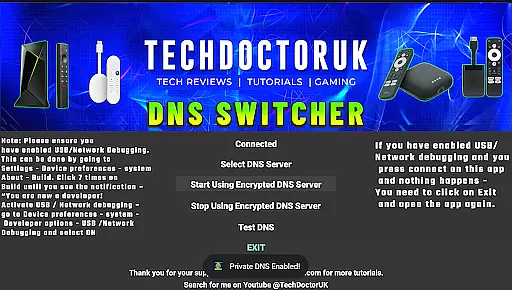
The app provides a selection of well-known encrypted DNS servers to choose from, while also offering the option to input custom server details. Before using TDUK DNS Switcher, ensure that USB or Network Debugging is enabled on your device to facilitate a smooth setup process.
With cyber threats on the rise, having a secure DNS service is crucial for safeguarding personal data. TDUK DNS Switcher offers an accessible solution for Android TV users to maintain control over their network security.
TDUK DNS Switcher stands out with its straightforward approach to securing DNS requests on Android TV devices. The primary feature of this tool is the ability to switch to encrypted DNS servers, which ensures that all DNS queries are protected from potential interception.
Users can select from a list of trusted encrypted DNS providers or manually enter specific server information. This flexibility caters to both casual users looking for quick setup options and advanced users who require custom configurations.
In addition to its core functionality, the app emphasizes ease of use and accessibility. By streamlining the process of enabling encrypted DNS services, TDUK DNS Switcher empowers users to take charge of their digital privacy without needing extensive technical knowledge.
TDUK DNS Switcher provides a reliable solution for Android TV users seeking to enhance their privacy through encrypted DNS settings. The core functionality allows users to easily switch to well-known encrypted DNS servers or input custom ones, ensuring that all DNS requests are safeguarded against unauthorized access.
The application's implementation is both accurate and effective, offering straightforward controls that guarantee proper configuration of your DNS settings. By choosing from trusted encrypted DNS providers or entering personalized server details, users can significantly improve their network security.
This level of precision in managing DNS requests delivers tangible benefits to the user, primarily by protecting sensitive information from potential threats. With clear options and reliable execution, TDUK DNS Switcher ensures that your Android TV's internet traffic remains private and secure.
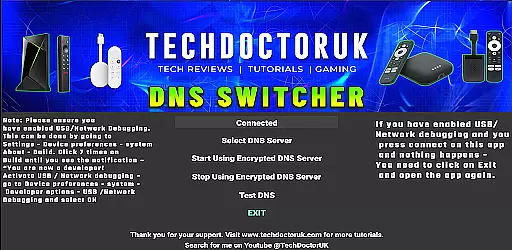
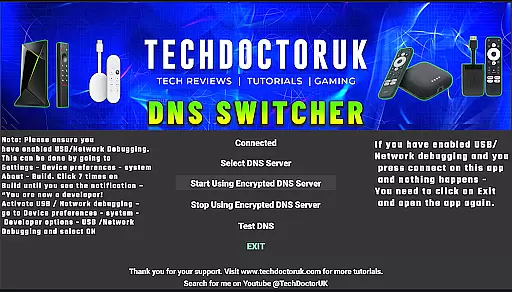
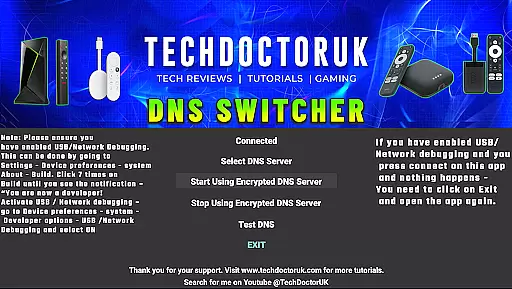
A simple and intuitive interface is crucial for tools like TDUK DNS Switcher, especially when dealing with technical configurations such as DNS settings. This app excels in providing an easy-to-navigate interface that makes the process of switching DNS servers straightforward even for non-technical users.
Upon opening the app, users are greeted with a clean layout that highlights key functionalities without overwhelming them with unnecessary details. The design emphasizes usability, ensuring that enabling USB or Network Debugging before use is clearly communicated, which is essential for seamless operation.
By focusing on clarity and ease of use, TDUK DNS Switcher removes barriers to adopting better security practices. Users can confidently manage their DNS settings knowing that the app's intuitive design supports them every step of the way.
Enhances privacy protection
Easy-to-use interface
Supports custom DNS settings
Wide selection of DNS servers
Accessible for all user levels
Requires debugging enabled
Limited to Android TV
No automatic updates
Manual setup needed
Basic UI design

 4.50
4.50
A convenient photo, video, and file recovery tool.
4.00
Just swipe the edge to do something!
4.40
Fluid navigation gestures for all of us!
4.30
Remote for Roku, Fire TV, Samsung TV, LG TV, Android TV, Chromecast and VIZIO TV
4.20
Use your phone as a webcam on your computer over WiFi or USB.
4.40
An easy-to-use calculator designed to save time calculating and bending conduit
4.30
Download any file easily and quickly with Downloader
4.0
Fast VPN USA for any country. Super secure VPN for calls, streaming, games, TV.
4.40
Navigate with Ease and Style
4.90
Excellent scientific calculator with symbolic algebra, integrals, derivatives
4.80
Monitor car performance in real time and troubleshoot malfunctions.
4.80
Creation, Learning, Entertainment & More — The All-in-One AI Search Engine
4.70
Connect instantly to a fast, encrypted VPN with one tap
4.60
Head tracking for PC sim games such as MSFS 2024 or Elite:Dangerous. No headset!
4.50
MS-DOS in your pocket. Play old DOS games anywhere you are ;)
4.10
Automate everything from settings to photos, SMS to speech. ADC2 prize winner.
4.10
Safely recover deleted photos, videos, and files with a single easy tap.
3.70
A recovery soft,it features photo recovery, video recovery, file recovery.
3.40



User Reviews