
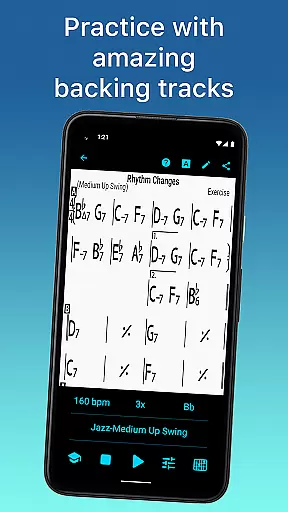
iReal Pro is a comprehensive music practice tool designed for musicians of all levels. This application simulates a realistic band accompaniment, allowing users to practice with high-quality piano, bass, and drum accompaniments. It also features an extensive library of chord charts that can be edited, printed, and shared, making it an essential resource for both practice and performance.
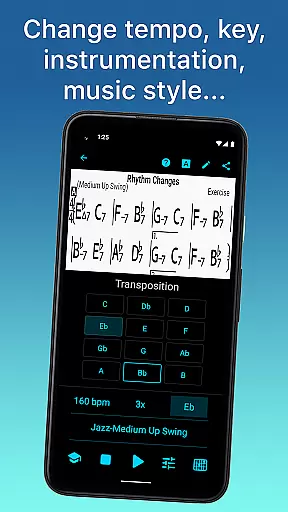
One of the standout features of iReal Pro is its versatility in music education. The app includes over 50 accompaniment styles ranging from Swing to Latin, along with thousands of downloadable songs. Users can personalize their experience by choosing different instruments and sounds, recording their performances, and even transposing songs to suit their vocal range or preferred key. Whether you're a beginner or a professional musician, iReal Pro provides the tools necessary to enhance your musical skills effectively.
The app's value extends beyond individual practice sessions. It serves as a portable backup band, enabling musicians to rehearse anywhere, anytime. Additionally, iReal Pro supports exporting charts and audio files in various formats, ensuring that your music is always accessible. Used by prestigious music schools like Berklee College of Music, this app has earned its reputation as one of Time Magazine's 50 Best Inventions of 2010.
iReal Pro offers a rich set of features tailored for musicians seeking to improve their craft. One of its core functionalities is the ability to simulate a virtual band with 51 included accompaniment styles, such as Swing, Rock, and Bossa Nova. These styles can be personalized with a variety of instrument sounds including piano, electric guitar, and drums, providing a customizable practice environment.
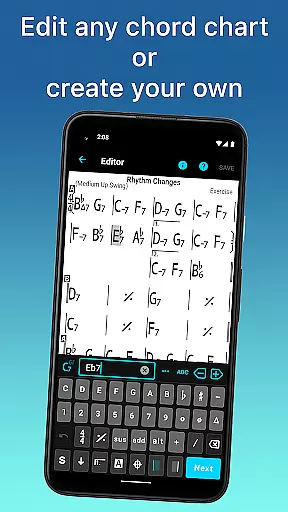
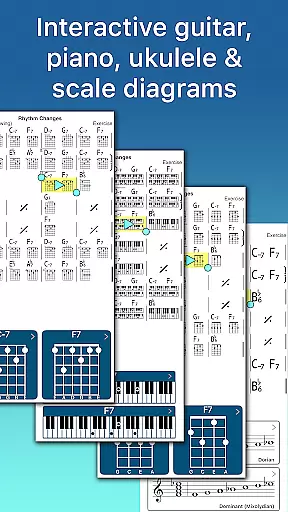
Beyond accompaniment, iReal Pro allows users to create, edit, and manage chord charts effortlessly. With access to thousands of downloadable songs and an intuitive editor, musicians can build a personal library of sheet music. Advanced practice settings such as automatic tempo increase and key transposition further enhance the learning process. The app also displays chord diagrams and scale recommendations, aiding in improvisation and technical skill development.
Sharing and exporting capabilities make iReal Pro a versatile tool for collaboration and archiving. Users can share playlists via email or export charts as PDFs and audio files in multiple formats. This ensures that musicians can take their work anywhere and integrate seamlessly with other digital audio workstations. Overall, iReal Pro combines powerful educational tools with practical usability, making it indispensable for modern musicians.
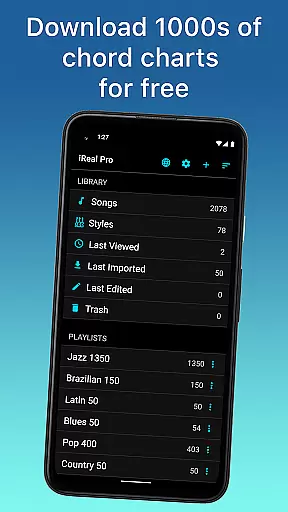
Having a comprehensive music library is essential for any musician looking to practice and improve their skills. iReal Pro boasts an extensive collection of songs that can be easily downloaded from the forums, providing users with thousands of options at their fingertips.
The app ensures copyright authenticity by allowing users to create, edit, and collect chord charts of their favorite songs. This feature not only supports musicians in their practice sessions but also respects intellectual property rights by enabling personal use and sharing within the community.
Moreover, iReal Pro offers various styles and sounds, including piano, Fender Rhodes, acoustic and electric guitars, basses, drums, and more, which are all legally obtained and integrated into the accompaniment options. This vast array of choices allows musicians to personalize their practice experience while adhering to legal standards.
Audio quality is paramount when it comes to musical practice tools. iReal Pro provides high-quality audio output options, ensuring that musicians receive the best possible sound during their practice sessions. The app includes realistic sounding accompaniments for piano, guitar, bass, and drums, enhancing the overall practice experience.
Users can record themselves playing or singing along with the accompaniment, with the assurance that the audio recordings will maintain a professional standard. This feature is particularly beneficial for self-assessment and tracking progress over time.
In addition to its superior audio playback, iReal Pro allows exporting audio files in multiple formats such as WAV, AAC, and MIDI. These export options give users flexibility in how they utilize their recordings, whether for personal review, sharing with peers, or integrating into other projects.
User-friendly interface
Extensive style options
High-quality sound library
Customizable practice settings
Export functionality
Some styles require in-app purchases
Advanced features may overwhelm beginners
Occasional syncing issues
Limited free song downloads
Subscription model for full access

Turn your phone into a musical instrument from the future!
 3.90
3.90
The Skullcandy App Experience
3.20
The Cubase remote control app
3.60
VB-AUDIO Software / VBAN-Receptor allows listening to any VBAN Streams
4.10
Most Advanced AI Song Generator and Music Creator. Rap, Pop, Rock, Gospel & more
4.70
Make songs with AI! Any genre, custom lyric, song generator for music creation!
4.80
Simple mp3 and mp4 player with advanced features.
3.40
Sheet music reader, piano & music note player. Play music score & learn to read.
3.90
Full featured mp3 and audio player with Chromecast and Android Auto support.
4.40
Offline Music Player & MP3 Player.Powerful equalizer, Lyrics, Themes, Tag Editor
4.80
More downloads than any other metronome. Includes drum machine & tempo trainer.
4.80
Gorgeous UI, Powerful music Search and Equalizer, the great choice for you!
4.70
Over 100 million tracks available for high quality streaming and download
4.60
DJ Music Mixer - DJ Remix: remix songs, make beat music & record mix of DJ.
4.40
Learn and play 2M+ music tabs & chords on guitar, ukulele, bass, and more
4.30
The official Sonos app
4.10
The only true audiophile music player with Hi-Fi audio rendering and DSP engine
3.90
Background pads for your band
3.80
MilkDrop for Android TV
3.00




User Reviews