
Move to iOS is a powerful migration tool designed to simplify the process of switching from Android to iPhone or iPad. This application enables users to transfer all essential content securely and automatically, including contacts, photos, videos, message history, mail accounts, calendars, and even WhatsApp data. The app creates a private Wi-Fi network between devices, ensuring a seamless and secure transition without the need for third-party storage solutions.
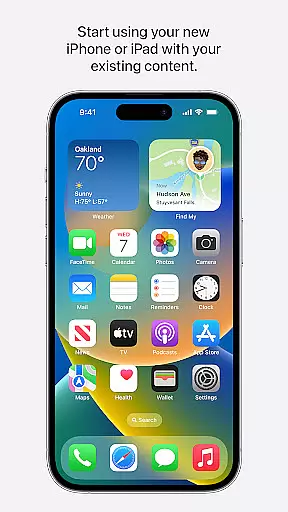
One of the standout features of Move to iOS is its user-friendly design. By following a few simple steps, users can migrate their digital lives effortlessly. The app ensures that all transferred content is organized correctly on the new device, allowing users to start using their iPhone or iPad immediately after the migration is complete. Whether you're upgrading your smartphone or switching ecosystems, Move to iOS provides a reliable solution for a smooth transition.
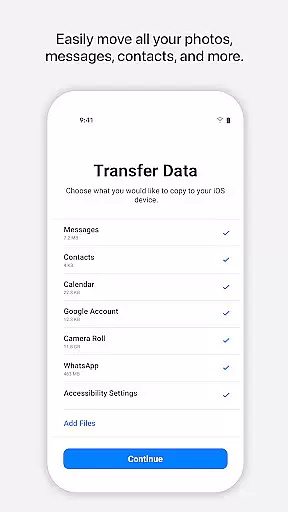
Move to iOS offers a comprehensive set of features tailored to ensure a complete and secure data migration experience. The app supports the transfer of various content types, such as apps, call logs, camera media, mail accounts, and voice memos. It also includes optional permissions for SMS, photos, contacts, music, and more, giving users control over what they wish to migrate. These granular options allow for a personalized migration process based on individual needs.
The app's ability to create a private Wi-Fi network between devices is one of its key innovations. This feature eliminates the need for external Wi-Fi networks or cables, streamlining the migration process while maintaining security. Additionally, Move to iOS provides real-time notifications about the migration status, ensuring users are informed every step of the way. With its robust functionality and attention to detail, Move to iOS stands out as an essential tool for anyone transitioning to Apple's ecosystem.
Move to iOS is designed to ensure the utmost accuracy and effectiveness in transferring data from Android devices to iOS. This app meticulously handles various types of content, including contacts, message history, photos, videos, and even WhatsApp conversations.
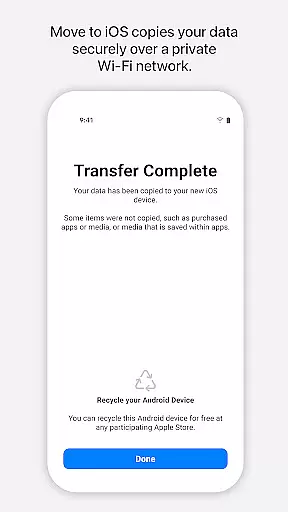
The app creates a private Wi-Fi network to connect your Android device with your new iPhone or iPad, ensuring that all data is transferred securely without the need for an internet connection. By entering a security code, users can begin the migration process, which places each piece of content in its appropriate location on the iOS device.
This seamless transition allows users to maintain continuity in their digital lives without worrying about data loss or privacy breaches. The precision in handling different data types ensures that everything from apps to call logs is accurately mirrored on the new device.
By focusing on core functionalities such as secure data transfer and ease of use, Move to iOS provides a reliable solution for those switching platforms, making the transition both smooth and efficient.
The interface of Move to iOS is crafted to offer simplicity and intuitiveness, ensuring that users of all technical backgrounds can navigate the migration process effortlessly. With clear instructions and straightforward steps, the app minimizes complexity, allowing users to complete the data transfer with minimal effort.
Upon launching the app, users are guided through a series of well-defined steps that involve establishing a private Wi-Fi connection between devices and entering a security code to initiate the transfer. This user-friendly approach eliminates confusion and potential errors during the migration process.
Optional permissions for SMS, photos, contacts, and other data types are presented clearly, giving users control over what they wish to migrate. This transparency not only enhances trust but also simplifies decision-making for the user.
Overall, the intuitive design and simple interface of Move to iOS make it accessible and efficient, enabling users to switch to iOS with confidence and ease.
User-friendly interface
Secure data transfer
Comprehensive content support
Private Wi-Fi connection
Optional permission controls
Limited to Apple devices
Requires both devices nearby
Migration speed depends on data size
No cross-platform support
Optional features may lack depth

card-reader app
 2.20
2.20
Small and simple app to Verify Root Access and BusyBox Install!
4.70
Create your own live wallpaper or check out thousands already made presets
3.90
Detect hidden spy camera with advanced scanning {{ Premium version }}
4.00
PC precision for mobile gaming: dominate with keyboard and mouse!
4.30
With videos, electrical calculators, and built-in ebook, Ugly’s has your answer.
4.50
Screen Mirroring for Roku Sticks, Roku TCL TV and Roku Hisense TV
4.50
Create your own custom widget with endless possibilities
3.90
A simple app to back up and restore SMS & MMS messages and call logs.
4.10
Enjoy smooth gameplay with Game Booster
4.90
Excellent scientific calculator with symbolic algebra, integrals, derivatives
4.80
NFC Tools can read and write NFC tags.
4.70
FV File Manager Pro, Fast and powerful file manager for Android
4.60
App to pay for FUTO Keyboard
4.60
Universal TV remote control all TVs, Roku, LG, Samsung, Fire, Vizio, Sony, TCL.
4.40
Making emulation easy for everyone!
4.30
Family Locator, Share location, StayConnect with your family in real time
3.90
Unleash gamepad precision for ultimate mobile gaming dominance.
3.90
Safely recover deleted photos, videos, and files with a single easy tap.
3.70



User Reviews