
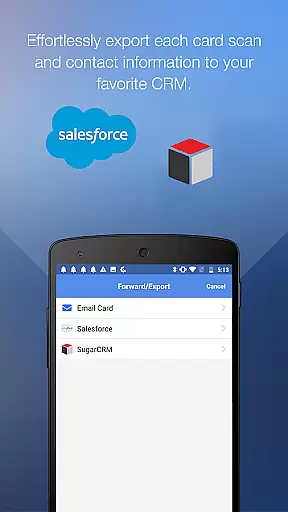
ScanBizCards Premium is a versatile business card management app for Android that allows users to digitize and organize their physical business cards. The app offers advanced scanning capabilities, including batch scanning and human transcription services for 100% accuracy. It also integrates with popular CRM platforms like Salesforce and SugarCRM, enabling seamless export of contacts.
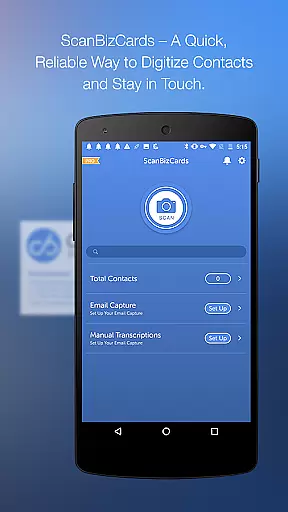
In addition to its core functionality, the app provides features such as email signature capture, which automatically extracts contact information from incoming emails. This makes it an ideal tool for sales professionals and networkers who need to keep their contact lists up-to-date. With support for 22 languages and additional functionalities like double-sided card scanning and 3D gallery view, ScanBizCards caters to a global audience seeking efficient contact management solutions.
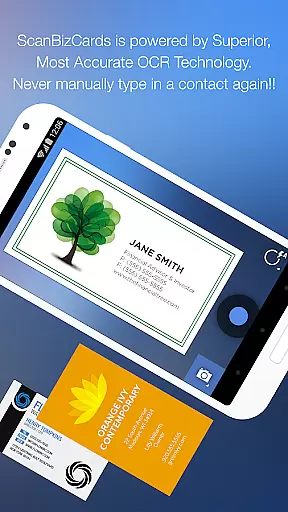
One of the standout features of ScanBizCards Premium is its ability to perform high-speed scans, which is five times faster than previous versions. Users can take advantage of batch scanning to process multiple cards quickly. The app's unique human transcription service ensures maximum accuracy when converting physical cards into digital contacts.
Another key feature is the integration with CRM systems. Users can export scanned business cards directly to platforms like Salesforce, keeping their databases current. Additionally, the app supports capturing contacts from email signatures, making it easy to update address books without manual entry. With customizable folders, personal notes, and search functionality, ScanBizCards offers a comprehensive solution for managing professional relationships.
ScanBizCards Premium revolutionizes collaborative work by integrating advanced CRM connectivity. The app allows seamless export of scanned business cards to major CRM platforms like Salesforce and SugarCRM, ensuring your team's database remains up-to-date.
With the latest update, users can connect their email accounts for automatic signature capture. This feature extracts contact information from incoming emails and updates the address book accordingly, streamlining the process of maintaining accurate business contacts.
The batch scanning functionality enables teams to process multiple business cards simultaneously. This is particularly useful during conferences and trade shows, where large volumes of contacts need to be captured quickly and efficiently.
Furthermore, the unlimited export capability to Salesforce ensures that sales teams can continuously sync new leads without worrying about monthly limitations. This comprehensive integration creates a robust ecosystem for collaborative work environments.
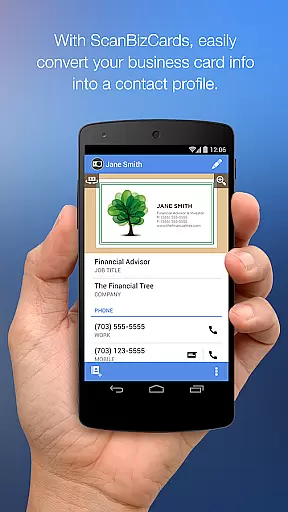
Effective task management is at the core of ScanBizCards Premium. The app provides a systematic approach to converting physical business cards into digital contacts through a four-step process: snapping, scanning, reviewing, and adding to the address book.
Users can organize scanned cards using custom folder names, making it easier to categorize and retrieve contacts. The ability to create personal notes for each card adds another layer of task management, allowing users to include additional context or reminders.
The 3D gallery view mode offers an innovative way to browse through stored business cards. This visual approach enhances the user experience when managing large collections of contacts, providing quick access to essential information.
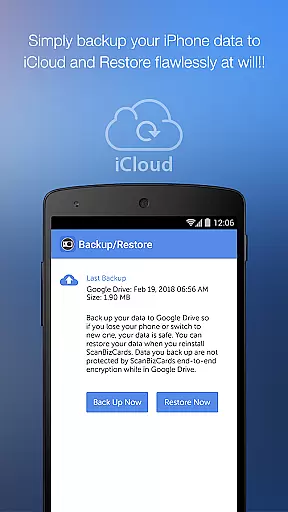
Additionally, the search functionality and backup/restore options to Google Drive ensure that users can efficiently manage their contact database. These features collectively contribute to a comprehensive task management solution for professional environments.
User-friendly interface
Fast and accurate scanning
Seamless CRM integration
Supports 22 languages
Email signature capture
Premium version required for full features
Subscription cost may be high for some users
Limited free exports to CRM
Occasional OCR errors
Human transcription takes time

Ask Accio anything about business. Alibaba-backed, built by experts, not just AI
 4.60
4.60
ANDROID'S TOP MOBILE OFFICE - Word, Excel, PowerPoint and PDF at your fingertips
4.50
FaxCover - Create fax cover pages. Works with any app or fax machine.
4.90
TurboScan turns your phone into a full-featured PDF document scanner.
4.80
Get instant construction estimates: accurate home repair & material calculator.
4.70
enjoy effortless PDF reading anytime, anywhere
3.90
Make invoices, bills, receipts & estimates on the go with Invoice Generator.
4.70
Collaborate seamlessly with Google Chat, part of Google Workspace
4.50
Shop, deliver, and earn with the Spark Driver™ App
4.10
Employee Management Made Easy
4.80
Earn free swag, G-Cards & food • Enter sweepstakes • Find stores • So much more.
4.70
We help people get jobs
4.70
Paychex Flex - Save Time and Stay Connected
4.60
Mobile POS for any business: sales, invoices, retail, restaurants & appointments
4.60
Master crypto trading with real-time simulations and exciting challenges!
4.50
Measure distances, surfaces and draw plans in seconds with CamToPlan!
4.40
All Your Gig Work. One App.
4.30
Smarter career moves start here. AI job alerts, insights & the right tools.
4.20
view, manage, and share every PDF file you have
3.60



User Reviews