
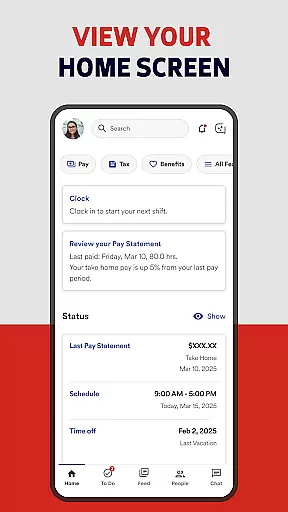
ADP Mobile Solutions is a comprehensive business application designed to streamline HR management for both employees and managers. The app provides easy access to essential payroll, time tracking, benefits, and other critical HR functions. With its user-friendly interface, the app ensures that users can conveniently manage their work-related information on the go.
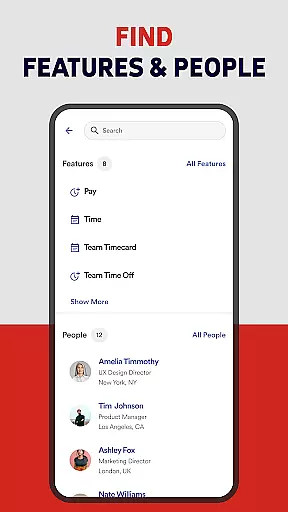
The application offers distinct features tailored for different user roles. Employees can view pay statements, request time off, and track attendance, while managers have additional capabilities like approving time cards and viewing team calendars. Security is a top priority, with all transactions encrypted and multiple authentication methods supported. This makes ADP Mobile Solutions an ideal tool for modern businesses looking to enhance operational efficiency while maintaining data security.
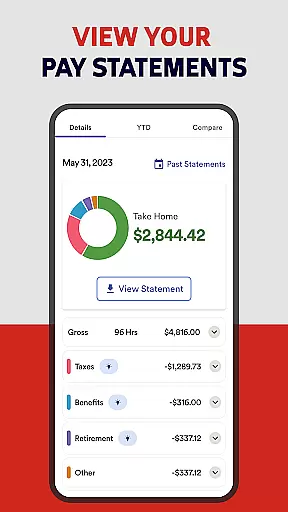
ADP Mobile Solutions stands out with its robust feature set catering to both employees and managers. For employees, the app allows viewing of pay and W2 statements, requesting time off, and tracking attendance through punching in/out and creating timesheets. Managers benefit from advanced functionalities such as approving time cards and time off requests, and accessing executive dashboards for better oversight.
Security features are another highlight of this app. All transactions between the mobile device and ADP's servers are encrypted, ensuring data integrity. Additionally, sensitive employee information stored on the device is also encrypted. The app supports biometric authentication for quick yet secure login, and includes measures like session timeouts and account lockouts after multiple failed login attempts. These features collectively ensure that ADP Mobile Solutions not only enhances productivity but also maintains stringent security standards.
ADP Mobile Solutions offers a comprehensive suite of collaborative work features designed to streamline workforce management for both employees and managers. The application enables seamless interaction with payroll, time tracking, benefits administration, and other essential HR functions.
For employees, the app provides convenient access to view pay statements, request time off, and track attendance. Managers can efficiently approve time cards, manage team calendars, and access executive dashboards. These features collectively enhance team coordination and productivity by centralizing critical HR processes.
The real value lies in its ability to integrate various ADP products such as Workforce Now and Vantage, creating a unified platform for workforce management. This integration ensures that all team members have access to accurate and up-to-date information, facilitating better decision-making and operational efficiency.
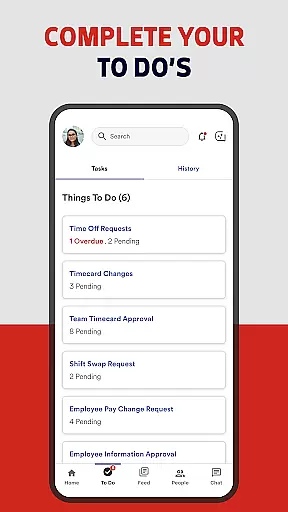
Task management within ADP Mobile Solutions is designed to optimize daily operations by providing tools that simplify complex HR tasks. Employees can easily punch in and out, create timesheets, and update their time cards directly through the mobile app.
Managers benefit from advanced task management capabilities, including the ability to approve time-off requests and monitor team calendars. These features ensure that workforce scheduling aligns with business needs while maintaining compliance with labor regulations.
Additionally, the app's secure infrastructure guarantees that all task-related data is protected through encryption and strict access controls. This security framework not only safeguards sensitive information but also instills confidence among users when managing their professional responsibilities remotely.
User-friendly interface
Comprehensive HR tools
Strong security protocols
Customizable features
Multi-platform support
Limited to ADP clients
Some features locked
Occasional bugs
High system requirements
Steep learning curve

AI-powered document scanner with auto enhance for perfect PDFs.
 4.60
4.60
All Your Gig Work. One App.
4.30
BuildCalc - the easiest AND the most advanced construction calculator app.
4.80
Manage work life on the go
4.50
Find work, shifts and gigs near you. Jobs lasting a few hours to a few months.
4.30
Drive and earn extra money
4.50
Access All PDF Files
3.40
On the go? Take FedEx with you.
4.00
No more passwords, easier sign-in, and greater protection for your accounts.
4.60
FaxCover - Create fax cover pages. Works with any app or fax machine.
4.90
Start earning fast. Apply Today.
4.80
Your employer must have UKG Ready software configured for Mobile.
4.60
Mobile POS for any business: sales, invoices, retail, restaurants & appointments
4.60
Make money as a delivery driver with DoorDash and work when you want as a Dasher
4.30
FX Plus adds media, networking, and cloud capabilities to FX File Explorer.
4.10
The Penny Puss app with DG penny finder
4.10
Zoom built for Chrome OS
3.90
enjoy effortless PDF reading anytime, anywhere
3.90
Take the stress out of storage with the all-in-one app to manage your space.
3.70




User Reviews