
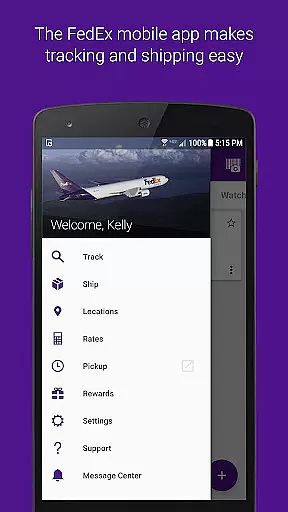
FedEx Mobile is a comprehensive business application designed to streamline shipping and package management for users on the go. With this app, you can create domestic and international shipping labels, track the status of all your incoming or outgoing packages, and manage shipments from anywhere. The app also provides quick rate estimates, helps you find pickup or drop-off locations, and allows barcode scanning for easy tracking.
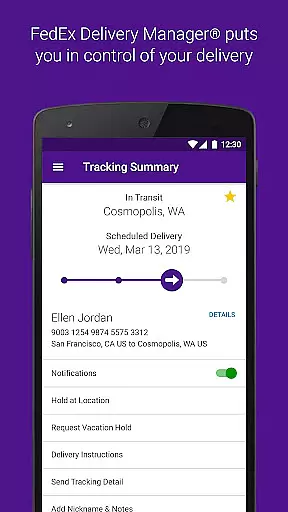
One of the standout features is the ability to enroll in FedEx Delivery Manager®, which allows customization of delivery preferences. Whether you need to hold a package at a preferred location, leave special instructions for the courier, or request vacation holds, this app has you covered. Available in all regions, it ensures that businesses maintain efficiency and control over their shipping processes.
This app is particularly useful for small to medium-sized businesses that require reliable logistics support. By offering functionalities like push notifications for shipment updates and sound alerts for delivered packages, FedEx Mobile enhances operational transparency and customer satisfaction.
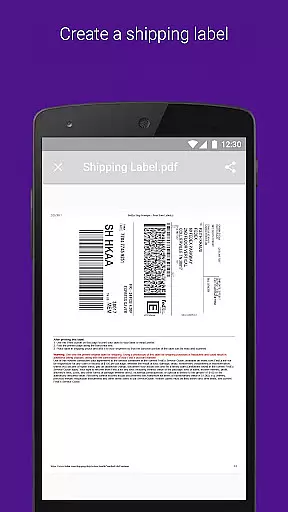
FedEx Mobile offers an array of robust features tailored for modern business needs. One key feature is the ability to create mobile shipment labels and request pickups directly from your device. This functionality not only saves time but also reduces errors associated with manual entry, making shipping more efficient.
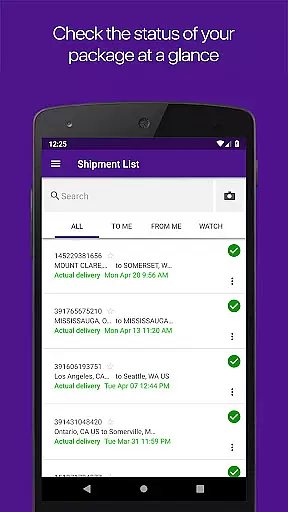
The app supports advanced tracking capabilities through barcode scanning and enables users to search their shipment lists by tracking number, references, vendors, and more. These features ensure that businesses can quickly locate and manage their packages. Additionally, users can access their shipper address book, simplifying repeat transactions and enhancing productivity.
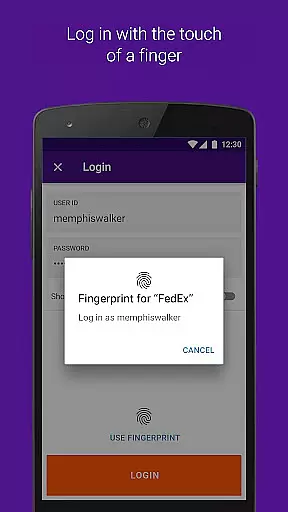
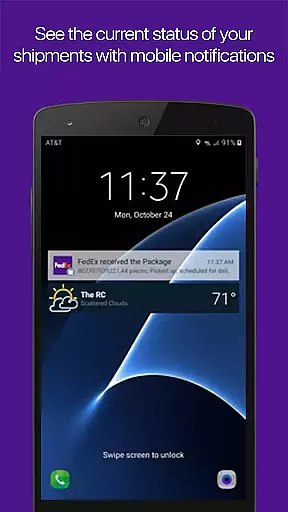
Security is another highlight, as the app allows login via fingerprint or facial recognition. Push notifications keep users informed about their shipments' status, while sound notifications provide immediate alerts for delivered items. For regions where available, features like rerouting packages to convenient FedEx locations further extend flexibility and convenience.
In the realm of business logistics, collaboration is key. The FedEx Mobile app excels in providing collaborative work features that streamline the shipping and tracking process for teams. With functionalities such as sharing shipment details and statuses, team members can stay informed about the progress of deliveries without needing to individually track each package.
One standout feature is the ability to access a shared shipper address book, which allows all team members to utilize the same contacts and addresses for shipments, ensuring consistency and reducing errors. This shared resource simplifies the coordination among team members, particularly when organizing pickups or drop-offs at various locations.
Moreover, the app supports seamless communication by enabling users to send updates directly from the app interface. Whether it's notifying a colleague about a scheduled pickup or sharing a tracking number, these capabilities ensure that everyone involved is on the same page, enhancing overall productivity.
The FedEx Mobile app also integrates with other digital tools businesses use, making it easier to incorporate shipping tasks into broader workflows. By allowing multiple users to manage shipments under a unified system, it fosters an environment where collaborative efforts are not only possible but optimized for efficiency.
Effective task management is crucial for businesses that rely on timely deliveries and shipments. The FedEx Mobile app offers robust task management features that enable users to organize, track, and execute their shipping-related tasks efficiently. From creating shipment labels to scheduling pickups, the app provides a comprehensive suite of tools designed to keep your logistics operations running smoothly.
Users can easily create and manage mobile shipment labels through an intuitive interface, significantly reducing the time and effort required to prepare packages for delivery. Additionally, the ability to request and cancel pickups directly from the app ensures that businesses can adapt quickly to changing schedules or unexpected delays.
Another valuable aspect of the app's task management system is its advanced tracking capabilities. Users can search their list of shipments using various filters such as tracking numbers, references, and vendors. This makes it simple to locate specific shipments and monitor their progress, ensuring that nothing falls through the cracks.
To further enhance task management, the FedEx Mobile app includes push notifications that alert users to important updates regarding their shipments. These real-time alerts help maintain awareness of any changes or issues that may arise, allowing for prompt responses and adjustments to plans as needed.
User-friendly interface
Comprehensive tracking options
Efficient shipment management
Secure authentication methods
Customizable delivery preferences
Limited regional availability
Requires multiple permissions
Occasional notification delays
Some features need registration
Dependent on network connectivity

Find jobs and make money fast with JobStack.
 4.60
4.60
ANDROID'S TOP MOBILE OFFICE - Word, Excel, PowerPoint and PDF at your fingertips
4.50
TurboScan turns your phone into a full-featured PDF document scanner.
4.80
Get your benefits on-the-go.
3.80
viewing and sharing PDFs and other files—anytime, anywhere!
4.3
Paychex Flex - Save Time and Stay Connected
4.60
Make invoices, bills, receipts & estimates on the go with Invoice Generator.
4.70
Say hello to the mobile work experience built to help you thrive at work.
4.30
Chat, meet, and collaborate to achieve more together, all in one place on Teams
4.60
Create curriculum vitae, a professional cover letter creator and resume designer
4.80
Earn free swag, G-Cards & food • Enter sweepstakes • Find stores • So much more.
4.70
Find the right fit, faster.
4.70
We help people get jobs
4.70
Ask Accio anything about business. Alibaba-backed, built by experts, not just AI
4.60
Grow your business and connect with more people with Meta Business Suite.
4.60
The app that lets you deliver with Amazon.
4.50
Deliver and earn money
4.30
FX Plus adds media, networking, and cloud capabilities to FX File Explorer.
4.10
The All-in-One File Manager for Phone, TV, Watch, Cars, XR / VR, Chromebook
4.10




User Reviews