
Drawnames is a versatile Secret Santa app designed to simplify gift exchanges and manage wish lists for various occasions. Whether you're organizing for Christmas, birthdays, or other celebrations, this tool makes the process seamless and enjoyable. The app allows users to create groups, set exclusions, generate wish lists, and discover gift ideas without requiring an account.
With cross-device compatibility, participants can join from any mobile phone, tablet, or computer with a web browser. This ensures everyone in your group can participate regardless of their device. Drawnames also offers features like budget setting, exclusion management, and multiple gift exchange tracking, making it perfect for friends, family, and co-workers alike.
The true value of Drawnames lies in its ability to eliminate manual name drawing and paper tracking. By offering functionalities such as personalized wish lists, gift inspiration, and easy sharing options through messaging apps, texts, or emails, it ensures a stress-free and organized experience for all users.
Drawnames stands out with its array of practical features tailored to enhance gift exchange experiences. One key feature is the simple Secret Santa generator, which lets users set up exchanges in just three easy steps: creating a group, setting exclusions, and drawing names. This functionality supports groups of any size and ensures unwanted pairings are avoided.
Another notable aspect is the personal wish list creation. Participants can build and share customized lists, simplifying the gift selection process. Additionally, the app provides thousands of gift ideas and suggestions directly within its interface, catering to diverse occasions like holidays, birthdays, and baby showers.
Furthermore, Drawnames supports cross-device compatibility and flexible event management. Users can organize multiple exchanges and track them all within one app. Sharing capabilities extend to popular messaging platforms, ensuring that invitations reach everyone conveniently. These comprehensive features collectively deliver a streamlined and efficient user experience.
At the heart of drawnames lies its core functionality, designed to simplify and enhance the experience of organizing Secret Santa gift exchanges. The app's primary feature is its ability to generate pairings for participants in just three easy steps: creating a group, setting exclusions, and drawing names. This streamlined process ensures that users can quickly set up their gift exchanges without any hassle.
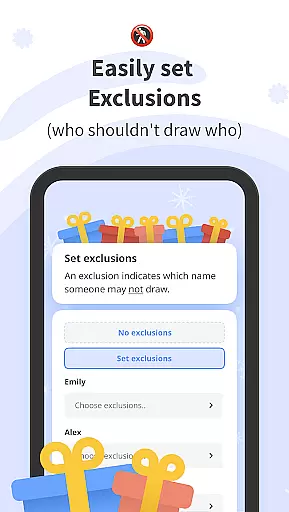
The effectiveness of drawnames is further demonstrated through its advanced exclusion settings, which allow users to prevent specific individuals from being paired together. This thoughtful feature caters to various social dynamics, ensuring that friends, family, and co-workers are matched appropriately. By addressing potential mismatches, the app guarantees a smooth and enjoyable experience for all participants.
Moreover, drawnames offers practical tools such as personalized wish lists and gift inspiration suggestions. These features not only facilitate easier gift selection but also enhance the overall gifting experience by making it more personalized and engaging. With access to thousands of gift ideas, users can discover trending presents and tailor their choices to suit individual preferences.
Ultimately, the precision and reliability of drawnames' core functions translate into significant user benefits. By removing the complexities traditionally associated with organizing Secret Santa events, the app allows users to focus on the joy of giving and celebrating, making every occasion memorable and stress-free.
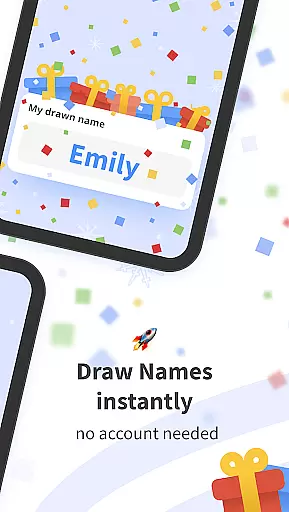
The drawnames app excels in providing an interface that is both simple and intuitive, ensuring that users of all technical backgrounds can navigate and utilize its features with ease. Upon downloading the app, users are greeted with a clean and straightforward layout that requires no account creation or lengthy setup processes. This immediate accessibility allows users to dive straight into organizing their gift exchanges without any barriers.
One of the standout aspects of drawnames' interface is its seamless integration with popular messaging apps, text, and email services. This compatibility enables users to invite participants using their preferred communication methods, streamlining the group formation process. Whether sending invitations via WhatsApp, Messenger, or traditional email, the app adapts to fit the user's existing digital habits.
Additionally, drawnames supports cross-device compatibility, allowing group members to join from any mobile phone, tablet, or computer with a web browser. This flexibility ensures that everyone can participate regardless of their device preferences, promoting inclusivity and convenience. The app's responsive design maintains consistency and usability across different platforms, enhancing the overall user experience.
By prioritizing interface simplicity and intuitiveness, drawnames empowers users to efficiently manage multiple gift exchanges while enjoying a hassle-free interaction with the app. Its thoughtful design choices result in an accessible and enjoyable tool that makes organizing Secret Santa events a delightful experience for all involved.
User-friendly interface
No account required
Customizable wish lists
Cross-device compatibility
Versatile occasion support
Limited advanced features
No offline mode
Occasional ads
Dependent on internet
Basic design

 4.50
4.50
FV File Manager Pro, Fast and powerful file manager for Android
4.60
Unit and currency converter with easy and simple UI.
4.80
Detect hidden spy camera with advanced scanning {{ Premium version }}
4.00
Navigate with Ease and Style
4.90
Signal Strength, Mobile, Wifi, Speed Test, Bad Signals, Cellular, 5G, LTE, 4G
4.20
Undelete and recover your lost or deleted files with DiskDigger!
3.40
Create your own custom widget with endless possibilities
3.90
Fun lie-detection pranks for friends and parties.
3.80
Monitor car performance in real time and troubleshoot malfunctions.
4.80
The one-and-only remote control for PC, Mac, and Linux
4.70
The Ultimate Flex Drivers Utility App - Convenient Tapping & Block Filters
4.70
Creation, Learning, Entertainment & More — The All-in-One AI Search Engine
4.70
HD Video player and downloader for all formats, fast & smooth 4K video playback.
4.60
Planner and Tracker for Stardew Valley
4.60 4.50
4.50
Smart and comfortable browsing experience.
3.80
Safely recover deleted photos, videos, and files with a single easy tap.
3.70
Transfer Files, APK from Phone to Watch & Install.
4.1






User Reviews