
Permission Manager X is a comprehensive tool designed to manage app permissions on Android devices. It allows users to view, grant, or revoke both manifest and AppOps permissions from a single interface. The application provides fine-grained control over various permissions such as storage, camera, location, and more, ensuring optimal privacy management.
This tool is particularly useful for users who frequently reinstall apps or change devices, as it enables quick backup and restoration of permission settings. With its intuitive colored bars, reviewing and managing permissions across multiple apps becomes significantly easier. Whether you're concerned about background execution, clipboard access, or other privacy-related controls, Permission Manager X offers the necessary tools to maintain your device's security.
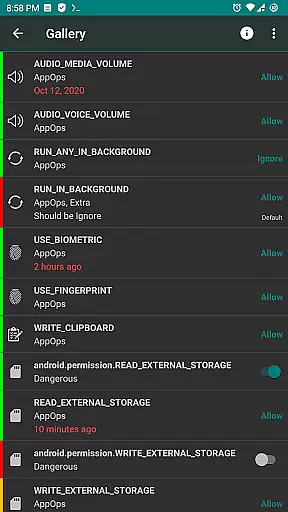
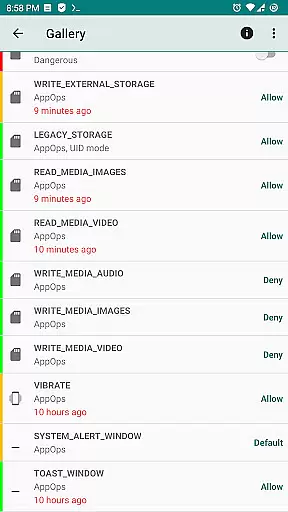
One of the standout features of Permission Manager X is its ability to handle both manifest permissions and AppOps. Manifest permissions include commonly known permissions like Storage and Camera, while AppOps provide deeper control mechanisms such as background execution and vibration. This dual functionality ensures that users have robust control over their app permissions.
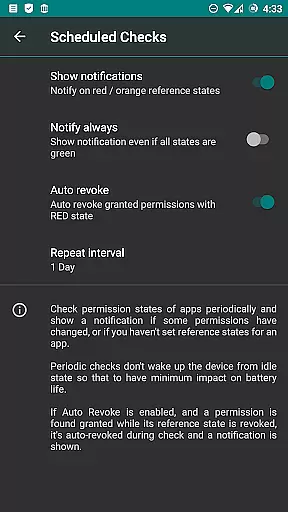
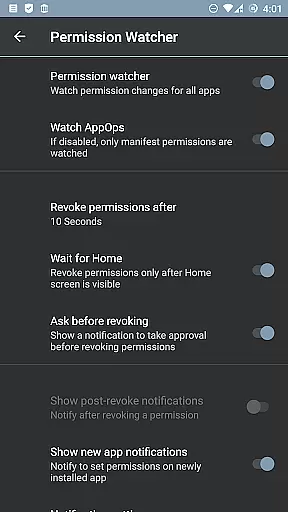
The app also includes advanced features such as scheduled checks to notify users of bad reference states, auto-revoke capabilities for granted permissions with red states, and a Permission Watcher to quickly remove unwanted permissions. Additionally, users can sort apps and permissions by different parameters, create automatic backups upon changes, and enjoy theming options along with batch operations for efficient management.
For those needing even more control, Permission Manager X supports multi-user profiles and work profiles, making it suitable for both personal and professional environments. Its open-source nature ensures transparency, and the active community contributes to continuous improvements and translations, enhancing the overall user experience.
Permission Manager X offers a comprehensive suite of tools designed to manage app permissions with precision and efficiency. The core functionality allows users to view, grant, or revoke both manifest permissions and AppOps permissions from a single screen. This ensures that every permission change is accurately reflected in the system, providing users with complete control over their privacy settings.
The application's robust framework leverages Android's backend access control mechanisms, offering fine-grained control over various permissions. Whether it's managing background execution, vibration, clipboard access, or more traditional permissions like storage and camera usage, PMX ensures each action is executed effectively. Users can set reference values for changeable permissions, which simplifies the process of backing up and restoring preferred settings across devices or after reinstallations.
For those who prioritize performance, privacy, and control, Permission Manager X delivers by enabling restrictions on what apps can do. From preventing apps from running in the background to controlling access to location data, contacts, accounts, camera, microphone, files, and even clipboard interactions, PMX provides an effective solution. These capabilities ensure that your device operates optimally while safeguarding sensitive information against unauthorized access.
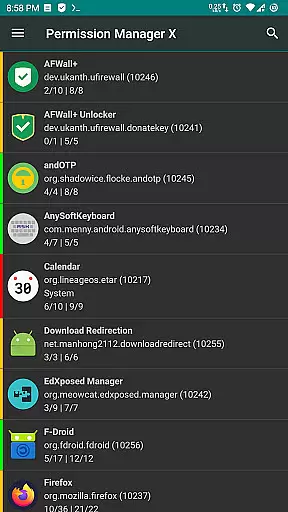
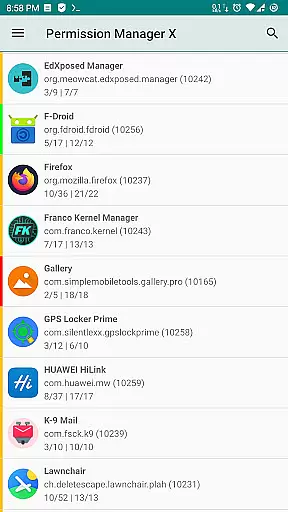
Despite its powerful features, Permission Manager X maintains an intuitive interface that makes managing permissions straightforward for all users. Upon launching the app, users are greeted with a clean layout where they can easily navigate through installed applications and their respective permissions. Each section is clearly labeled, making it simple to understand and modify settings without requiring extensive technical knowledge.
The design philosophy behind PMX emphasizes ease of use without compromising depth. Colored bars at the left of permission entries allow quick visual assessments, helping users identify granted or revoked states at a glance. Additionally, detailed descriptions and search suggestions enhance the user experience by providing context-sensitive guidance throughout the permission management process.
Advanced functionalities such as scheduled checks, auto-revoke options, and permission watcher further demonstrate the appu2019s commitment to simplifying complex tasks. By integrating these features into an accessible interface, Permission Manager X empowers users to maintain optimal security configurations effortlessly. Whether you're a casual user or a tech enthusiast, PMX's blend of simplicity and power ensures a seamless interaction with your device's permission settings.
User-friendly interface
Comprehensive permission control
Quick backup and restore
Active community support
Open-source and transparent
Requires root or ADB
Limited on non-rooted devices
No built-in ads
Complex for beginners
Frequent updates needed

Connect instantly to a fast, encrypted VPN with one tap
 4.60
4.60
Save any video in HD - paste the link, download fast and watch offline.
4.5
Canon PRINT is a companion app for your Canon printer.
4.60
Keep track of your Palia friendships, tasks, and inventory with Palia Notebook
4.60
View detailed information about your Nissan Leaf the dealer never shows you.
4.10
Mirror your screen to Chromecast and Android TV - Super fast and simple
4.60
Quickly check the frequency of the Earth
4.30
Enhance your Beats
3.70
The ideal app to be the digital eye of your family
3.40
Connect wirelessly to your computer to watch movies, browse the web, play games
5.00
Best leveling tool for your Android device. Hang paintings like a pro.
4.90
The one-and-only remote control for PC, Mac, and Linux
4.70
FV File Manager Pro, Fast and powerful file manager for Android
4.60 4.50
4.50
Just swipe the edge to do something!
4.40
Universal TV remote control all TVs, Roku, LG, Samsung, Fire, Vizio, Sony, TCL.
4.40
VESC Tool can monitor and configure VESC-compatible devices over BLE and Wifi
4.20
Family Locator, Share location, StayConnect with your family in real time
3.90
Fun lie-detection pranks for friends and parties.
3.80



User Reviews