
Dogsix Family Assistant is a comprehensive parental control tool designed to help parents monitor and manage their children's online activities. The app provides real-time insights into children's digital behavior, including last seen activity on social media platforms and detailed usage reports. Parents can set daily time limits or specific intervals for monitoring, ensuring a balanced routine especially during school hours or bedtime.
One of the key features of Dogsix is its ability to provide detailed analysis of children's online presence. This includes tracking usage patterns and generating comprehensive reports that help parents understand their children's online habits. The app also prioritizes data privacy and security, allowing users to delete all their data with a single tap. With its user-friendly interface and robust functionality, Dogsix ensures parents can maintain a safe and healthy digital environment for their children.
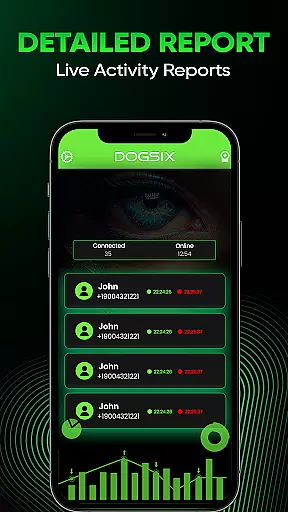
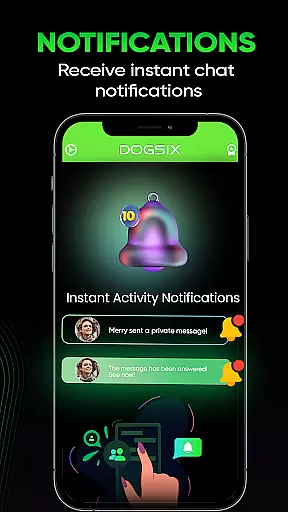
Dogsix Family Assistant offers a range of powerful features tailored for parental control. The app provides instant notifications and detailed reports on children's online activities, giving parents valuable insights into their digital behavior. Users can track last seen activity on various platforms, monitor usage patterns, and receive regular updates on their children's online presence.
A standout feature of Dogsix is its customizable monitoring options. Parents can set daily time limits or establish specific intervals for checking online activities during crucial periods like school hours or bedtime. The app also emphasizes data privacy and security, allowing users to manage their information easily. With its intuitive interface and reliable performance, Dogsix empowers parents to create a safer digital space for their children while maintaining control over their online experiences.
Dogsix Family Assistant is designed to provide parents with accurate insights into their children's online activities. The app meticulously tracks usage patterns, last seen activity, and overall digital behavior, ensuring that the information provided is both reliable and actionable.
The effectiveness of Dogsix lies in its robust analytical capabilities. By offering detailed reports and instant notifications, it empowers parents to make informed decisions about their children's online safety. This real-time data ensures that any potential issues are addressed promptly, maintaining a secure digital environment.
Parents can set specific time limits or intervals for monitoring, which helps in managing screen time effectively. This feature not only aids in regulating usage during crucial times like school hours or bedtime but also promotes a balanced routine for children. The ability to customize these settings makes the app highly effective for diverse family needs.
With privacy being a top priority, Dogsix ensures that all user data is securely handled. Parents have the option to delete all data with a single tap, reinforcing the app's commitment to security and user control. This focus on data protection enhances the overall reliability and trustworthiness of the application.
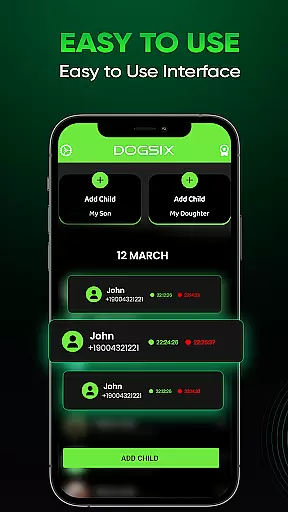
The interface of Dogsix Family Assistant is crafted to ensure ease of use and intuitive navigation. Upon opening the app, users are greeted with a clean and organized layout that highlights essential features without overwhelming them. This simplicity allows parents to quickly access the tools they need to monitor their children's online activities.
Key functionalities such as setting time limits, viewing activity reports, and receiving notifications are easily accessible from the main dashboard. The straightforward design eliminates the learning curve, making it possible for users of all technical backgrounds to utilize the app effectively. Clear labels and logical grouping of features enhance the overall user experience.
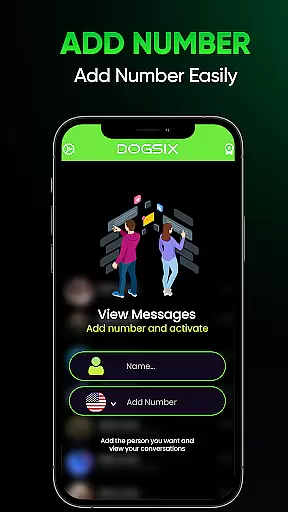
Dogsix offers an intuitive setup process that guides parents through configuring monitoring preferences. Step-by-step instructions ensure that even those unfamiliar with similar tools can set up monitoring parameters effortlessly. This approach reduces setup time and increases user satisfaction by providing a seamless initiation into the app's capabilities.
Furthermore, the app includes helpful tooltips and contextual help options to assist users in understanding various features. These aids contribute to a more engaging and supportive user journey, ensuring that parents feel confident in using Dogsix to maintain their children's online safety. Such thoughtful design elements underscore the app's dedication to accessibility and user-centric solutions.
User-friendly interface
Real-time activity monitoring
Detailed usage reports
Customizable time limits
Strong data privacy measures
Subscription-based pricing
Limited free features
Requires constant internet connection
May invade child's privacy
Auto-renewal policy concerns

pdf merge, word to pdf, jpg to pdf, edit pdf, convert to pdf and much more!
 4.20
4.20
Head tracking for PC sim games such as MSFS 2024 or Elite:Dangerous. No headset!
4.50
Safely recover deleted photos, videos, and files with a single easy tap.
3.70
Universal TV remote control all TVs, Roku, LG, Samsung, Fire, Vizio, Sony, TCL.
4.40
Carry a FTP server in your pocket and avoid USB cables for file transfer
4.20
Signal Strength, Mobile, Wifi, Speed Test, Bad Signals, Cellular, 5G, LTE, 4G
4.20
Bedrock Together: Join any bedrock server on Xbox/PS
4.80
Creation, Learning, Entertainment & More — The All-in-One AI Search Engine
4.70
Clean up your phone, find files, play media, and share files offline
4.50
Enjoy smooth gameplay with Game Booster
4.90
HD Video player and downloader for all formats, fast & smooth 4K video playback.
4.60
eXtended Permission Manager - a small app to manage permissions and AppOps
4.50
Game Booster, GFX Tool is now compatible with newer game update
4.50
Use your phone as a webcam on your computer over WiFi or USB.
4.40
Remote for Roku, Fire TV, Samsung TV, LG TV, Android TV, Chromecast and VIZIO TV
4.20
Quickly & easily calculate the spacing of handrail balusters
4.20
Unleash gamepad precision for ultimate mobile gaming dominance.
3.90
Undelete and recover your lost or deleted files with DiskDigger!
3.40
Transfer Files, APK from Phone to Watch & Install.
4.3




User Reviews