
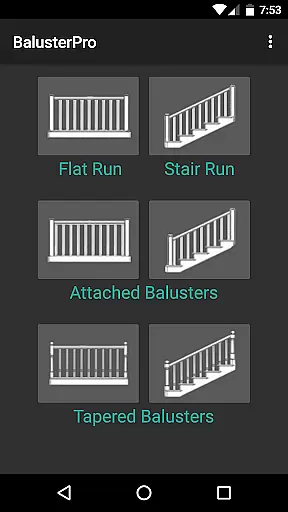
BalusterPro is a specialized tool designed for carpenters, woodworkers, and DIY enthusiasts. This app simplifies the task of calculating spacing between handrail balusters, making it an essential companion for both professionals and homeowners. With its ability to handle flat and stair runs, tapered balusters, and support both inch and metric measurements, BalusterPro offers versatile solutions for various woodworking projects.
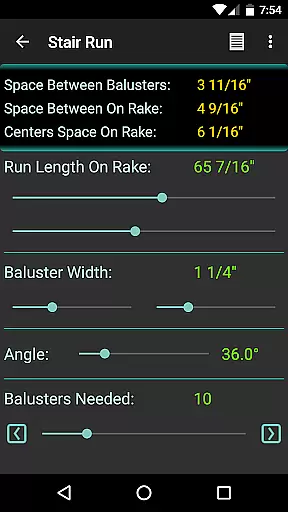
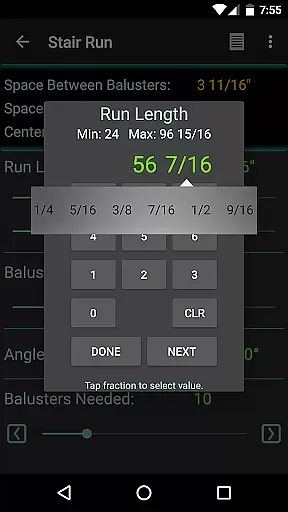
The app's intuitive interface allows users to input run length and baluster width, then adjust the 'Balusters Needed' slider to achieve the desired spacing. Whether you're working on picket fences, bench backs, or decking, BalusterPro ensures accurate calculations that meet code requirements. Its portability enables use at your desk, on the job site, or wherever your phone goes, providing convenience and efficiency in every project.
BalusterPro stands out with its unique features tailored for woodworking projects. The app provides precise calculations for baluster spacing, accommodating both flat and stair runs as well as tapered balusters. Users can switch between inch and metric units, catering to different measurement standards worldwide. This flexibility makes the app suitable for a wide range of tasks, from staircase construction to deck building.
One of the key features is the adjustable 'Balusters Needed' slider, which allows users to fine-tune spacing until it meets specific requirements. The app also displays the number of balusters needed, streamlining the planning process. With positive endorsements from industry experts and publications like This Old House Magazine, BalusterPro has proven its value as a reliable and innovative tool for both professional carpenters and DIY enthusiasts.
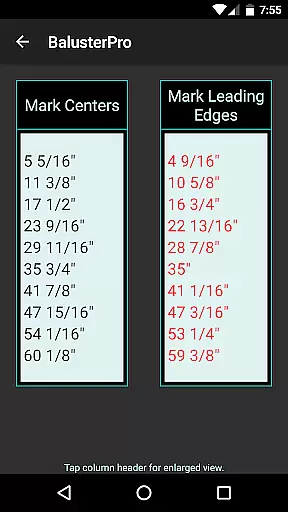
BalusterPro stands out as a precise and effective tool for anyone involved in carpentry or woodworking. Its primary function is to calculate the spacing of handrail balusters, which can be a tedious task if done manually. The app simplifies this process by allowing users to input the run length and baluster width, then adjusting the 'Balusters Needed' slider until the desired spacing is achieved.
The effectiveness of BalusterPro lies in its ability to cater to both flat and stair runs, tapered balusters, and offers measurements in either inch or metric units. This versatility ensures that whether you're working on picket fences, bench backs, decking, or column flutes, the app provides accurate calculations every time. It's not just limited to professional woodworkers; even DIY enthusiasts and homeowners find immense value in its capabilities.
By using BalusterPro, users save significant time and effort, eliminating the guesswork and potential errors associated with manual calculations. The app's interface is intuitive, making it easy for anyone to use, regardless of their technical expertise. With just a few inputs, users can quickly determine the number of balusters needed and ensure they meet code requirements.
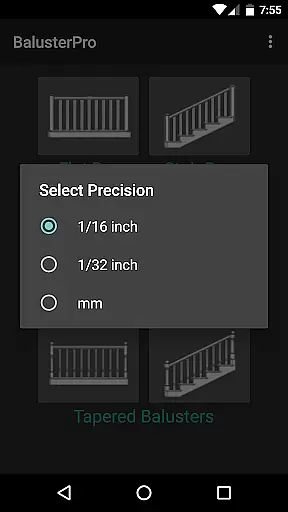
The hallmark of BalusterPro is its simple and intuitive interface, designed to make the complex task of calculating baluster spacing straightforward and hassle-free. Upon opening the app, users are greeted with an uncluttered screen where they can easily enter the necessary dimensions such as run length and baluster width. The clean layout ensures that even those unfamiliar with digital tools can navigate the app without any difficulty.
One of the standout features is the 'Balusters Needed' slider, which allows users to dynamically adjust values until they reach the desired spacing between balusters. This interactive element makes the process engaging and less monotonous compared to traditional calculation methods. Additionally, the app provides instant feedback, displaying the number of balusters required above the slider, thus enabling quick decision-making.
BalusterPro's design philosophy centers around user experience, ensuring that all essential functions are accessible within a few taps. Whether you're at your desk, on the job site, or traveling, the app delivers consistent performance across different environments. Its portability and ease of use empower carpenters, contractors, and homeowners alike to achieve professional-grade results without the need for extensive training or expertise.
Accurate calculations
User-friendly interface
Versatile measurement options
Portable and convenient
Cost-effective solution
Limited to baluster projects
No advanced design tools
Basic visual interface
Requires manual input
Few customization options

pdf merge, word to pdf, jpg to pdf, edit pdf, convert to pdf and much more!
 4.20
4.20
Quickly switch to an encrypted DNS server on Android TV
4.50
A powerful, easy-to-use flight computer on your phone or tablet!
3.80
Universal TV remote control all TVs, Roku, LG, Samsung, Fire, Vizio, Sony, TCL.
4.40
An open-source APK explorer for Android!
4.10
ADB support Android 4.X-Android 13(Support wireless pair mode).No root required!
4.70
PC precision for mobile gaming: dominate with keyboard and mouse!
4.30
Automate everything from settings to photos, SMS to speech. ADC2 prize winner.
4.10
Clean up your phone, find files, play media, and share files offline
4.50
Best leveling tool for your Android device. Hang paintings like a pro.
4.90
Protect your device with antivirus, storage cleanup, and system monitoring
4.70
Play your X-Box games remotely in 1080p with any controller and zero latency
4.60 4.50
4.50
Mirror your screen to Fire TV - Super fast and simple
4.40
VESC Tool can monitor and configure VESC-compatible devices over BLE and Wifi
4.20
Introducing Smart Printer, your ultimate destination for printing solutions!
4.00
1-Click close all background apps on Android TV
3.90
PDF Reader - Document Viewer: Read, Manage & Organize Your Documents
3.10
Unlock your Essential Key. Create custom shortcuts to your favorite apps!
4.1



User Reviews