
The Everything Key is a powerful utility app designed to unlock the full potential of your device's hardware button. With this tool, users can remap their device's special button to perform custom actions, significantly enhancing productivity and personalization.
Key features include double and triple press action mapping, an intuitive minimalist UI, and advanced control options like quick enable/disable and 'Toggle All' functionality. The app works seamlessly without requiring root access, using standard Android Accessibility Service features to detect hardware key presses while maintaining user privacy.
This application is particularly useful for owners of specific Nothing Technology devices, including Nothing Phone (3a), (3a Pro), and (3), as well as CMF Phone (2 Pro). It offers a personalized experience with device-specific customization and beautiful integrated backgrounds.
The Everything Key stands out with its comprehensive feature set tailored for power users. The app's most notable capability is its powerful remapping function, allowing users to assign different apps to both double-press and triple-press actions of their hardware button.
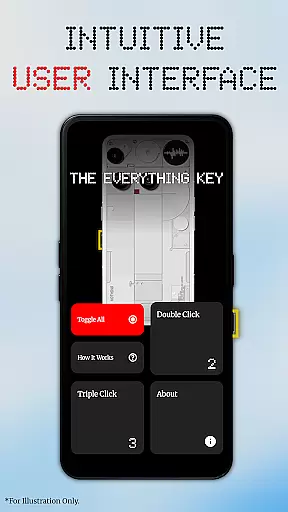
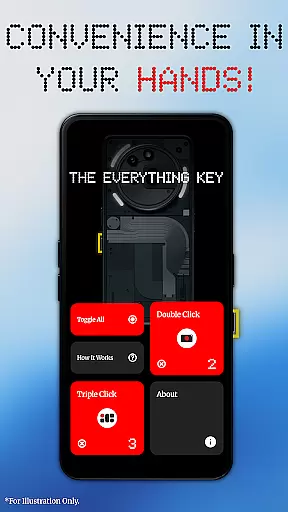
The intuitive user interface follows modern design principles, featuring a clean aesthetic that aligns with the Nothing design language. Users can easily view and manage their mapped applications through simple tap interactions. Advanced control features include individual action toggles, permanent un-mapping through the 'X' icon, and the ability to activate or deactivate all mappings simultaneously.
Unlike other similar tools, The Everything Key operates without requiring root access or complex ADB commands. It leverages Android's built-in Accessibility Service API specifically to detect KEYCODE_UNKNOWN events from the device's Essential Key, ensuring minimal system impact while providing maximum functionality.
The Everything Key excels in providing precise and effective core functionality by enabling users to remap their device's special hardware button. This app leverages Android's Accessibility Service to accurately detect specific hardware key presses, ensuring that each double or triple press triggers the intended action without fail.
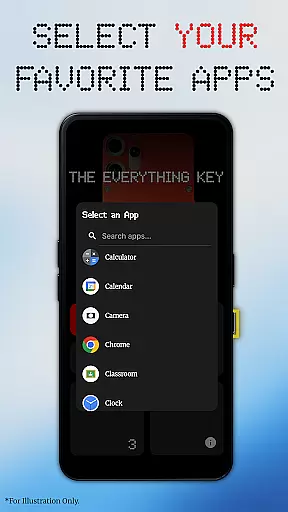
With a focus on speed and personalization, the app allows for both simple and advanced control options. Users can assign favorite apps to specific button actions, launch cameras, messaging apps, or utilities effortlessly. The intuitive interface ensures that these mappings are easily managed, with features like quick enable/disable and permanent un-mapping through clear visual indicators.
This remapping capability transforms a previously underutilized hardware feature into a powerful productivity tool. By streamlining access to frequently used applications, The Everything Key enhances operational efficiency, saving users time and effort in their daily tasks.
The Everything Key boasts a clean, minimalist interface inspired by the Nothing aesthetic, making it remarkably simple and intuitive to use. Upon first launch, the app guides users through selecting their specific device model and color, displaying a stunning, integrated background that feels native to the device.
Navigation within the app is straightforward, with clearly visible mapped apps and active status indicators. Advanced controls such as the 'Toggle All' feature allow users to activate or deactivate all mappings at once, adding an extra layer of convenience without complicating the user experience.
By prioritizing ease of use and visual clarity, The Everything Key ensures that even those unfamiliar with customization tools can quickly adapt and make full use of their deviceu2019s capabilities. This thoughtful design approach enhances overall usability while maintaining a sleek, modern appearance.
Intuitive interface
No root required
Advanced remapping
Privacy-focused
Device optimized
Limited device support
Accessibility needed
Specific use case
Third-party app
Learning curve

Just swipe the edge to do something!
 4.40
4.40
PDF Reader - Document Viewer: Read, Manage & Organize Your Documents
3.10
Unit and currency converter with easy and simple UI.
4.80
View detailed information about your Nissan Leaf the dealer never shows you.
4.10
Making emulation easy for everyone!
4.30
The Ultimate Flex Drivers Utility App - Convenient Tapping & Block Filters
4.70
Pro Emulator is an easy to use game console emulator for a range of consoles.
4.40
Fun lie-detection pranks for friends and parties.
3.80
Fast VPN USA for any country. Super secure VPN for calls, streaming, games, TV.
4.40
Connect wirelessly to your computer to watch movies, browse the web, play games
5.00
The one-and-only remote control for PC, Mac, and Linux
4.70
Optimize your WiFi network, turn your phone into Wifi Analyzer
4.70
Connect instantly to a fast, encrypted VPN with one tap
4.60
App to pay for FUTO Keyboard
4.60
Screen Mirroring for Roku Sticks, Roku TCL TV and Roku Hisense TV
4.50
Button mapper, mouse toggle, sleep timer and a lot of another features
4.50
Carry a FTP server in your pocket and avoid USB cables for file transfer
4.20
This app unlocks the Pro features of the Central for DayZ app
3.60
Save any video in HD - paste the link, download fast and watch offline.
4.2



User Reviews