
WiFi Pro FTP Server transforms your Android device into a fully functional FTP server, enabling seamless file transfers between your phone or tablet and other devices. With support for FTP over TLS/SSL (FTPS), this app ensures secure data exchanges while offering advanced configuration options such as customizable port numbers, home folders, and user credentials.
This application is particularly useful for users who wish to avoid cumbersome USB cables and prefer wireless file management. Whether you're transferring photos, movies, songs, or documents, WiFi Pro FTP Server provides a reliable solution that works over Wi-Fi and even in tethering mode (hotspot). Its intuitive interface makes it accessible for both casual users and tech-savvy individuals looking to optimize their workflow.
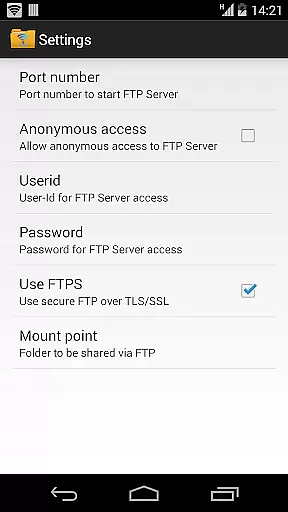
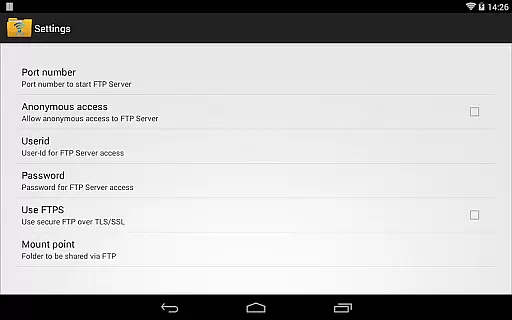
One of the standout features of WiFi Pro FTP Server is its comprehensive set of customization options. Users can configure port numbers above 1024, set up anonymous access if needed, and define specific home folders to streamline file organization. Additionally, the app supports secure FTP connections through FTPS, ensuring encrypted data transmission during file transfers.
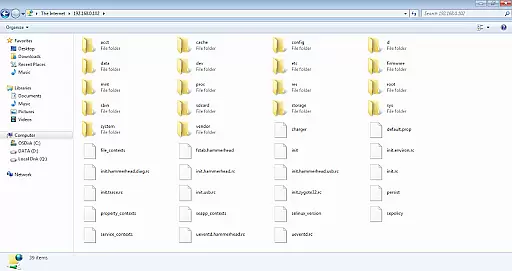
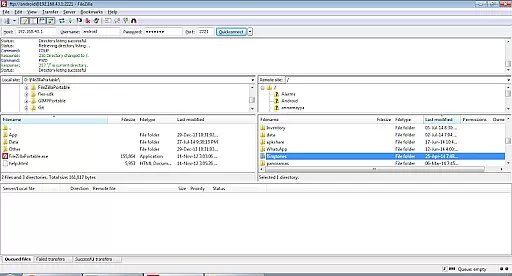
The app also offers practical usability enhancements like compatibility with popular FTP clients such as FileZilla and direct access via Windows File Explorer. By eliminating the need for physical cables, WiFi Pro FTP Server simplifies backup processes and allows users to manage files remotely. Furthermore, its ability to operate in Wi-Fi tethering mode extends its utility in environments without traditional network setups.
WiFi Pro FTP Server excels in providing a reliable and efficient file transfer solution. The app transforms Android devices into fully functional FTP servers, enabling seamless file sharing over Wi-Fi networks. With support for FTP over TLS/SSL (FTPS), it ensures secure data transmission while maintaining high performance.
The application allows users to configure key parameters such as port number, home folder, and login credentials. This flexibility ensures that the FTP server can be tailored to individual needs, enhancing both usability and security. By avoiding USB cables and supporting wireless file transfers, the app streamlines workflows for professionals and casual users alike.
One of the standout features is its compatibility with various network modes, including standard Wi-Fi and hotspot tethering. This versatility makes it an ideal tool for users who need consistent access to their files regardless of their network environment. The ability to customize settings like anonymous access further demonstrates the app's commitment to meeting diverse user requirements.
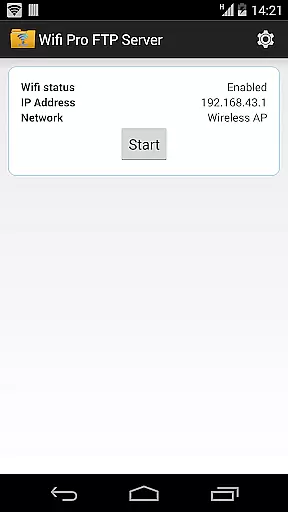
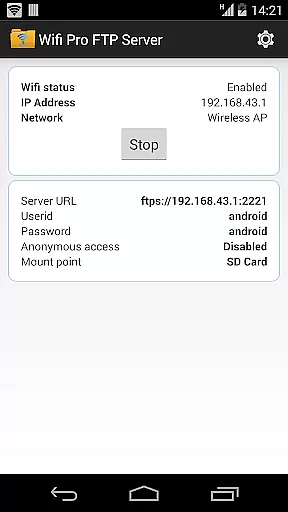
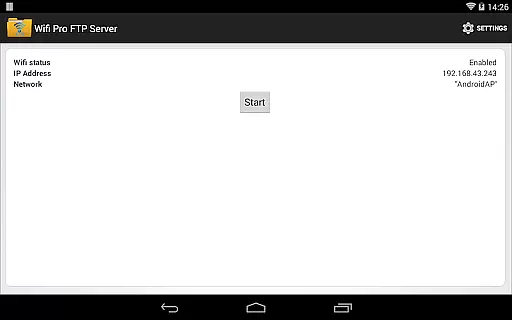
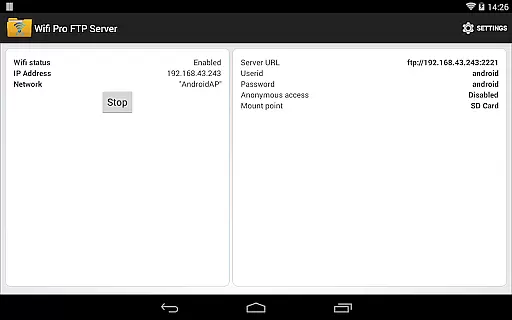
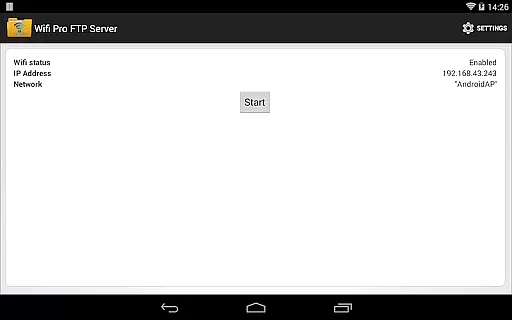
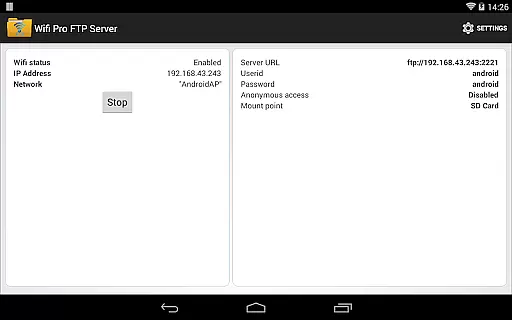
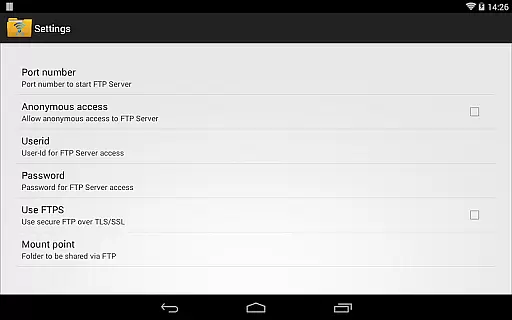
The user interface of WiFi Pro FTP Server is designed with simplicity and ease of use in mind. Upon launching the app, users are greeted with a clean layout that provides quick access to essential settings. Key configuration options such as port number, home directory, and authentication details are presented in an organized manner, making it easy for users to set up their FTP server without technical expertise.
Despite offering advanced features like FTPS support and customizable security settings, the app maintains an intuitive control scheme. Users can enable or disable features like anonymous access with just a few taps, ensuring that even those new to FTP technology can operate the server effectively. The inclusion of default settings that work out-of-the-box further enhances the user experience.
For users seeking additional guidance, the app provides clear instructions and links to resources such as FileZilla downloads. This attention to detail extends to the app's documentation of important considerations, like the distinction between FTPS and SFTP protocols. Such educational elements contribute to a more informed and confident user base while maintaining the app's straightforward operational approach.
User-friendly interface
Secure FTPS support
Customizable settings
Wireless convenience
Cross-device compatibility
No SFTP support yet
Limited low-port binding
Default security restrictions
Paid version only
Requires Wi-Fi

 4.50
4.50
Quickly switch to an encrypted DNS server on Android TV
4.50
A recovery soft,it features photo recovery, video recovery, file recovery.
3.40
An open-source APK explorer for Android!
4.10
ADB support Android 4.X-Android 13(Support wireless pair mode).No root required!
4.70
Mirror your screen to Chromecast and Android TV - Super fast and simple
4.60
With videos, electrical calculators, and built-in ebook, Ugly’s has your answer.
4.50
The Ultimate Bluetooth Keyboard & Mouse. Securely control your PC, Mac, and more
4.50
The ideal app to be the digital eye of your family
3.40
Best leveling tool for your Android device. Hang paintings like a pro.
4.90
WiFi Signal Strength Meter help you detect WiFi Signal Strength in real time.
4.80
The Ultimate Flex Drivers Utility App - Convenient Tapping & Block Filters
4.70
FV File Manager Pro, Fast and powerful file manager for Android
4.60 4.50
4.50
Use your phone as a webcam on your computer over WiFi or USB.
4.40
Mirror your screen to Fire TV - Super fast and simple
4.40
Clean up large files and similar photos, fast and easy to use
4.40
1-Click close all background apps on Android TV
3.90
Amateur Radio app for APRS: Track friends, exchange messages, get tactical info.
3.90



User Reviews