
Files by Google is a powerful file management tool designed to help users efficiently organize, secure, and optimize their mobile device storage. The app provides cleaning recommendations to free up space, allowing users to easily manage photos, videos, documents, and apps. With features like Quick Share for fast offline file transfers and cloud backup options, it ensures both convenience and security.
The app also offers advanced functionalities such as end-to-end encrypted file sharing, playback controls for offline media, and smart suggestions that improve with usage. Whether you need to find files faster, protect sensitive data, or back up important content, Files by Google delivers a comprehensive solution for managing your digital assets effectively.
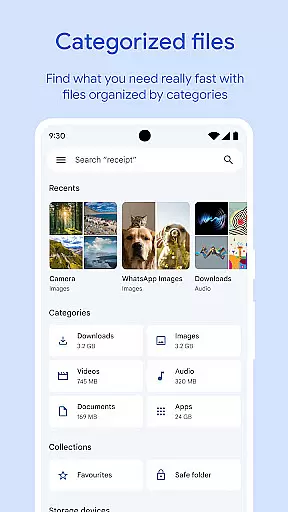
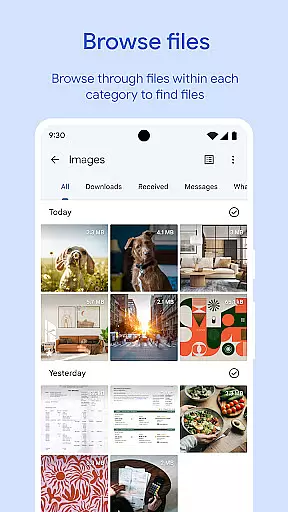
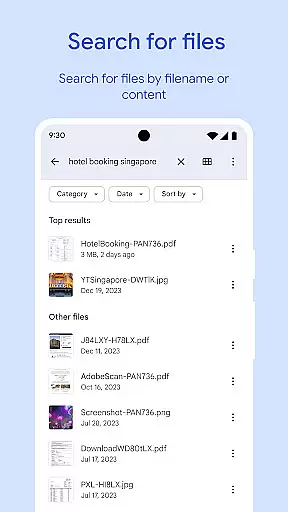
One of the standout features of Files by Google is its intuitive interface that simplifies file management. Users can quickly locate files using the search function or browse through categorized sections like photos, videos, and documents. Sorting options by size or type make it easy to identify space-consuming items.
Another key feature is Quick Share, which allows users to transfer files at speeds up to 480 Mbps without requiring an internet connection. This is complemented by robust security measures, including end-to-end encryption during transfers and the ability to secure files with a unique PIN or pattern lock separate from the device's primary lock screen.
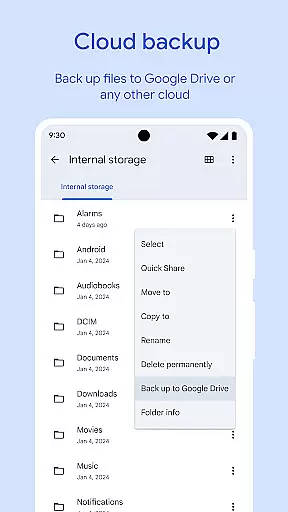
Additionally, the app supports seamless integration with cloud services like Google Drive, enabling users to back up files and free up device storage. Smart recommendations further enhance productivity by suggesting actions such as deleting duplicate files or clearing cached data, ensuring optimal performance over time.
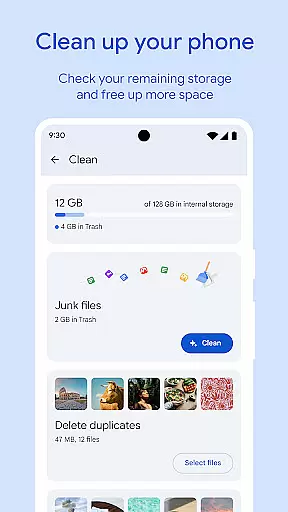
Files by Google excels in providing accurate and effective core functions that cater to users' file management needs. The app offers precise recommendations for freeing up space by identifying old photos, duplicate files, and cache data. This targeted approach ensures users can efficiently manage their device storage.
The app's search functionality allows for quick location of specific files, with intuitive browsing options that save time when managing photos, videos, and documents. Sorting capabilities enable users to understand which files consume the most space, empowering them to make informed decisions about their data.
With advanced features like Quick Share, users can transfer files at high speeds of up to 480 Mbps without an internet connection. The transfers are secured with end-to-end encryption, ensuring both speed and security are prioritized. These robust functionalities demonstrate the app's commitment to delivering a seamless user experience.
Moreover, Files by Google maintains efficiency by using less than 20 MB of storage space, making it lightweight yet powerful. Its ad-free design further enhances usability, allowing users to focus on managing their files without distractions. This combination of precision, speed, and security establishes Files by Google as a reliable tool for effective file management.
Files by Google stands out for its simple and intuitive interface, designed to make file management accessible even for novice users. The clean layout provides a clear view of available storage space on the device, SD card, and USB drive, presenting information in an easily digestible format.
Navigating through different file types such as photos, videos, and documents is straightforward thanks to well-organized categories and a powerful search function. Users can effortlessly browse their media or locate recently downloaded items, reducing the time spent on file management tasks.
The app also includes smart recommendations that improve over time, offering personalized suggestions for optimizing storage and protecting the device. These insights appear in an unobtrusive manner, maintaining the appu2019s overall simplicity while adding significant value for the user.
Additional features like playback controls for offline media and secure file sharing via Quick Share integrate seamlessly into the interface without overwhelming the user. By balancing comprehensive functionality with an intuitive design, Files by Google ensures that users of all technical levels can manage their files with confidence and ease.
User-friendly interface
Fast offline sharing
Secure file encryption
Smart cleanup suggestions
Lightweight design
Limited third-party integrations
No advanced editing tools
Occasional bugs reported
Basic media player
Cloud dependency for backups

Just swipe the edge to do something!
 4.40
4.40
Unlock your Essential Key. Create custom shortcuts to your favorite apps!
4.4
Keep track of your Palia friendships, tasks, and inventory with Palia Notebook
4.60
Small and simple app to Verify Root Access and BusyBox Install!
4.70
Navigate with Ease and Style
4.90
Powerful collection of electronics tools and reference.A must for any enthusiast
4.90
The Ultimate Flex Drivers Utility App - Convenient Tapping & Block Filters
4.70
Create your own custom widget with endless possibilities
3.90
NFC Tools can read and write NFC tags.
4.70
WiFi Signal Strength Meter help you detect WiFi Signal Strength in real time.
4.80
Bedrock Together: Join any bedrock server on Xbox/PS
4.80
Remote Play with FSR upscaling, low latency & full controller support
4.80
App to pay for FUTO Keyboard
4.60 4.50
4.50
The Ultimate Bluetooth Keyboard & Mouse. Securely control your PC, Mac, and more
4.50
Quickly & easily calculate the spacing of handrail balusters
4.20
Screen Mirroring with sound for Samsung TV, LG TV, Sony TV, Smart TV and Browser
4.20
1-Click close all background apps on Android TV
3.90
Safely recover deleted photos, videos, and files with a single easy tap.
3.70



User Reviews