
BedrockTogether (Pro) is an innovative networking tool designed to simplify server connections for Minecraft Bedrock Edition players. This ad-free version allows any Bedrock server to appear as a LAN server on Xbox or PlayStation clients, enabling seamless connections without DNS rerouting. While Realms and Nintendo Switch compatibility aren't supported, the app provides reliable performance for other platforms.
The application's core functionality lies in its ability to facilitate direct server connections through a simple four-step process. Users can input their server details, launch the connection through the app, and access their desired server through the game's Friends tab. The tool automatically handles network configurations within the local area network, making multiplayer gaming more accessible for both casual and experienced players.
This tool particularly benefits families and gaming groups who frequently play together on shared networks. By eliminating complex network setup procedures, BedrockTogether (Pro) makes it easier for players to focus on their gaming experience while ensuring stable and consistent server connections.
BedrockTogether (Pro) distinguishes itself through several key features that enhance the Minecraft connection experience. The application's primary advantage is its ability to transform any Bedrock server into a recognizable LAN server for console clients, specifically supporting Xbox and PlayStation platforms. This feature eliminates the need for complicated DNS rerouting methods that often confuse users.
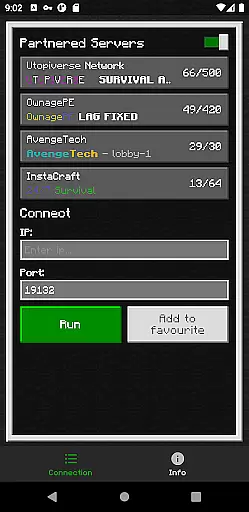
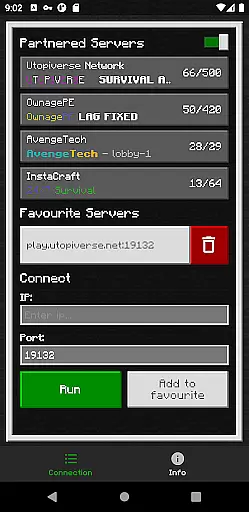
The tool incorporates a straightforward user interface with essential connection parameters including server IP and port fields, plus a simple Run button for activation. It also includes built-in troubleshooting guidance to help users verify their network configurations and resolve common connection issues. The application maintains active communication channels through Discord and Telegram, where users can report bugs and receive support.
Additional notable features include its lightweight design that minimizes system resource usage and its automatic termination function after successful client connections. These elements contribute to a seamless user experience while maintaining network stability during gameplay sessions.
BedrockTogether (Pro) delivers exceptional core functionality by enabling Bedrock Edition servers to appear as LAN servers on Xbox or PlayStation clients. This allows users to connect seamlessly without relying on DNS rerouting, ensuring a smooth and reliable connection process.
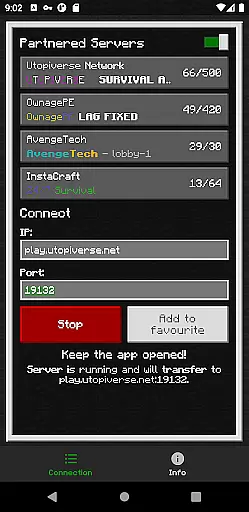
The app's accuracy is demonstrated through its straightforward setup: users simply input the server IP and port, click 'Run,' and navigate to the 'Friends' tab in Minecraft. The LAN tab then displays the server, ready for connection. This precise functionality eliminates unnecessary steps, making it easy for players to join their desired servers quickly.
Effectiveness is further highlighted by the app's compatibility with most devices on the same LAN network. By ensuring that gaming consoles and mobile devices are connected to the same network, BedrockTogether (Pro) provides a dependable solution for Minecraft enthusiasts looking to enhance their multiplayer experience.
With a focus on user-friendly design, BedrockTogether (Pro) offers an intuitive interface that simplifies the entire connection process. The layout is clean and uncluttered, allowing users to enter server details effortlessly and initiate connections with a single click.
Its straightforward instructions guide users through each step, from entering server information to launching the game and accessing the 'Friends' tab. This logical flow ensures that even those new to networking setups can successfully operate the app without confusion.
Additionally, BedrockTogether (Pro) enhances intuitiveness by automatically closing after the client joins the server, reducing manual intervention. Such thoughtful design choices make this tool not only powerful but also exceptionally easy to use, catering to both novice and experienced Minecraft players alike.
Seamless connectivity
User-friendly interface
Reliable performance
Active support channels
Efficient resource usage
No Nintendo support
Limited platform scope
Network dependency
Third-party status
Basic UI design

Quickly switch to an encrypted DNS server on Android TV
 4.50
4.50
PDF Reader - Document Viewer: Read, Manage & Organize Your Documents
3.10
1-Click close all background apps on Android TV
3.90
Head tracking for PC sim games such as MSFS 2024 or Elite:Dangerous. No headset!
4.50
Canon PRINT is a companion app for your Canon printer.
4.60
Monitor car performance in real time and troubleshoot malfunctions.
4.80
Planner and Tracker for Stardew Valley
4.60
Protect your device with antivirus, storage cleanup, and system monitoring
4.70
Your personal health butler
3.60
Change your GPS location instantly. Simulate routes anywhere in the world.
4.90
The ultimate tool for network analysis, wifi scanning and problem detection.
4.90
Excellent scientific calculator with symbolic algebra, integrals, derivatives
4.80 4.50
4.50
Button mapper, mouse toggle, sleep timer and a lot of another features
4.50
Remote for Roku, Fire TV, Samsung TV, LG TV, Android TV, Chromecast and VIZIO TV
4.20
Quickly & easily calculate the spacing of handrail balusters
4.20
Automate everything from settings to photos, SMS to speech. ADC2 prize winner.
4.10
Amateur Radio app for APRS: Track friends, exchange messages, get tactical info.
3.90
A non-root local ADB shell client. READ BELOW!
3.40



User Reviews