
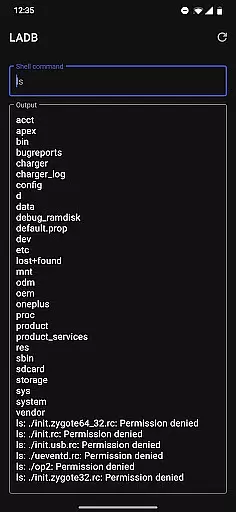
LADB — Local ADB Shell is a powerful tool designed for developers and advanced users who need to execute ADB commands directly on their Android devices without requiring a computer. The app bundles an ADB server within its libraries, enabling local shell access through Android's Wireless ADB Debugging feature.
With LADB, users can perform various debugging and device management tasks directly from their phone or tablet. This includes managing files, inspecting system properties, and running shell commands. It is particularly useful for troubleshooting device issues, automating tasks, and testing applications during development.
The app requires careful initial setup, including enabling Wireless Debugging in the device settings and pairing it with LADB using a unique code. Once configured, LADB provides a reliable way to interact with your device's system locally, making it an essential tool for Android power users.
LADB offers several notable features that make it stand out as a local ADB solution. First, it integrates an ADB server directly into the app, eliminating the need for external tools or connections. This allows users to run shell commands, manage files, and debug applications directly from their Android device.
Another key feature is its compatibility with Android's Wireless ADB Debugging. By pairing the device with LADB using a unique code and port, users can establish a secure local connection. The app also supports manual pairing for cases where Assisted Pairing mode encounters issues, ensuring reliable connectivity even with newer Android versions.
Additionally, LADB emphasizes user privacy and control. The app operates entirely offline, ensuring that no device data is sent outside the app. Its open-source nature, based on a modified GPLv3 license, allows developers to review and modify the code while respecting the request not to publish unofficial builds to app stores.
LADB u2014 Local ADB Shell offers a unique solution by bundling an ADB server within the app itself. This allows users to execute ADB commands directly on their Android devices without requiring a computer. The core function centers around enabling local ADB operations through Wireless ADB Debugging, which bridges the communication between the internal server and the device.
The app ensures accuracy by facilitating precise pairing procedures. Users can establish a stable connection by entering specific pairing codes and ports, ensuring that commands are transmitted effectively. This eliminates the need for USB connections, providing a seamless debugging experience.
For users experiencing compatibility issues, such as with Shizuku, LADB provides troubleshooting steps like clearing app data and rebooting. These measures ensure that the app maintains its functional integrity across different scenarios and device environments.
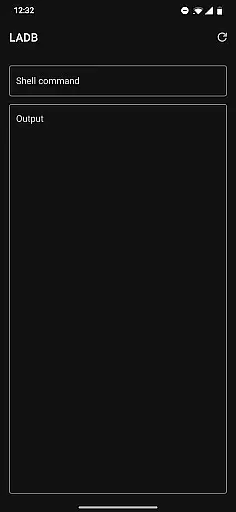
Despite the technical nature of ADB operations, LADB maintains an intuitive interface that simplifies complex processes. The app supports split-screen mode, allowing users to manage wireless debugging settings alongside the main LADB interface. This design choice reduces the complexity of initial setup and ensures that critical dialogs remain accessible.
Additionally, the app incorporates straightforward error-handling mechanisms. Most issues can be resolved using simple in-app solutions, such as restarting or clearing data, which are easy to execute even for less technical users. This contributes to a smoother overall user experience.
While certain advanced features may require additional steps, such as manual pairing, the app includes comprehensive support resources. Video tutorials and direct email assistance further enhance the accessibility of the app, making it approachable for users of varying expertise levels.
Powerful local ADB
No USB connection
Offline operation
Open-source code
Manual pairing option
Complex setup
Incompatible apps
Requires reboot
Occasional errors
Advanced users only

Enjoy smooth gameplay with Game Booster
 4.90
4.90
App to pay for FUTO Keyboard
4.60
Navigate with Ease and Style
4.90
Making emulation easy for everyone!
4.30
Mirror your screen to Fire TV - Super fast and simple
4.40
Connect wirelessly to your computer to watch movies, browse the web, play games
5.00
Game Booster, GFX Tool is now compatible with newer game update
4.50
Screen recorder with audio to record high-quality videos and take screenshots.
4.40
Enhance your Beats
3.70 4.50
4.50
Just swipe the edge to do something!
4.40
Use your phone as a webcam on your computer over WiFi or USB.
4.40
Clean up large files and similar photos, fast and easy to use
4.40
Complete kernel toolbox with features to manage and tweak your rooted device
4.30
Fluid navigation gestures for all of us!
4.30
Quickly & easily calculate the spacing of handrail balusters
4.20
View detailed information about your Nissan Leaf the dealer never shows you.
4.10
Automate everything from settings to photos, SMS to speech. ADC2 prize winner.
4.10
PDF Reader - Document Viewer: Read, Manage & Organize Your Documents
3.10



User Reviews