
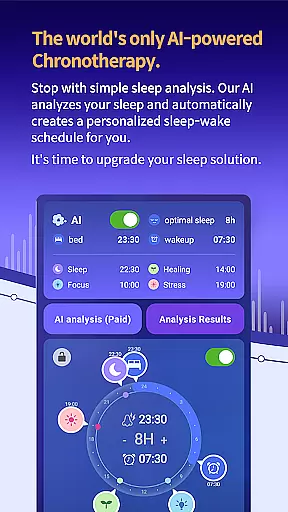
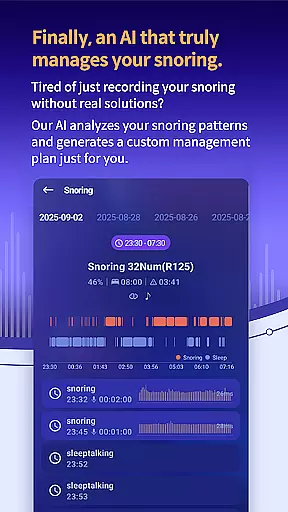
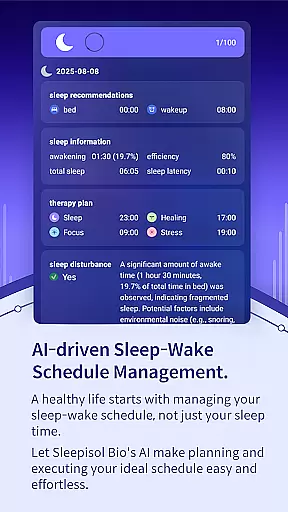
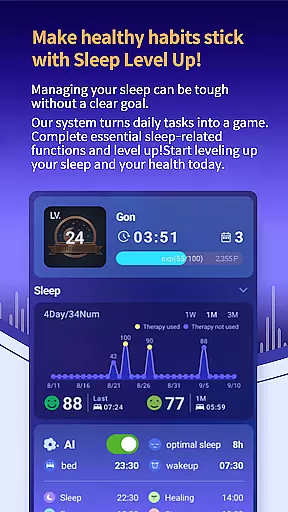
SleepisolBio is a pioneering sleep management application that leverages circadian rhythm analysis to promote healthier sleep patterns. The app utilizes AI technology to provide personalized sleep assessments and recommendations, creating an optimal chronotherapy plan tailored to individual needs. Users can benefit from detailed reports on sleep quality, snoring patterns, and circadian rhythm metrics.
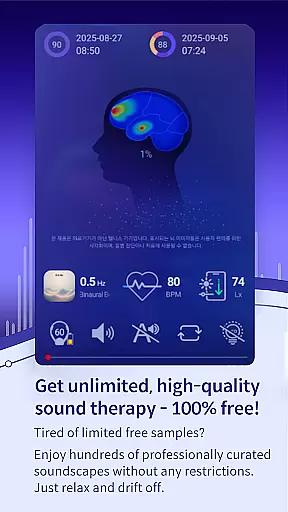
The app offers both free and premium features, including various sound-based therapy options and mindfulness content. With high-quality audio at 320kbps, users can access different types of therapy sessions designed for sleep, focus, healing, and stress management. SleepisolBio also integrates real-time biofeedback through heart rate monitoring, ensuring the therapy provided is as effective as possible.
Designed with user experience in mind, SleepisolBio prioritizes essential sleep data on its interface, making it easy for users to quickly access their most relevant information. The app supports a holistic approach to sleep management, covering everything from daily activities to bedtime routines, and includes various alarm systems and missions to gently wake users up in the morning.
SleepisolBio stands out with its comprehensive suite of features designed to enhance sleep quality through personalized management. One of its core functionalities is the AI-driven analysis of sleep patterns and circadian rhythms, which results in customized sleep schedules and therapy recommendations. This feature ensures that users receive the most effective treatment based on their unique physiological data.
In addition to personalized sleep plans, SleepisolBio provides a variety of sound therapies and mindfulness content. These include 48 sound therapies categorized into sleep, focus, healing, and stress, along with brainwave therapies such as Theta, Alpha, Beta, and Gamma waves. The app also features bedtime stories and real-time generated sound therapies like monaural beats, binaural beats, and isochronic tones, all produced in high-quality stereo sound.
Another notable feature is the integration with wearable devices like Samsung Galaxy Watch and Leesol's Sleepisol device, which allows for real-time biofeedback during therapy sessions. The app also supports Google Health Connect, enabling users to visualize health metrics such as heart rate, blood pressure, and body temperature in relation to their sleep patterns. This comprehensive approach ensures users have all the tools they need for effective sleep management.
SleepisolBio offers seamless companion app integration, ensuring that users can synchronize and manage their sleep data across multiple devices effortlessly. This feature is crucial for those who use both a smartphone and a wearable device to track their sleep patterns.
The app integrates with Samsung Galaxy Watch and Leesol's Sleepisol device, allowing real-time heart rate monitoring during therapy sessions. This synchronization ensures that all sleep-related data, including circadian rhythms and snoring patterns, are accurately captured and analyzed.
Users benefit from having a unified view of their sleep health, regardless of the device they use. The ability to access detailed sleep reports and personalized therapy recommendations from either device enhances convenience and supports better sleep management.
This integration highlights SleepisolBio's commitment to providing a comprehensive and flexible sleep management solution, making it easier for users to maintain consistent tracking and improve their overall sleep quality.
Device compatibility is a significant advantage of SleepisolBio, particularly its support for Wear OS. This compatibility ensures that users with Android Wear devices can fully utilize the app's features without any compromise in functionality or user experience.
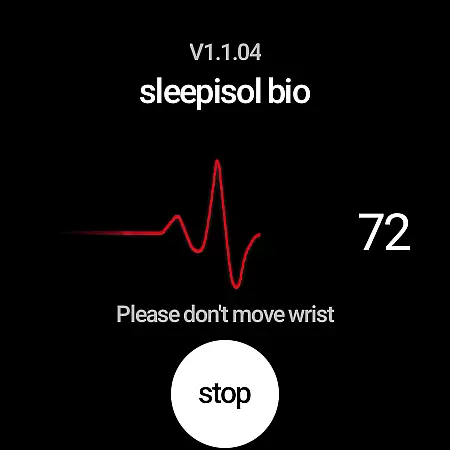
SleepisolBio's Wear OS app captures real-time heart rate data during therapy sessions, enhancing the accuracy of sleep analysis. By leveraging the capabilities of Wear OS, the app provides users with precise biofeedback, which is essential for effective sleep management.
The compatibility extends the app's utility beyond smartphones, allowing users to engage with their sleep data on the go. This flexibility is vital for individuals who lead active lifestyles and require continuous monitoring throughout the day.
Overall, SleepisolBio's compatibility with Wear OS devices underscores its versatility and adaptability, catering to a broad range of users seeking advanced sleep solutions. This ensures that every user can find a suitable device to integrate into their sleep management routine.
Personalized sleep plans
High-quality audio content
Real-time biofeedback
Comprehensive health metrics
User-friendly interface
Premium features require payment
Advanced features need additional devices
Limited medical application
Data stored locally only
Complex for beginners

Walking app for weight loss: walk & step tracker, pedometer, indoor treadmill
 4.60
4.60
A heartwarming Christmas scene featuring a cute image of Santa and Rudolf
4.2
Watch face designed for Thanksgiving Day. 7 Background Styles included.
3.20
Connect to your Bluelink equipped Hyundai vehicle from your smartphone.
4.50
Professional weather radar and more
3.90
A digital watch face that celebrates Christmas.
4.00
Simple, helpful messaging by Google
4.60
Want to take charge of your health? Let Google Fit help you reach your goals.
3.50
Track your active life in one place and share the journey with friends.
4.40
The Chevron App allows you to pay for fuel from the comfort of your car!
4.80
Hyperlocal rain alerts by MyRadar using patent-pending technology, radar & more
4.80
Reliable phone calls with spam protection, caller ID and more helpful features
4.40
Christmas watch face. For Wear OS devices.
4.30
Calming & relaxing sounds for sleeping and stress relief. Stay focused all day!
4.20
Elegant animated Christmas tree with multiple customization options
4.20
Connect, create, and collaborate with Gmail, part of Google Workspace.
4.10
Authentic military-tactical design with ZULU time! Realistic and functional!
3.80
an Analog Watch Face for winter season with freeze winter background for Wear OS
4.4
3 Complications. All shadow on/off. 30 Themes color palette...
4.3



User Reviews