
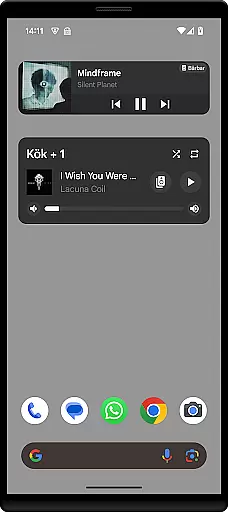
Sonos Widget is a powerful tool designed for music enthusiasts who want seamless control over their Sonos system directly from their smartphone's home screen. This app offers two distinct widget options - Compact and Enhanced, allowing users to customize their experience based on their needs.
With features like volume control, grouping, playback controls (Play, Pause, Next, Previous), and support for modes such as Shuffle and Repeat, Sonos Widget ensures you have complete control over your audio environment. Whether you're at home or entertaining guests, this app provides quick access to essential functions without needing to open the main Sonos application.
The Sonos Widget stands out with its dual-widget offering: Compact and Enhanced. The Compact widget provides a minimalist interface focusing on essential controls, while the Enhanced widget delivers a more detailed view with additional functionalities. Both widgets display relevant metadata, ensuring you always know what's playing.
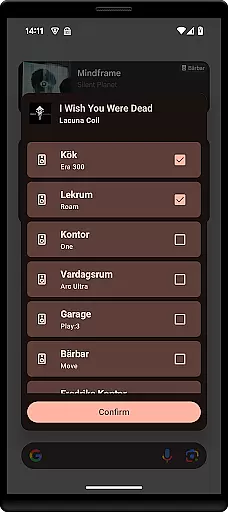
Volume control is precise and responsive, allowing users to adjust sound levels effortlessly. Grouping functionality enables you to manage multiple speakers within your Sonos ecosystem easily. Playback controls include standard actions like Play, Pause, Next, and Previous, along with advanced options such as Shuffle and Repeat modes, giving users comprehensive command over their listening experience.
When it comes to managing your music library, Sonos Widget offers a seamless experience. The application allows you to control playback, adjust volume, and manage grouping directly from your home screen. This ensures that your entire music collection is easily accessible without any need to open the full Sonos app.
The widget supports various modes such as Shuffle and Repeat, giving users flexibility in how they enjoy their music. By displaying relevant metadata, it enhances the user's interaction with their music library, making it more informative and engaging. These features collectively ensure that users can enjoy a wide range of music options while maintaining an intuitive interface.
Regarding copyright authenticity, although Sonos Widget itself does not host or distribute music, it provides tools for users to manage content already available through their Sonos system. This means that all tracks played via the widget are sourced from the user's existing Sonos setup, ensuring compliance with copyright laws and regulations.
Sonos Widget excels in delivering high-quality audio experiences. By offering precise volume control and supporting different playback modes like Play, Pause, Next, and Previous, the widget ensures that users can tailor their listening sessions according to their preferences. This level of customization helps maintain optimal audio quality at all times.
In addition to basic playback controls, the widget also supports advanced features such as Shuffle and Repeat modes. These functionalities allow users to explore their music library in diverse ways, enhancing the overall auditory experience. With these options, listeners can enjoy a dynamic range of audio settings that cater to various moods and occasions.
Furthermore, the Enhanced widget variant provides even more detailed metadata about the currently playing track. This additional information enriches the user's understanding of the audio content, contributing to a more immersive listening session. Overall, Sonos Widget prioritizes both convenience and quality, ensuring that every note sounds just right.
User-friendly interface
Customizable widgets
Comprehensive playback controls
Responsive volume adjustment
Efficient speaker grouping
Limited to Sonos systems
No official endorsement
Setup can be complex
Requires constant connectivity
Occasional bugs reported

 4.70
4.70
Offline and always ad-free - stream in the highest quality available.
4.10
Save hundreds of dollars for a physical strobe tuner and instead use this app.
4.50
Brian Eno and Peter Chilvers’ acclaimed music app Bloom, radically reinvented.
4.80
USB audio recording and playback finally possible on Android 3.1 or higher!
3.90
AI Music Maker: Generate And Compose AI Tunes & AI Songs & AI Music & AI Melody!
4.60
Listen radio AM / FM Stations. Live AM / FM Radio App Station. Radio Com.
4.70
Learn and play 2M+ music tabs & chords on guitar, ukulele, bass, and more
4.30
Play your music offline without limits
4.80
Play your hearts out on TouchTunes jukeboxes & connect with fellow music lovers.
4.80
Gorgeous UI, Powerful music Search and Equalizer, the great choice for you!
4.70
Taal player that lets you sing any Indian & Western song with Tabla & Tanpura
4.60
Visualize the guitar fretboard, master scales & play through changes like a pro!
4.50
Guzheng Master supports many playing techniques as an acoustic Guzheng
4.50
10-Band Audio Equalizer, Sound / Bass Booster for Spotify Users & Music Players
4.40
Play KORG’s revolutionary touch-based instrument on a variety of devices.
4.40
The Music Journey in Your Hands
4.30
A sleek, no-frills player designed for true music lovers.
4.20
Music Streaming suite for Ampache, Nextcloud Music and compatible backends.
4.1



User Reviews