
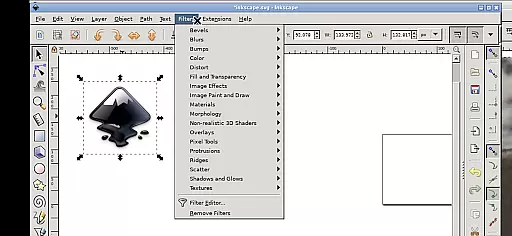
Inky is a powerful vector graphics editor that brings the full functionality of Inkscape to your mobile device. This professional-grade application allows users to create and edit vector images in Scalable Vector Graphics (SVG) format, while also supporting other file formats for import and export. With its comprehensive feature set, Inky empowers designers and artists to produce high-quality vector artwork directly on their Android devices.
The app supports primitive vector shapes such as rectangles, ellipses, polygons, arcs, spirals, stars, and 3D boxes, along with text manipulation capabilities. Users can fill objects with solid colors, patterns, or gradients, and adjust transparency levels for both fills and strokes. The application also enables tracing of raster graphics, making it possible to convert photos into vector graphics. These robust features make Inky an essential tool for graphic designers who need professional-grade vector editing capabilities on the go.
Inky offers an impressive array of features that mirror the desktop version of Inkscape. The app supports various touch gestures for intuitive navigation, including one-finger tapping for left-clicks, pinch-to-zoom functionality, and two-finger scrolling. Users can pan by pressing and holding, then sliding one finger - particularly useful when working on detailed designs at high zoom levels. The app also provides access to system files through helpful links in the home directory, eliminating the need for cumbersome file importing and exporting.
Advanced design tools include shape transformation options such as moving, rotating, scaling, and skewing. The application maintains professional-grade vector editing capabilities while adapting to the mobile environment. Notably, Inky runs under GPLv3 licensing and provides complete source code transparency. While developed independently from the main Inkscape team, this adaptation successfully brings Linux-based vector editing to Android devices, making professional design tools accessible anywhere, anytime.
Inky offers a comprehensive suite of creative tools that cater to both professional designers and hobbyists. The app provides full-featured vector graphics editing capabilities, enabling users to create intricate designs with ease.
With support for primitive vector shapes such as rectangles, ellipses, polygons, arcs, spirals, stars, and 3D boxes, Inky allows for versatile design options. Users can fill these objects with solid colors, patterns, or gradients while adjusting transparency levels for unique visual effects.
The ability to embed and trace raster graphics means that users can transform photos and other raster images into scalable vector artwork. This feature expands the creative possibilities and ensures that Inky remains a powerful tool in any designer's arsenal.
Inky stands out with its canvas and format flexibility, allowing creators to work without constraints. The app supports Scalable Vector Graphics (SVG) as its primary format but also enables importing and exporting of various other file types.
Designers can manipulate their creations through transformations like moving, rotating, scaling, and skewing. These functions provide complete control over the design process, ensuring precision and adaptability in every project.
For those who require access to files across different platforms, Inky facilitates seamless integration by linking useful directories directly within the home folder. This setup eliminates the need for cumbersome import/export processes, streamlining workflow efficiency.
User-friendly interface
Professional-grade tools
Comprehensive file support
Open-source flexibility
Convenient mobile access
Steep learning curve
Small screen limitations
Performance constraints
Limited stylus support
Complex navigation

Download now for a stylish and functional timepiece
 4.2
4.2
Stylish letters, Stylish Keyboard, Symbols, Emojis, Cool nickname
4.40
Unleash your drawing and painting potential
4.50
AI Art Generator transforms your words into AI generated art & paintings.
3.70
Draw glowing spinners, relax, and spin your creative art
4.60
Minecraft & Roblox Clothes
4.70
Retouch photos. Create or edit images. Endless capabilities.
2.70
Video AI: Revolutionize Your Content Creation with Advanced Video Generation
4.50
An intuitive, high-performance painting app that lets you focus on creating
4.40
The ultimate tool for creating animations
4.60
AI Tattoo Generator: Create Tattoo Designs & Get Ideas! Ink & Stencil Maker
4.50
Everything you need to create hand drawn animation, anywhere you go!
4.40
Trace, draw, and create art with AR - from memes to masterpieces!
4.30
Sketch and paint on your device with the feel and freedom of drawing on paper
4.00
Create sweet, cool and unique couple avatars easily, in just a few steps!
3.40
Vidu is an AI video generator made for creators and aspiring makers.
3.30
Art of Combination Wear OS Watch faces (for Wear OS 5+ devices)
3.00
Transform photos into amazing monochrome dither art with professional algorithms
4.3
Art of Combination Wear OS Watch faces
4.5



User Reviews