
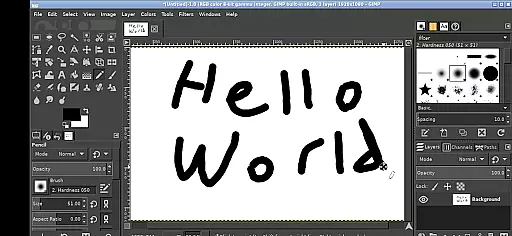
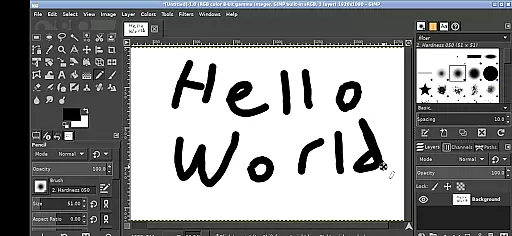
GIMP, the GNU Image Manipulation Program, brings professional-grade image editing to your mobile device. This full-featured application supports a wide array of tools and features expected from desktop-grade software.
Designed for both creative professionals and hobbyists, GIMP offers advanced photo retouching, image composition, and image authoring capabilities. Its adaptability makes it suitable for tasks ranging from simple drawings to intricate graphic design projects.
With its Android adaptation, users can seamlessly access their files across the device, edit images on-the-go, and utilize familiar desktop-like controls optimized for touchscreens. Whether you're an artist or a photographer, GIMP provides the tools necessary to produce high-quality work directly from your mobile device.
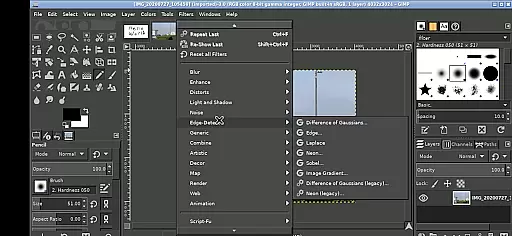
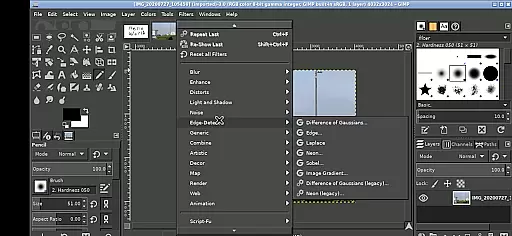
GIMP stands out with its extensive set of features tailored for professional image editing. The app includes advanced tools such as customizable brushes, layers, filters, and various selection options that allow precise control over every aspect of your artwork.
One of the key highlights is its ability to mimic desktop functionality on mobile devices. Users can perform complex tasks like photo retouching, free-form drawing, and resizing images with ease. Additionally, GIMP's interface has been adapted for Android, allowing intuitive gestures such as pinch-to-zoom, tap-to-click, and pan with a press-and-hold action.
Another notable feature is the seamless integration with Android's file system, enabling users to access documents and media without cumbersome imports or exports. With these robust capabilities, GIMP empowers users to create and edit graphics with precision and efficiency, rivaling many paid alternatives in the market.
In the realm of digital art and design, having access to a comprehensive suite of creative tools is paramount. GIMP, the GNU Image Manipulation Program, stands out by offering an extensive array of features that cater to both amateur enthusiasts and professional designers. This includes advanced photo retouching, image composition, and image authoring capabilities.
GIMP's functionality spans from basic editing tasks to complex graphic design projects. Users can leverage its sophisticated selection tools, path editing, and customizable brushes for detailed work. The program supports various plugins, enabling additional effects and filters that expand its utility beyond traditional image editing software.
For those who demand precision and flexibility in their creative process, GIMP delivers with layers, channels, masks, and alpha blending. These features allow for non-destructive editing, empowering users to experiment without compromising original artwork. Moreover, GIMP facilitates color management for maintaining color integrity across different devices and workflows.
Flexibility in canvas size and format compatibility is crucial for accommodating diverse project requirements and ensuring seamless integration into various workflows. GIMP excels in this area by providing adaptable canvas dimensions and supporting multiple file formats, making it suitable for a wide range of artistic endeavors.
Users can easily adjust canvas sizes to fit specific needs, whether working on small icons or large-scale prints. GIMP also allows for resolution changes, catering to both screen display and high-quality print outputs. Its ability to handle layers and transparency ensures that complex compositions remain manageable and visually coherent.
Furthermore, GIMP supports industry-standard file formats such as JPEG, PNG, GIF, and TIFF, alongside its native XCF format. This versatility enables smooth collaboration and sharing across platforms. Additionally, GIMPu2019s integration with Android devices through tailored interfaces enhances accessibility, allowing creatives to produce quality work on-the-go using touch controls optimized for mobile environments.
Professional-grade tools
Extensive customization options
Free and open-source
Active community support
Cross-platform compatibility
Steep learning curve
Complex interface
Performance may vary
Limited official support
Requires technical knowledge

Download now for a stylish and functional timepiece
 4.2
4.2
Transform photos into amazing monochrome dither art with professional algorithms
4.4
Castle is social media for creating and playing games!
4.60
Painting, drawing, & sketching
4.50
Image resizer to resize, crop, rotate, flip, change dpi photo or picture in bulk
4.60
2D animation studio for Android tablets - unlimited layers, infinite timeline
4.70
Everything you need to create hand drawn animation, anywhere you go!
4.40
Explore future self face age filter & remove background image for a unique look.
3.50
An intuitive, high-performance painting app that lets you focus on creating
4.40
Make your phone cooler and have a fantastic experience
4.80
Draw beautiful mandala's very easily
4.60
Just trace a projected picture on paper and color! Draw & Paint with AR drawing
4.40
Draw, make movies & animate cartoons easily with our 2D animation maker app
4.40
Customizable Outlined Fonts. Watch Face Format. Battery friendly Digital Clock.
4.20
Digital Drawing: Draw & Paint
4.10
Unleash Your Creativity with Draw Cartoon - AR Drawing App
4.10
Powerful home decoration & house design that allows you to design dream home.
3.80
Art of Combination Wear OS Watch Faces
3.30
Android 14 style widgets and wallpapers app.
4.2



User Reviews