
Callipeg is a professional-grade 2D hand-drawn animation application tailored for both seasoned animators and beginners. The app provides an extensive suite of tools akin to a full-fledged animation studio, all accessible on Android devices. With support for frame-by-frame and keyframe animation, storyboard development, and complete shot production, Callipeg enables creators to produce high-quality animations directly on their tablets.
The platform offers advanced features such as adjustable frame rates up to 60 frames per second, canvas sizes reaching 4K resolution, and unlimited layer support for various media types including drawing, video, and audio. Its intuitive interface supports stylus input, customizable workspaces, and flexible import/export options in multiple formats like .mp4, .gif, and .psd. These capabilities ensure that users can achieve professional results while enjoying the convenience of mobile creation.
Callipeg stands out by providing these robust functionalities without any subscription fees, making it an ideal choice for artists seeking a versatile and affordable animation solution on-the-go.
Callipeg distinguishes itself through its comprehensive feature set designed to streamline the animation process. One notable aspect is its studio-like organization system, allowing users to manage shots, scenes, and folders with ease. The drag-and-drop functionality, combined with color tags and filters, ensures efficient asset management, while the integrated search function helps quickly locate specific shots.
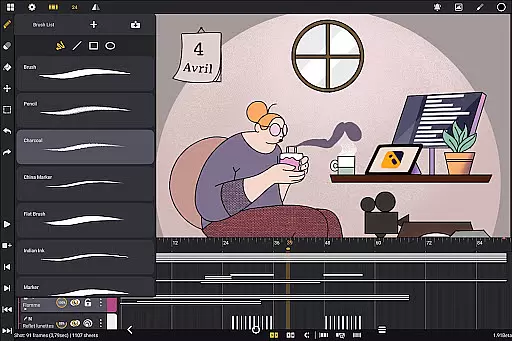
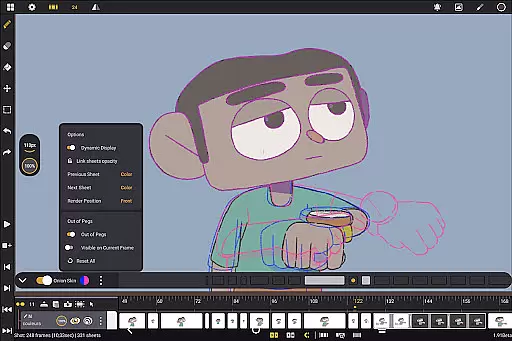
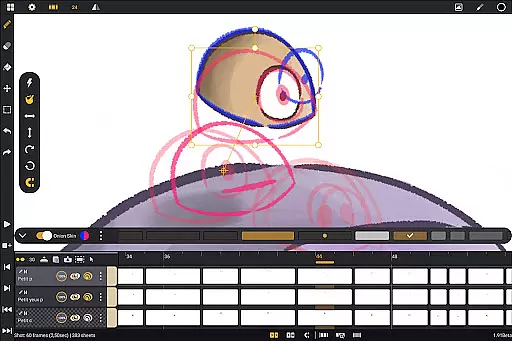
The app also excels in its drawing and animation tools. Users have access to a diverse brush set including pencil, charcoal, and ink options, each customizable in terms of smoothing, tip shape, and texture. The onion skinning feature displays up to eight frames before and after the current frame, with adjustable opacity and color settings, facilitating precise frame transitions. Additionally, gesture-based controls for playback, flipping frames, and transformations enhance workflow efficiency.
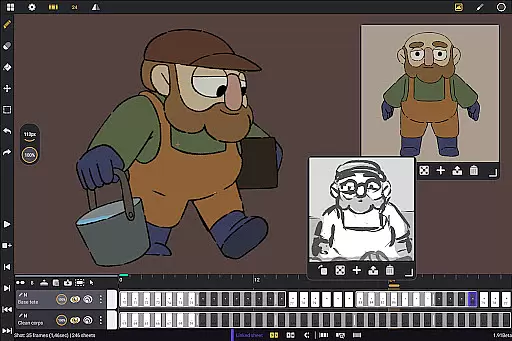
Furthermore, Callipeg supports a highly customizable workspace, catering to both right- and left-handed users. The ability to reposition sidebars, import unlimited reference images, and invert the canvas for proportion checks underscores its adaptability. Coupled with supportive learning resources like YouTube tutorials and an active Discord community, these features collectively empower users to maximize their creative potential.
In the realm of digital art and animation, having a comprehensive suite of creative tools is essential for bringing ideas to life. Callipeg stands out by offering an extensive array of features that cater to both professional animators and beginners alike. The app provides users with a versatile brush set including pencil, charcoal, ink, and more, allowing artists to emulate traditional drawing techniques digitally.
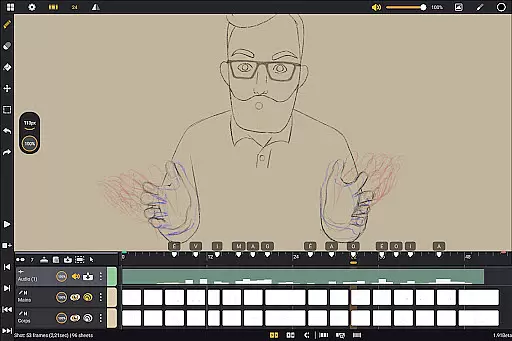
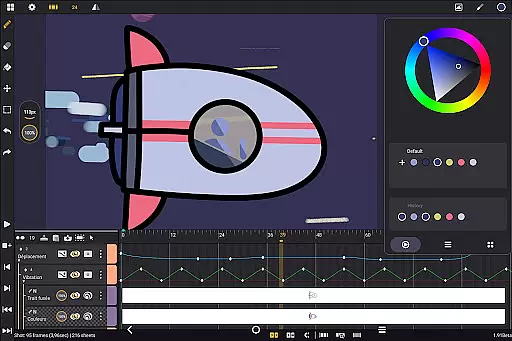
Furthermore, Callipeg supports unlimited layers of various types such as drawing, video, transformation, audio, or group layers. This flexibility enables creators to import images, video clips, and audio files for advanced techniques like rotoscopy or lip-syncing. With customizable brush settings for smoothing, tip shape, and texture, alongside sophisticated color management options, artists can fine-tune their workflow to match their unique style.
The inclusion of animation-focused tools like onion skinning enhances the user experience by displaying up to eight frames before and after the current frame with adjustable opacity and color settings. Such features ensure that whether you're crafting feature-quality shots or simple rough sketches, Callipeg equips you with everything needed to produce high-quality animations on your Android device.
Flexibility in canvas size and format compatibility is crucial for artists who require precision and adaptability in their work. Callipeg addresses this need by providing a large canvas size that can go up to 4K resolution, meeting professional standards while ensuring detailed artwork creation. Users have the freedom to set their preferred frame rates, choosing from options like 12, 24, 25, 30, or 60 frames per second, which allows them to tailor their projects according to specific requirements.
Moreover, Callipeg's support for flexible import and export options adds another layer of convenience. Animations can be exported in multiple formats such as .mp4, .gif, .png, .tga, .psd, and .peg, catering to diverse project needs. Additionally, importing and exporting project files in industry-standard formats like .json, .xdts, and .oca maintains timing and layer structure across different software platforms.
This level of canvas and format flexibility not only streamlines the creative process but also ensures seamless integration with other tools used within the animation pipeline. By prioritizing usability and versatility, Callipeg transforms any Android tablet into a powerful 2D animation studio capable of handling complex projects with ease.
User-friendly interface
Unlimited layer support
Professional-grade tools
No subscription model
Active community support
Limited to Android devices
Stylus-dependent features
Advanced tools may overwhelm beginners
Export format limitations
Occasional performance lags

Floor Plan Creator lets you create, edit and share floor plans.
 4.00
4.00
Image/ Text to Video Generator
4.40
Sketch, plan, take notes and illustrate on an infinite canvas.
4.20
Logo Generator powered by AI: Create stunning logos effortlessly!
4.70
See Color, Paint Color
4.90
Mobile pixel art editor. Simple. Fast. Portable.
4.80
Get an overview over all your embroidery threads, projects and more.
4.60
Explore future self face age filter & remove background image for a unique look.
3.50
How to draw anime step by step for beginner easily by AR drawing sketch & paint.
3.60
Make your phone cooler and have a fantastic experience
4.80
Convert image to JPG PNG HEIC PDF, support almost all kinds of image formats
4.70
Digital, Abstract, Classic - all types of color wheels in one app!
4.60
Draw glowing spinners, relax, and spin your creative art
4.60
AI Tattoo Generator: Create Tattoo Designs & Get Ideas! Ink & Stencil Maker
4.50
Photo blender app to create overlay photos & double exposure.
4.40
Create stylish invitation cards using templates for weddings, birthdays & RSVP.
4.20
OneUI 8.5 icons ✨ Smooth, modern & based on the latest Play Store design ??
4.10
AR Anime Drawing: How to draw anime with AR drawing & sketching apps!
4.00
Draw anime easily with AR guidance, sketch templates & trace tools!
3.10




User Reviews