
RoughAnimator is a professional-grade hand-drawn animation app designed for both Android and desktop platforms. This powerful tool provides animators with everything needed to create traditional frame-by-frame animations anywhere. With its robust feature set, the app caters to professional animators while remaining accessible to beginners.
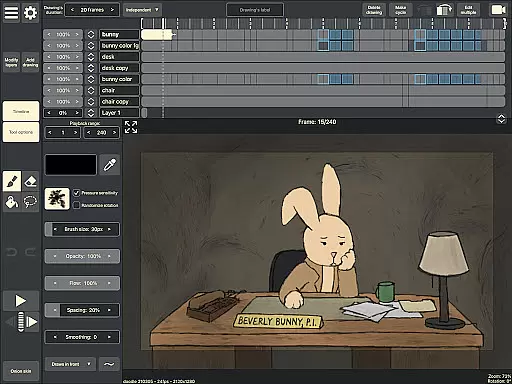
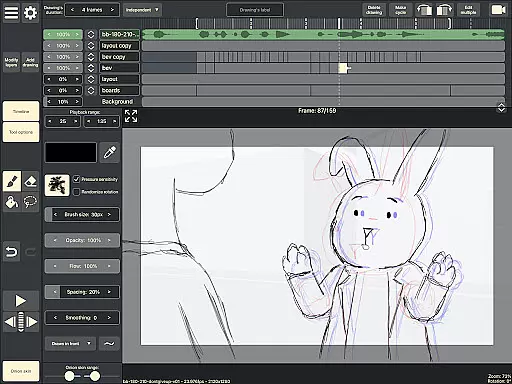
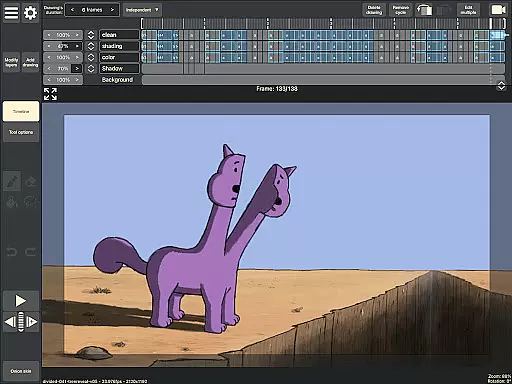
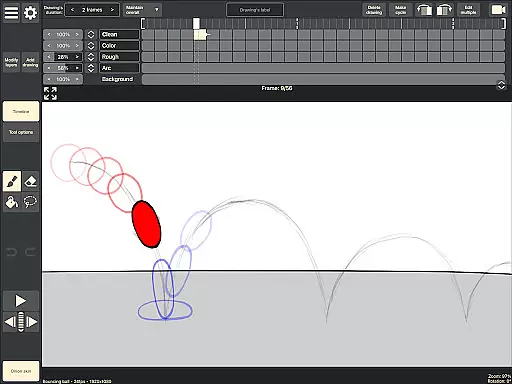
The application includes an intuitive timeline with unlimited layers, adjustable exposure, onion skinning, and playback preview. It also supports audio and video import for advanced animation techniques like lip-syncing and rotoscoping. RoughAnimator ensures high-quality output through customizable brushes, framerate control, and multiple export options including Quicktime video, GIFs, and image sequences.
Whether you're creating animations for film, television, or web, RoughAnimator streamlines the process by allowing seamless project transfer to industry-standard software like Adobe Flash/Animate, After Effects, and Toon Boom Harmony. Its compatibility with pressure-sensitive devices like Samsung S-Pen makes it an essential tool for digital artists on the go.
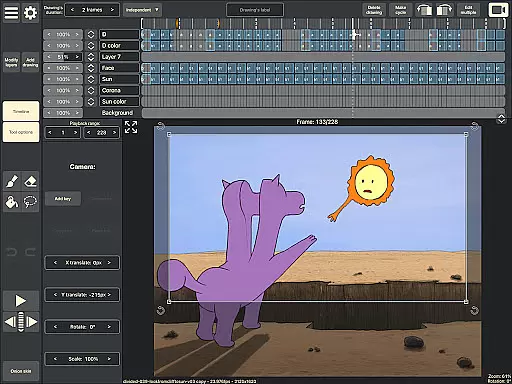
RoughAnimator distinguishes itself through its comprehensive feature set tailored specifically for hand-drawn animation. The app's timeline system supports unlimited layers and offers precise control over exposure length for individual drawings, making it suitable for both pose-to-pose and straight-ahead animation techniques.
Advanced features include onion skinning for better frame referencing, scrubbing functionality along the timeline, and support for custom brushes. The app enables animators to import audio tracks for lip-syncing purposes and video files for rotoscoping projects. Its compatibility with pressure-sensitive devices like Samsung S-Pen enhances drawing precision and artistic expression.
Professional users will appreciate the ability to control frame rate and resolution settings, ensuring their animations meet industry standards. The app supports multiple export formats including Quicktime video, GIFs, and image sequences. Additionally, RoughAnimator projects can be seamlessly imported into major animation software such as Adobe Flash/Animate, After Effects, and Toon Boom Harmony, establishing a smooth workflow between mobile creation and desktop post-production.
In the realm of digital art and animation, having a comprehensive set of creative tools is essential for bringing ideas to life. RoughAnimator offers a robust suite of features that cater to both professional animators and beginners alike.
This application provides users with a timeline that supports unlimited layers, customizable exposure lengths, onion skinning, and playback previews. These functionalities enable creators to produce frame-by-frame animations with precision and ease, mimicking traditional hand-drawn techniques in a digital format.
Additionally, RoughAnimator enhances the creative process by allowing artists to import audio for lip-syncing and video for rotoscoping, thus expanding the possibilities for creative expression. With support for custom brushes and pressure-sensitive devices like the Samsung S-Pen, animators can achieve the desired tactile feel and control over their work.
The ability to export animations into various formats such as Quicktime video, GIF, or image sequences further underscores the app's commitment to providing a complete creative toolkit. By facilitating seamless integration with industry-standard software like Adobe Flash/Animate, After Effects, and Toon Boom Harmony, RoughAnimator ensures that artists have everything they need to create professional-grade animations on-the-go.
Flexibility in canvas size and format options is crucial for animators who need to adapt their work for different mediums and platforms. RoughAnimator addresses this need by offering versatile canvas settings that accommodate a wide range of project requirements.
Artists using RoughAnimator can control the framerate and resolution of their animations, ensuring that their creations meet the technical specifications of various distribution channels. This level of control is particularly beneficial when preparing animations for film, television, or web publishing.
Moreover, the app's compatibility with both mobile and desktop environments allows users to switch between devices without losing quality or functionality. Animators can start a project on their Android device and continue working on a desktop version of RoughAnimator, maintaining consistent formatting and quality across platforms.
By supporting high-resolution outputs and providing flexible export options, RoughAnimator empowers creators to produce animations that look sharp and professional regardless of the final display medium. This adaptability makes it an invaluable tool for artists seeking to push the boundaries of their creative projects while maintaining full control over the technical aspects of their work.
Powerful animation tools
User-friendly interface
Cross-platform availability
Professional export options
Industry-standard compatibility
Steep learning curve
Requires high-end device
Limited free features
No cloud backup
Occasional performance issues

The ultimate tool for creating animations
 4.60
4.60
Draw anime & manga drawing, art with templates to create stunning picture!
4.50
AI Assistant, powered by ChatGPT GPT-4 & GPT-4o. Your intelligent companion.
3.50
AI Face Swap, Video Effects Editor, Realtime Morph, Funny Video FX,AI Filters
3.70
Logo Generator powered by AI: Create stunning logos effortlessly!
4.70
Art of Combination Wear OS Watch Faces
3.30
2D animation studio for Android tablets - unlimited layers, infinite timeline
4.70
OneUI 8.5 icons ✨ Smooth, modern & based on the latest Play Store design ??
4.10
Create Logos, Tattoos, AI Art & more with our AI Photo Generator & Design Editor
4.20
Mobile pixel art editor. Simple. Fast. Portable.
4.80
Digital, Abstract, Classic - all types of color wheels in one app!
4.60
Digital illustration drawing & painting pad app to paint Anime and Manga art
4.50
Create neon drawing with magic doodle and fun doodle art effects!
4.50
Unleash your drawing and painting potential
4.50
Photo blender app to create overlay photos & double exposure.
4.40
Bring One UI 8.5 Icons to life -elegant dark icons with a modern, premium touch.
4.30
Create stylish invitation cards using templates for weddings, birthdays & RSVP.
4.20
AR Anime Drawing: How to draw anime with AR drawing & sketching apps!
4.00
Download now for a stylish and functional timepiece
4.2




User Reviews