
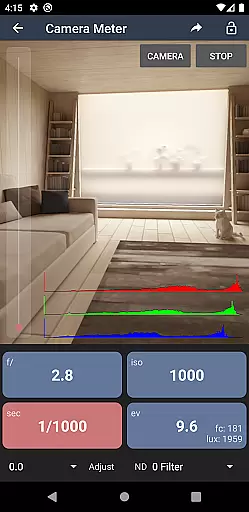
Light Meter is a comprehensive photography tool that combines both spot and incident light metering in one app. Designed for photographers of all levels, it delivers accurate exposure readings using the device's camera and light sensor. The app has been rigorously tested against industry-standard Gossen and Sekonic meters, ensuring reliable performance across most devices.
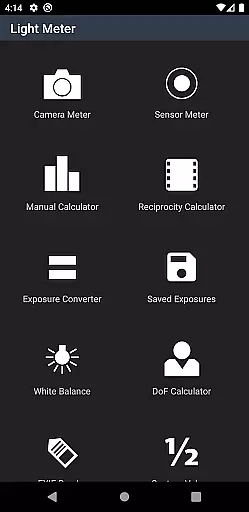
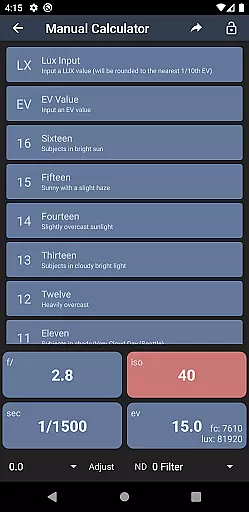
In addition to its core light metering capabilities, Light Meter offers a suite of advanced features including Color Temperature measurement, Reciprocity Calculation, Exposure Conversion, Manual (Sunny Sixteen) calculation, Depth of Field calculation, and an EXIF Reader. Whether you're shooting with a film SLR, pinhole camera, or working in cinematography, this app provides the tools necessary to achieve perfect exposure and enhance your photographic workflow.
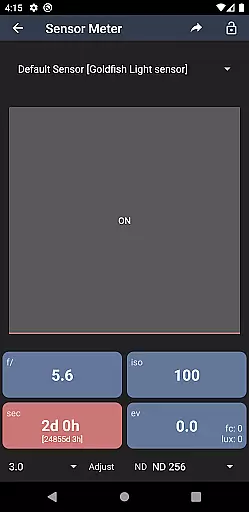
Light Meter stands out with its dual functionality, offering both reflected light metering via the device's camera and incident light metering through the built-in light sensor. This dual approach ensures versatility and accuracy, making it suitable for various types of photography, from traditional film to modern digital formats.
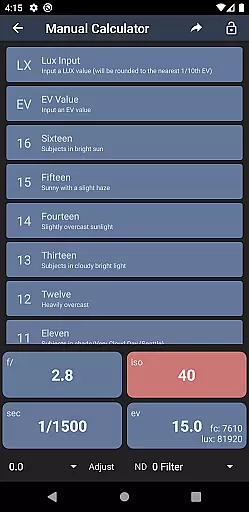
Beyond its primary functions, the app includes several specialized tools designed to assist photographers. These include a Color Temperature meter for precise white balance adjustments, a Reciprocity Calculator for long exposures, an Exposure Convert for different ISO settings, a Manual (Sunny Sixteen) calculator for estimating exposure without a meter, a Depth of Field calculator for precise focusing, and an EXIF Reader for analyzing image metadata. Each feature is crafted to provide practical value, enhancing both the technical and creative aspects of photography.
Real-time capture and preview functionality is essential for photographers who need accurate exposure readings. Light Meter offers both reflected and incident light metering, ensuring precise measurements in various shooting conditions.
The app utilizes the device's camera for spot metering and its light sensor for incident metering, providing reliable data that matches professional-grade external meters like Gossen and Sekonic. This dual capability allows users to adapt quickly to different lighting scenarios without carrying additional equipment.
Photographers can trust the real-time feedback when adjusting settings on their cameras, whether they are using film SLRs, pinhole cameras, or cinematographic equipment. The instant availability of this information streamlines the workflow and enhances creative control over every shot.
While primarily a tool for technical precision, Light Meter also includes features that enhance image quality through calculated adjustments rather than artificial manipulation. One such feature is the Color Temperature meter, which helps achieve accurate white balance settings tailored to specific lighting conditions.
In addition to color correction tools, the app provides several calculators including Reciprocity, Exposure Conversion, Manual (Sunny Sixteen), and Depth of Field. These aids assist photographers in making informed decisions about their camera settings while maintaining natural-looking results free from excessive digital enhancement.
By focusing on delivering authentic photographic outcomes based on scientific principles rather than AI-driven beautification, Light Meter ensures that each photograph retains its original integrity and aesthetic appeal.
Accurate light readings
Versatile camera support
Comprehensive toolset
User-friendly interface
Reliable performance
Premium price point
Requires calibration
Limited low-light performance
No automatic sync
Device compatibility issues

HD Photo gallery and photo manager to edit, hide private photos, videos & albums
 4.1
4.1
Viewfinder, Light meter, Reciprocity failure time, DOF & Bellows Extension
4.60
Create & Edit with AI: AI Remove, Enhance, Retouch, Filter
4.10
Photo editor: AI filters, photo enhancer, pic collage maker, AI art generator.
4.80
Turn your phone into a professional camera - full DSLR manual photography
4.30
Raw Image Viewer. Gallery with support of raw images (.cr3, .cr2, .nef, .raf).
2.00
Turn photos into cartoons & avatars! - Photo Editor, Cartoon Face!
3.90
Welcome to ProShot, the most powerful camera app on Android.
4.20
Discover How to Plan any Sun, Moon and Milky Way Photo You Imagine in Seconds
4.70
Create funny photos and videos with the popular Time Warp Scan filter.
4.90
Unblur, enhance & restore photos with powerful AI photo enhancer tools.
4.60
Create AI photos & videos with Enhancer; restore, fix, beautify, enhance photos
4.50
AI photo enhancer with Sora 2! Enhance, descratch, and colorize your old photos.
4.50
Search, tag and rate your way to an organized image gallery
4.40
Edit like a pro with Hypic. Apply filters, AI effects, & magic touch.
4.40
Shooting photos and records video easily and efficient with professional Camera
4.30
All-in-One Editor & AI Photo Enhancer, Beautify & Retouch, Collage, Cartoonify
4.20
Gallery Slideshow is slideshow maker app for slideshow from your gallery photos.
3.90
USB Storage Access for Photos, Videos, Music and Documents
3.80



User Reviews