
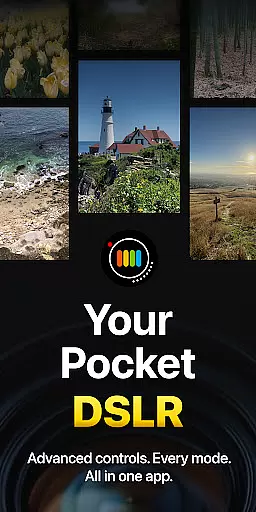
ProShot is a professional-grade photography and filmmaking application designed for Android users who demand full control over their mobile photography experience. This app offers an expansive feature set that rivals DSLR cameras, including manual controls for shutter speed, ISO, white balance, and focus, as well as advanced video capabilities up to 8K resolution.
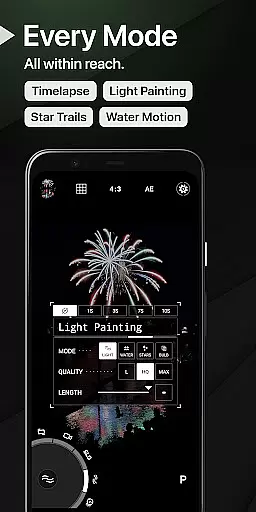
The app's unique interface includes a Dual Dial system for swift adjustments of camera settings, multiple shooting modes like RAW, JPEG, and HEIC support, and specialized features such as Light Painting and Bulb mode. ProShot also emphasizes user privacy by not collecting or transmitting personal data, ensuring your images and videos remain secure on your device.
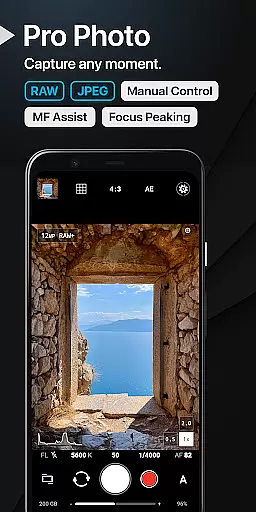
ProShot stands out with its comprehensive suite of photographic tools. The app leverages the camera2 API to deliver DSLR-like functionalities, including Auto, Program, Manual, and Custom modes. Users can fine-tune exposure settings, shoot in RAW+JPEG formats, and utilize advanced options like Tone Mapping and Noise Reduction.
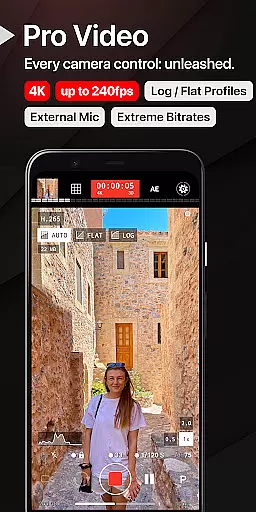
In addition to its photo capabilities, ProShot excels in videography with support for high frame rates, LOG/FLAT color profiles, and H.265 encoding. The app also provides practical utilities such as a histogram, focus peaking, and customizable accent colors. With seamless integration of the camera roll into the viewfinder and extensive customization options, ProShot empowers photographers to tailor the app to their specific needs.
Real-time capture and preview functionality is essential for photographers who need to see exactly what their camera is capturing before taking the shot. ProShot offers a sophisticated real-time preview system that ensures what you see on your screen is what you get in your final image. This feature leverages advanced processing capabilities to provide an accurate representation of exposure, white balance, and focus.
The application supports manual controls akin to a DSLR, allowing users to adjust settings such as ISO, shutter speed, and white balance in real time. As these adjustments are made, the preview updates instantly, giving photographers the ability to fine-tune their images with precision. This responsiveness is crucial for capturing scenes in challenging lighting conditions or when quick adjustments are necessary.
Moreover, ProShot's real-time preview extends to video recording, ensuring that videographers can also monitor their footage as it's being captured. With support for high resolutions and frame rates, users can trust that their videos will match their creative vision without any unwelcome surprises during post-production.
While ProShot does not specifically market itself as an AI beauty enhancement tool, its robust set of features allows for natural-looking photo improvements that maintain the authenticity of the original image. The app provides various options for noise reduction, sharpness adjustment, and tone mapping, which collectively contribute to enhancing the overall quality of photos without compromising their natural essence.
Photographers can shoot in RAW format, which preserves the most detail and allows for extensive post-processing. ProShot's manual controls enable users to make precise adjustments that enhance the photo's qualities while keeping enhancements looking natural. Whether it's through careful management of highlights and shadows or subtle tweaks to color balance, the results are professional-grade images that retain their genuine character.
In addition to photo enhancements, ProShot offers video features that include LOG and FLAT color profiles for increased dynamic range. These options give creators the flexibility to apply natural-looking enhancements during post-production, ensuring that the final output aligns with their artistic intent. By prioritizing user control over automated enhancements, ProShot empowers photographers to produce work that is both enhanced and true to life.
Full manual camera control
Advanced video features
Privacy-focused design
DSLR-like functionality
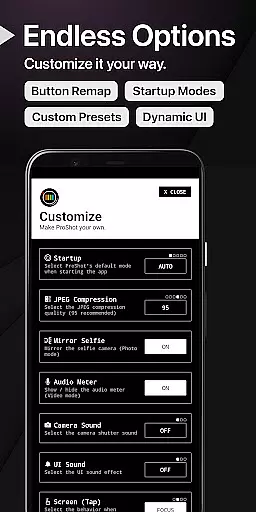
Customizable interface
Steep learning curve
High system requirements
Premium price point
Limited beginner guidance
Complex UI for casual users

Effortlessly organize, view and share your photos & videos with Gallery app!
 4.40
4.40
[3DSteroid Pro] is a stereoscopic application for Android.
4.30
Perfect photos with body shaping, BG changer and object remover.
3.70
An interval timer to automate photo taking process for timelapse
2.90
Gallery Slideshow is slideshow maker app for slideshow from your gallery photos.
3.90
Professional photography on your mobile phone
4.20
Professional quality photo edits with the new Snapseed.
4.00
PhotoSync Bundle Add-On License. Enables all features and services in PhotoSync.
4.60
Solocator stamps photos you take with GPS location, Compass Direction, Date/Time
3.80
AI Photo Editor with 100+ Filters, Effects! Remove BG, Retouch & Photo Enhancer.
4.80
Viewfinder, Light meter, Reciprocity failure time, DOF & Bellows Extension
4.60
Add Watermark - Sign your pictures with a text or logo. Effective, quick, easy!
4.50
Safe & smart flight with Go Fly drone controller for 40+ drone camera, zone map
4.50
Edit like a pro with Hypic. Apply filters, AI effects, & magic touch.
4.40
Professional camera app that brings DSLR manual photography controls to Android.
4.20
Create & Edit with AI: AI Remove, Enhance, Retouch, Filter
4.10
Astrophotography with your smartphone, photo live stacking and much more!
3.90
Be your best in every shot! Fix, edit and retouch your face in selfies & photos.
3.70
Snap photos remotely using your Garmin watch as the camera trigger
4.5




User Reviews