
Intervalometer for TimeLapse is a powerful photography tool designed to automate the process of capturing time-lapse sequences. This app allows photographers to configure specific time intervals for triggering the camera shutter, enabling precise control over exposure settings and supporting RAW format capture. It works seamlessly with various camera modes including manual, HDR, and night mode, making it an essential tool for both amateur and professional photographers.
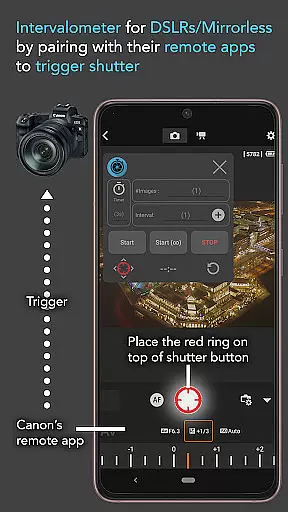
The app's versatility extends beyond basic time-lapse functionality. It supports advanced techniques such as low light time-lapse, long exposure time-lapse, and even specialized formats like Milky Way or Star Trails time-lapse. By integrating with AccessibilityService API, Intervalometer ensures compatibility with any Android camera app, while also offering dedicated support for remote apps from leading camera brands like Canon, Sony, and Nikon.
Whether you're capturing cityscapes at night or documenting the transition from day to night in a Holy Grail time-lapse, this application provides the flexibility needed for creative expression. Additionally, its ability to work with image stacking techniques enhances post-processing capabilities, resulting in higher quality final images.
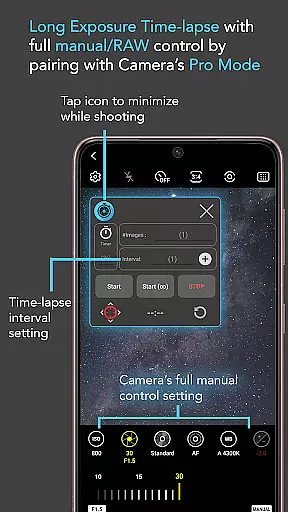
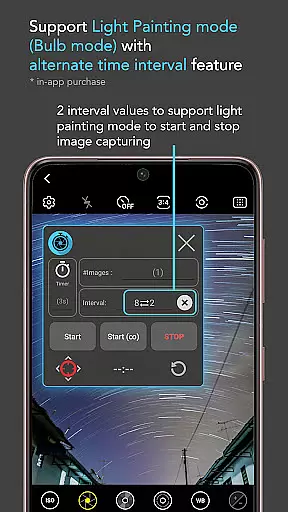
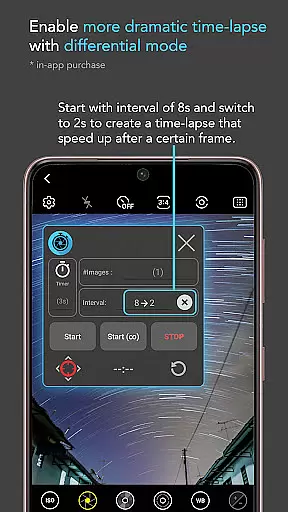
Intervalometer for TimeLapse offers an impressive array of features that cater to both casual and professional photographers. The app provides full control over time-lapse configurations, allowing users to set delay timers, interval times, and the number of shots. Its infinite mode enables continuous shooting without predefined limits, while bulb mode supports extended exposure times for creative effects.
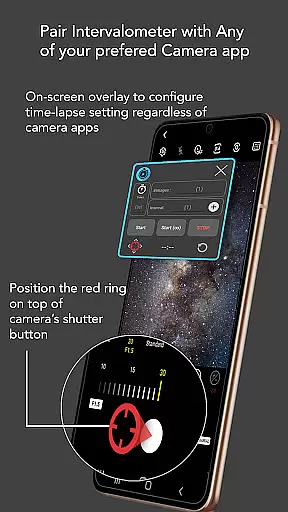
One of the standout features is its universal compatibility with any camera app. Through the use of AccessibilityService API, the app can trigger the shutter button across different camera applications, regardless of their interface design. Users can easily reconfigure the shutter button position to match their preferred camera app's layout.
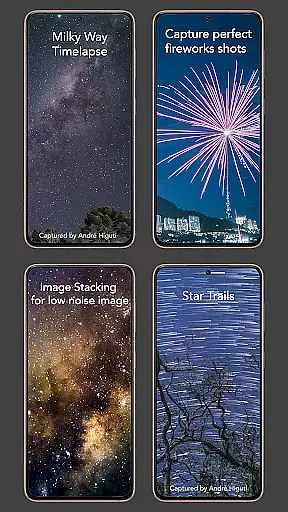
The app's flexibility extends to its support for various specialized photography techniques. From capturing star trails to creating dramatic light painting effects, Intervalometer empowers photographers to explore different artistic approaches. The inclusion of advanced modes like HDR time-lapse and ultra-wide angle time-lapse makes it particularly valuable for landscape and astrophotography enthusiasts.
Real-time capture and preview functionality is essential for photographers who need precise control over their time-lapse sequences. Intervalometer for TimeLapse offers this by integrating seamlessly with any camera app, allowing users to configure and trigger the shutter at specific intervals.
This application uses AccessibilityService API to automate the photo-taking process without being restricted to basic camera modes. It supports advanced settings such as light-painting mode, HDR, night mode, manual adjustments, telephoto, or ultra-wide-angle shots, providing a comprehensive toolset for creating professional-quality time-lapses.
Users benefit from the ability to execute complex time-lapse projects like low light scenes, long exposures, star trails, and more. The app's flexibility ensures that whether capturing holy grail transitions from day to night or experimenting with creative techniques like light painting, every shot is executed with precision timing.
While primarily focused on time-lapse photography, Intervalometer also indirectly enhances image quality through meticulous control over shooting parameters. Although it does not directly apply AI beauty enhancements, its precise interval settings contribute significantly to post-processing capabilities.
The app allows photographers to capture frames intended for image stackingu2014a technique used in post-processing to enhance image clarity and reduce noise. This method results in higher-quality images, particularly beneficial when photographing challenging subjects such as lightning storms or celestial bodies.
By enabling consistent and accurate frame capture, Intervalometer empowers photographers to achieve natural-looking enhancements during post-production. This ensures that final outputs retain authenticity while benefiting from advanced editing techniques made possible by carefully planned time-lapse sequences.
Universal camera app compatibility
Advanced time-lapse configurations
Supports RAW format capture
Works with major camera brands
Enables creative photography techniques
Requires AccessibilityService permission
May not work on all devices
Limited to Android 7 and above
No built-in camera functionality
Complex for beginners

Safe & smart flight with Go Fly drone controller for 40+ drone camera, zone map
 4.50
4.50
Create funny photos and videos with the popular Time Warp Scan filter.
4.90
Application for remote controlling DSLR
3.00
What celebrity do you look like? Celebs will find your celebrity match!
4.10
Pet Camera
3.70
Cartoon and artistic effects for your photos and videos
4.70
See your baby AI baby face generator AI baby maker Face generator babymaker fun!
4.70
live datamoshing
4.00
A unique animation app. Powerful, easy to use, and lots of fun.
4.30
Photo editor: AI filters, photo enhancer, pic collage maker, AI art generator.
4.80
The original Rarevision VHS look seen everywhere!
4.70
Unblur, enhance & restore photos with powerful AI photo enhancer tools.
4.60
AI portrait generator and polaroid AI selfie, fun AI generated AI photo creator!
4.30
[3DSteroid Pro] is a stereoscopic application for Android.
4.30
Luminar: Photo Editor - easy picture editing with AI
4.20
Transform Photos: Edit, Beautify and Craft Memories & Make Collages!
4.10
How would you look like with a differently shaped nose, chin or lips?
3.90
Superimpose one photo on top of another using the original Superimpose app!
3.20
Raw Image Viewer. Gallery with support of raw images (.cr3, .cr2, .nef, .raf).
2.00



User Reviews