
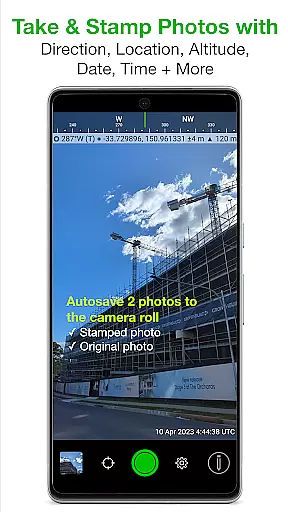
Solocator is a professional GPS camera app designed for fieldwork and photo documentation across various industries. It allows users to overlay and stamp photos with critical metadata such as location, direction, altitude, date, and time. With the optional Industry Pack, users can capture additional field notes like project names and descriptions.
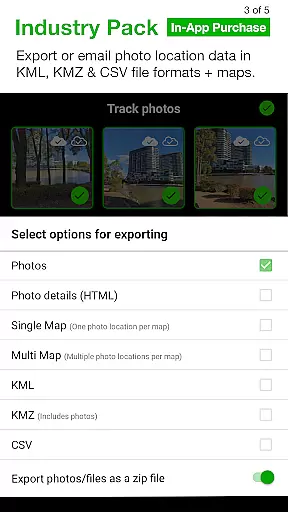
The app supports both front and back cameras, includes advanced features like autosave, batch editing, and cloud storage integration, and offers specialized tools for refining GPS locations and exporting data in KML, KMZ, or CSV formats. Solocator is ideal for professionals who need accurate, geotagged photos for documentation or reporting purposes.
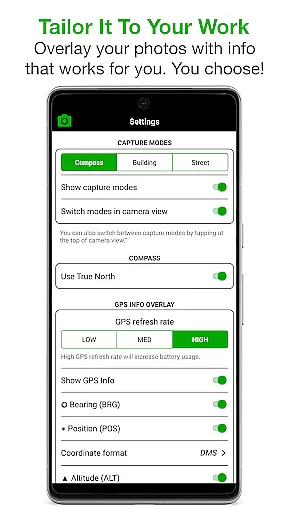
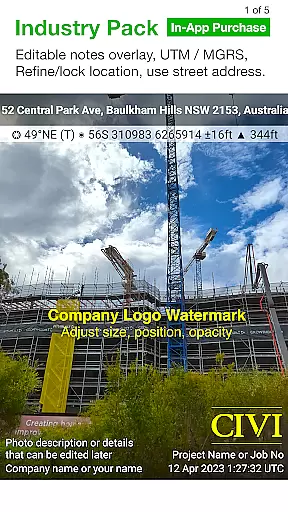
Solocator stands out with its extensive customization options for photo overlays. Users can select from a wide range of data points to stamp on their images, including GPS coordinates, compass direction, altitude, tilt and roll angles, and even street addresses with the Industry Pack. The app also supports UTM/MGRS coordinate formats, making it versatile for global use.
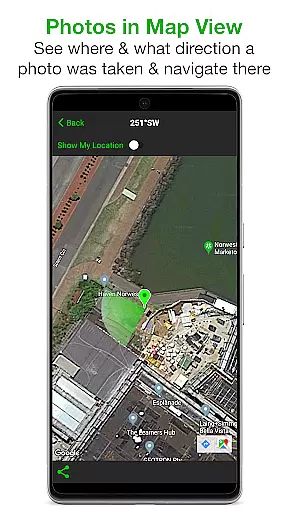
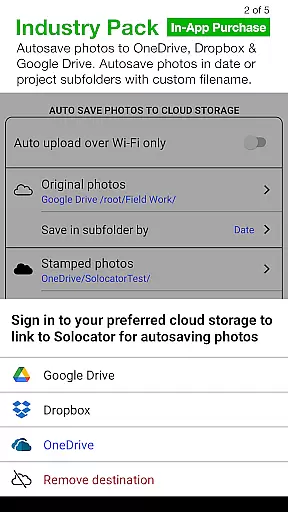
Additional features include autosaving photos to the camera roll with or without overlays, map-based sorting and navigation, and advanced export options. The Industry Pack enhances functionality further by enabling editable notes overlays, custom filenames, and seamless integration with cloud storage services like Google Drive and Dropbox. These capabilities ensure maximum flexibility and utility for professional workflows.
Solocator excels in real-time capture and preview, offering users immediate feedback on their photos. This feature is crucial for professionals who need to ensure that all necessary data is accurately captured the first time.
The app overlays essential information such as GPS position, compass direction, altitude, and more directly onto the image. Users can customize these overlays to suit their specific needs, ensuring that each photo contains exactly the information required for their documentation purposes.
With support for both back and front cameras, Solocator provides flexibility in capturing images from any angle. The inclusion of pinch zoom and standard camera controls like self-timer and flash enhances the user experience, making it easy to take high-quality photos with all necessary metadata included.
This real-time functionality not only saves time but also improves accuracy, allowing users to trust that their photo documentation will meet professional standards without the need for post-processing adjustments.
While Solocator does not focus on AI beauty enhancements, it offers a range of features that enhance photo utility and authenticity. The app's ability to overlay critical data such as location, direction, and altitude ensures that each photo serves as an accurate and reliable piece of evidence.
For industries requiring precise documentation, Solocatoru2019s Industry Pack adds layers of detail including street addresses and UTM/MGRS coordinates. These features provide a level of precision and context that goes beyond simple aesthetic enhancement, delivering genuine value to professionals.
The app allows users to autosave two versions of each photo: one with overlays for documentation and one original for other uses. This dual-saving feature ensures that users have both a natural, unaltered image and a data-rich version for their records.
By focusing on factual accuracy and comprehensive metadata rather than artificial enhancements, Solocator maintains the integrity of the photographic evidence while providing tools that genuinely improve its usefulness in professional settings.
User-friendly interface
Comprehensive metadata options
Cloud storage integration
Customizable export settings
Wide industry applicability
Industry Pack is paid
No built-in video support
Limited free features
Requires compass for full functionality
Occasional GPS inaccuracies

Perfect photos with body shaping, BG changer and object remover.
 3.70
3.70
Edit like a pro with Hypic. Apply filters, AI effects, & magic touch.
4.40
Android Native system HD camera app. Never been so simple and faster.
4.70
Pet Camera
3.70
Over 800 film simulation recipes for Fujifilm. Black Friday Offer!
4.4
Superimpose one photo on top of another using the original Superimpose app!
3.20
Add a dreamy vibe to your selfies and videos with soft style filters
4.4
Welcome to ProShot, the most powerful camera app on Android.
4.20
Photo & Video Gallery app to manage albums and save WA Status easily.
4.70
Easily create custom gifts, cards, photo books & more on the Shutterfly app!
4.60
Add Watermark - Sign your pictures with a text or logo. Effective, quick, easy!
4.50
Transform photos into videos! Create realistic or anime-style images easily!
4.50
Create AI photos & videos with Enhancer; restore, fix, beautify, enhance photos
4.50
Use AI Video Generator to turn your words to ai generated videos.
4.50
Turn your phone into a professional camera - full DSLR manual photography
4.30
Professional photography on your mobile phone
4.20
Transform Photos: Edit, Beautify and Craft Memories & Make Collages!
4.10
Long exposure camera with computational photography
2.60
HD Photo gallery and photo manager to edit, hide private photos, videos & albums
4.0




User Reviews